Mineuniverse
Resource Packs
Cube-ish Buckets Compats

Cube-ish Buckets Compats

RESOURCE PACK
Adds mod support for Cube-ish Buckets
by Fyoncle
Download Claim this project
254 downloads
0 likes
0 followers
Updated Oct 14, 2026
0 hypes
Follow0
16x Mod Support
Advertisement Remove ads with Premium →

Cube-ish Buckets Compats

As seen in Elysium Days

This resourcepack adds mod compatibility to Cube-ish Buckets to make everything look perfect together!
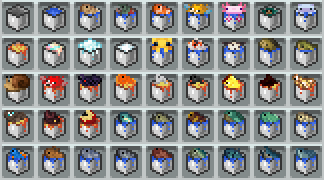
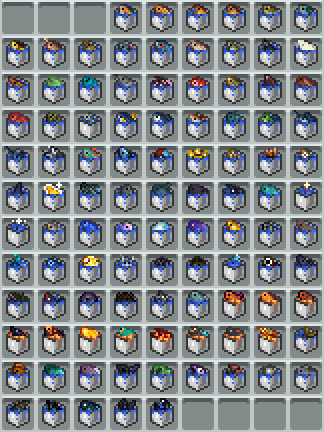
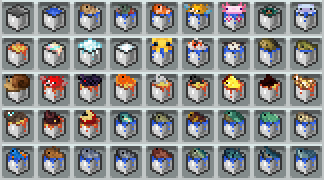
Modded Buckets

Update v2.0:

v2.0 Fishes

Compatibility List:

More Axolotl Variants Mod
Tide
Nether Depths Upgrade
Naturalist
Critters and Companions
Gipples Galore
Supplementaries
Eating Animation
Create Fabric
Create Crafts & Additions
Enderscape
Alex's Mobs

GitHub

The mod you need compatibility for isn't there? Open a suggestion on GitHub!

Cube-ish Buckets Compats v7.0
MC 1.21, 1.20.2, 1.21.8, 1.20.5, 1.21.5, 1.21.4, 1.20.1, 1.20, 1.20.6, 1.21.1, 1.21.6, 1.21.3, 1.21.7, 1.20.4, 1.20.3, 1.21.2, 1.21.9, 1.21.10, 1.21.11, 26.1, 26.1.1, 26.1.2
Release 2026-07-28 Get
Cube-ish Buckets Compats v6.0
MC 1.21, 1.20.2, 1.21.8, 1.20.5, 1.21.5, 1.21.4, 1.20.1, 1.20, 1.20.6, 1.21.1, 1.21.6, 1.21.3, 1.21.7, 1.20.4, 1.20.3, 1.21.2, 1.21.9, 1.21.10, 1.21.11, 26.1, 26.1.1, 26.1.2
Release 2026-07-14 Get
Cube-ish Buckets Compats v5.0
MC 1.21, 1.20.2, 1.21.8, 1.20.5, 1.21.5, 1.21.4, 1.20.1, 1.20, 1.20.6, 1.21.1, 1.21.6, 1.21.3, 1.21.7, 1.20.4, 1.20.3, 1.21.2, 1.21.9, 1.21.10, 1.21.11, 26.1, 26.1.1, 26.1.2
Release 2026-07-09 Get
Cube-ish Buckets Compats v4.0
MC 1.21, 1.20.2, 1.21.8, 1.20.5, 1.21.5, 1.21.4, 1.20.1, 1.20, 1.20.6, 1.21.1, 1.21.6, 1.21.3, 1.21.7, 1.20.4, 1.20.3, 1.21.2, 1.21.9, 1.21.10, 1.21.11, 26.1, 26.1.1, 26.1.2
Release 2026-06-22 Get
Cube-ish Buckets Compats v3.0
MC 1.21, 1.20.2, 1.21.8, 1.20.5, 1.21.5, 1.21.4, 1.20.1, 1.20, 1.20.6, 1.21.1, 1.21.6, 1.21.3, 1.21.7, 1.20.4, 1.20.3, 1.21.2, 1.21.9, 1.21.10, 1.21.11
Release 2026-06-16 Get

Requirements & install

How to use this resource pack in Minecraft
Resolution
16x
Minecraft
1.21.7 – 26.1.2
Install folder
.minecraft/resourcepacks

How to install resource packs

  1. Download the resource pack .zip file (do not extract it).
  2. In Minecraft open Options → Resource Packs → Open Pack Folder.
  3. Drop the .zip into the resourcepacks folder (.minecraft/resourcepacks).
  4. Move the pack to the Selected column and click Done.
Browse more: 16x resource packs 32x resource packs 64x resource packs 128x resource packs 256x resource packs 512x+ resource packs Resource Packs for 26.1.2 All resource packs

More from Fyoncle

Advertisement Remove ads with Premium →

You Might Also Like