Mineuniverse
Resource Packs
Crops 3D Revamped (hi modrinth)

Crops 3D Revamped (hi modrinth)

RESOURCE PACK
An updated & fixed version of the Crops 3D resource pack
by Vexcenot
Download Claim this project
Add a badge to your pageLink to Crops 3D Revamped (hi modrinth) from a README, website or forum post.
Preview: Badge

Badges update automatically and link to the resource pack page on MineUniverse.

48,409 downloads
0 likes
0 followers
Updated Oct 14, 2026
0 hypes
Follow0
16x Animated Data Packs Miscellaneous Photo Realistic
Advertisement Remove ads with Premium →

⚠️ Up-to-date version has moved!

The version on this page is outdated, please download it from Modrinth


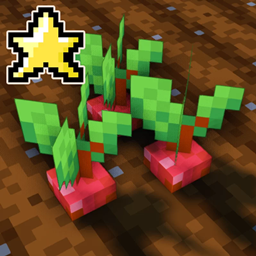
This is an unofficial revamp of the resource pack, 'Crops 3D'. It comes with the latest Minecraft support and a whole slew of polish and changes that were missing from the original pack such as new mushroom models as well as ones for the nether fungi. They can even be seen in 3D when put in a pot. Works perfectly in vanilla Minecraft client.


showcase


Instructions:
1. Download
2. Move zip folder to AppData\Roaming\.minecraft\resourcepacks (DO NOT EXTRACT)
3. Load it from the Minecraft resource pack in the menu

Done.

Check out Barebones Crops 3D


This pack currently includes models for the following blocks:

  • Carrots
  • Beetroots
  • Potatoes
  • Wheat
  • Melon Stem
  • Pumpkin Stem
  • Netherwart
  • Red Mushroom
  • Brown Mushroom
  • Sugarcane
  • Sweet Berry Bush
  • NEW! Warped Fungus
  • NEW! Crimson Fungus


Credits

  • Based on the "Crops 3D" resource pack by NinthWorld

Mushroom models from the Vanilla Tweaks website


Join my discord: discord.gg/NmKUDxf


crops-3d.zip
MC 1.17.1, 1.18.1, 1.14.4, 1.16.5, 1.15.2
Release 2022-01-30 Get

Requirements & install

How to use this resource pack in Minecraft
Resolution
16x
Minecraft
1.14.4 – 1.18.1
Install folder
.minecraft/resourcepacks

How to install resource packs

  1. Download the resource pack .zip file (do not extract it).
  2. In Minecraft open Options → Resource Packs → Open Pack Folder.
  3. Drop the .zip into the resourcepacks folder (.minecraft/resourcepacks).
  4. Move the pack to the Selected column and click Done.
Browse more: 16x resource packs 32x resource packs 64x resource packs 128x resource packs 256x resource packs 512x+ resource packs Resource Packs for 1.18.1 All resource packs

More from Vexcenot

Advertisement Remove ads with Premium →

You Might Also Like