Mineuniverse
Resource Packs
Create: Military Reskin

Create: Military Reskin

RESOURCE PACK
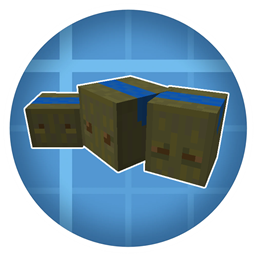
A resource pack for the Create mod that replaces default crates with military-style storage boxes. Rare crates also come with their own distinctive textures.
by reno_logan1
Download Claim this project
273 downloads
0 likes
0 followers
Updated Oct 14, 2026
0 hypes
Follow0
16x Miscellaneous Mod Support Modern
Advertisement Remove ads with Premium →

Description:
This texture pack for the Create mod completely transforms the appearance of all crates in the game, giving them a unique military-inspired look. Standard crates have been recolored and redesigned with army-style textures, while rare crates receive special designs.


Features:

  1. Recolors all standard crates with military-themed textures.
  2. Adds unique designs to rare crates to make them easily distinguishable.


Installation:

  1. Download the texture pack.
  2. Place the folder in your resourcepacks directory.
  3. Enable it in the game’s resource pack menu.


Notes:

  1. This pack is purely visual and does not affect gameplay mechanics.
  2. Ideal for players who want a military or organized theme for their building and automation setups.


Create:Military Reskin V1.0
MC 1.20.1
Release 2026-01-25 Get

Requirements & install

How to use this resource pack in Minecraft
Resolution
16x
Minecraft
1.20.1
Install folder
.minecraft/resourcepacks

How to install resource packs

  1. Download the resource pack .zip file (do not extract it).
  2. In Minecraft open Options → Resource Packs → Open Pack Folder.
  3. Drop the .zip into the resourcepacks folder (.minecraft/resourcepacks).
  4. Move the pack to the Selected column and click Done.
Browse more: 16x resource packs 32x resource packs 64x resource packs 128x resource packs 256x resource packs 512x+ resource packs Resource Packs for 1.20.1 All resource packs

More from reno_logan1

Advertisement Remove ads with Premium →

You Might Also Like