Mineuniverse
Resource Packs
create:mcGUI

create:mcGUI

RESOURCE PACK
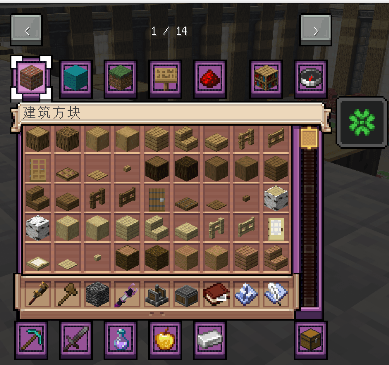
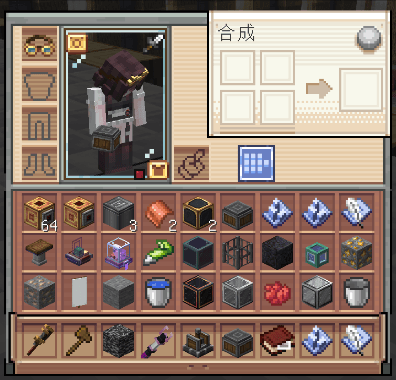
Change the GUI of vanilla and some mods to the Create style
by GALLIUM0202
Download Claim this project
2,324 downloads
0 likes
Updated Oct 14, 2026
0 hypes
16x Mod Support
Advertisement Remove ads with Premium →

image

image

📦 关于本资源包

本资源包将原版《我的世界》及部分模组的 GUI 全面改造为机械动力(Create)风格。

✨ 主要特性

  • 全面覆盖原版所有容器界面,包括工作台、铁砧、熔炉、酿造台等。
  • 扩展了对热门模组 GUI 的兼容,包括:
    • Create(机械动力) 及其生态
    • Farmer's Delight(农夫乐事)(烹饪与农耕)
    • JEI(Just Enough Items)(配方查看)
    • Curios API(饰品栏)(饰品槽位)
    • Touhou Little Maid(车万女仆)(女仆实体 GUI)

🔧 兼容性与测试

  • 版本支持:理论上兼容 Minecraft 1.20.1 – 1.21.3。
  • 测试公告:我们目前正重点测试 1.20.1 及以上版本。强烈欢迎使用这些版本(尤其是 1.20.1)的玩家下载体验,并通过 GitHub Issues 或 CurseForge 评论区反馈任何问题。你们的反馈对我们完善资源包至关重要!

📦 About This Pack

This resource pack overhauls the GUI of vanilla Minecraft and several mods to match the Create mod style.

✨ Key Features

  • Full coverage of all vanilla containers: crafting table, anvil, furnace, brewing stand, and more.
  • Extended GUI compatibility for popular mods, including:
    • Create (and its ecosystem)
    • Farmer's Delight (cooking & farming)
    • JEI (Just Enough Items) (recipe viewing)
    • Curios API (accessory slots)
    • Touhou Little Maid (maid entity GUI)

🔧 Compatibility & Testing

  • Version Support: Theoretically compatible with Minecraft 1.20.1 – 1.21.3.
  • Testing Announcement: We are currently focusing on testing 1.20.1 and above. Players on these versions (especially 1.20.1) are highly encouraged to download and report any issues via GitHub Issues or the CurseForge comments. Your feedback is crucial for us to polish the pack!
create_mcGUI_2.1.0.zip
MC 1.21.2-Snapshot, 1.21, 1.20.2-Snapshot, 1.20.5-Snapshot, 1.21.1-Snapshot, 1.20.2, 1.20.5, 1.20.1, 1.20, 1.20.6, 1.21.1, 1.21.3, 1.20.4, 1.21-Snapshot, 1.20.3-Snapshot, 1.20.3
Release 2026-10-14 Get
create_mcGUI_2.0.0.zip
MC 1.21.2-Snapshot, 1.21, 1.20.2-Snapshot, 1.20.5-Snapshot, 1.21.1-Snapshot, 1.20.2, 1.20.5, 1.20.1, 1.20, 1.20.6, 1.21.1, 1.21.3, 1.20.4, 1.21-Snapshot, 1.20.3-Snapshot, 1.20.3
Release 2026-10-11 Get
create_mcGUI_2.0.1.zip
MC 1.21.2-Snapshot, 1.21, 1.20.2-Snapshot, 1.20.5-Snapshot, 1.21.1-Snapshot, 1.20.2, 1.20.5, 1.20.1, 1.20, 1.20.6, 1.21.1, 1.21.3, 1.20.4, 1.21-Snapshot, 1.20.3-Snapshot, 1.20.3
Release 2026-10-11 Get
create_mcGUI_1.5.0.zip
MC 1.21.1
Release 2026-10-02 Get
create_mcGUI_1.1.0.zip
MC 1.21.1
Release 2026-09-24 Get
create_mcGUI_1.0.0.zip
MC 1.21.1
Release 2026-09-09 Get
create_mcGUI_0.3.0-beta.5.zip
MC 1.21.1
Beta 2026-08-30 Get

Requirements & install

How to use this resource pack in Minecraft
Resolution
16x
Minecraft
1.20.5 – 1.21.3
Install folder
.minecraft/resourcepacks

How to install resource packs

  1. Download the resource pack .zip file (do not extract it).
  2. In Minecraft open Options → Resource Packs → Open Pack Folder.
  3. Drop the .zip into the resourcepacks folder (.minecraft/resourcepacks).
  4. Move the pack to the Selected column and click Done.
Browse more: 16x resource packs 32x resource packs 64x resource packs 128x resource packs 256x resource packs 512x+ resource packs Resource Packs for 1.21.3 All resource packs

More from GALLIUM0202

Advertisement Remove ads with Premium →

You Might Also Like