Mineuniverse
Resource Packs
Connected Smooth Stone

Connected Smooth Stone

RESOURCE PACK
Resource Pack by XstooshX updated by GAMERKAON
by GAMERKAON
Download Claim this project
937 downloads
0 likes
0 followers
Updated Oct 14, 2026
0 hypes
Follow0
16x Miscellaneous Modern
Advertisement Remove ads with Premium →

Connected Smooth Stone

This texture pack requires Optifine to work.

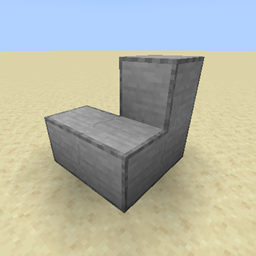
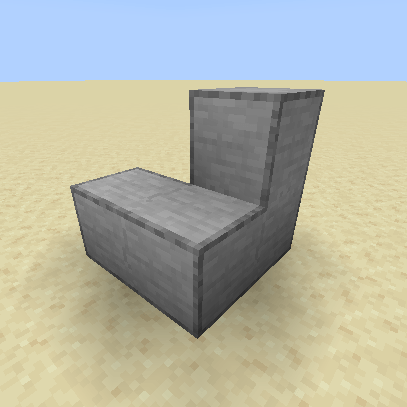
Smooth stone is a block loved by the Minecraft community, but smooth stone usually seems very separated from other smooth stone blocks, this texture pack fixes that by using connected textures to fix that problem.


This is my first texture pack, feel free to comment about bugs or suggestions


You can contact me on discord (XstooshX#0001) if you want this pack to be avalible for a version of your choice for free.

------------ Resource Pack by XstooshX updated by GAMERKAON ------------
Installation (วิธีการติดตั้ง)

Download GAERKAON_Kirov_Airship 

- Place the .zip file into the directory where the game is installed, for example: .minecraft\\resourcepacks. (นำไฟล์ .zip ไปใส่ในไดเรคทอรี่ที่ติดตั้งเกม เช่น .minecraft\\resourcepacks)

- Enable resourcepacks Connected Smooth Stone  in the game. (เปิดใช้งาน Connected Smooth Stone ในตัวเกม)

Connected Smooth Stone.zip
MC 1.21.9, 1.21.10, 1.21.11, 26.1, 26.1.1, 26.1.2, 26.2
Release 2025-11-11 Get

Requirements & install

How to use this resource pack in Minecraft
Resolution
16x
Minecraft
1.21.9 – 26.2
Install folder
.minecraft/resourcepacks

How to install resource packs

  1. Download the resource pack .zip file (do not extract it).
  2. In Minecraft open Options → Resource Packs → Open Pack Folder.
  3. Drop the .zip into the resourcepacks folder (.minecraft/resourcepacks).
  4. Move the pack to the Selected column and click Done.
Browse more: 16x resource packs 32x resource packs 64x resource packs 128x resource packs 256x resource packs 512x+ resource packs Resource Packs for 26.2 All resource packs

More from GAMERKAON

Advertisement Remove ads with Premium →

You Might Also Like