Mineuniverse
Resource Packs
Colors As Hexadecimals

Colors As Hexadecimals

RESOURCE PACK
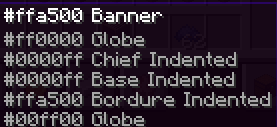
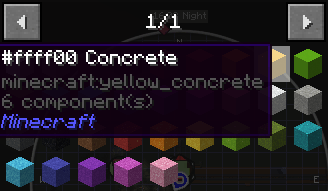
Makes all colors like Red in a hex code. Red = #ff0000
by AxolotlMan19
Download Claim this project
36 downloads
0 likes
0 followers
Updated Oct 14, 2026
0 hypes
Follow0
Font Packs Miscellaneous
Advertisement Remove ads with Premium →

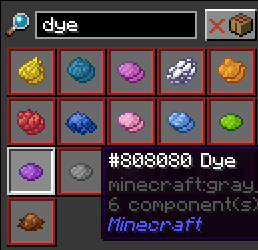
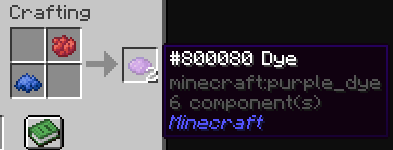
This texture pack goes into the .lang file and replaces all the names of colors like White with its equvlint hex code so like White would be •ffffff 
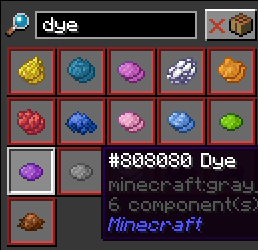
 

Help Guide


Red = •ff0000

Orange = •ffa500

Yellow = •ffff00

Lime = •00ff00

Green = •008000

Cyan = •00ffff

Blue = •0000ff

Light Blue = •add8e6

Purple = •800080

Magenta = •ff00ff

Pink = •ffc0cb

White = •ffffff

Light Gray = •d3d3d3

Gray = •808080

Black = •000000

Brown = •a52a2a

 

Hexadecimal Color Names.zip
MC 1.21
Release 2024-07-25 Get

Requirements & install

How to use this resource pack in Minecraft
Resolution
Not specified
Minecraft
1.21
Install folder
.minecraft/resourcepacks

How to install resource packs

  1. Download the resource pack .zip file (do not extract it).
  2. In Minecraft open Options → Resource Packs → Open Pack Folder.
  3. Drop the .zip into the resourcepacks folder (.minecraft/resourcepacks).
  4. Move the pack to the Selected column and click Done.
Browse more: 16x resource packs 32x resource packs 64x resource packs 128x resource packs 256x resource packs 512x+ resource packs Resource Packs for 1.21 All resource packs

More from AxolotlMan19

Advertisement Remove ads with Premium →

You Might Also Like