Mineuniverse
Resource Packs
Colorful Containers Glass

Colorful Containers Glass

RESOURCE PACK
The most cursed version of Colorful Containers. A must-have for pvpers!
by MrDexter
Download Claim this project
Add a badge to your pageLink to Colorful Containers Glass from a README, website or forum post.
Preview: Badge

Badges update automatically and link to the resource pack page on MineUniverse.

3,081 downloads
0 likes
0 followers
Updated Oct 14, 2026
0 hypes
Follow0
16x Animated Miscellaneous
Advertisement Remove ads with Premium →

Modrinth Downloads CurseForge Downloads

Join the Discord!


Sick of approaching your enchanting table only to be presented by the same grey menu as the crafting table? Looking to add some colour into your game? Introducing Colourful Containers! A container GUI replacement mod that hopes to match the menu to every one of Minecraft's colourful interactable blocks!

-Chris_XENO

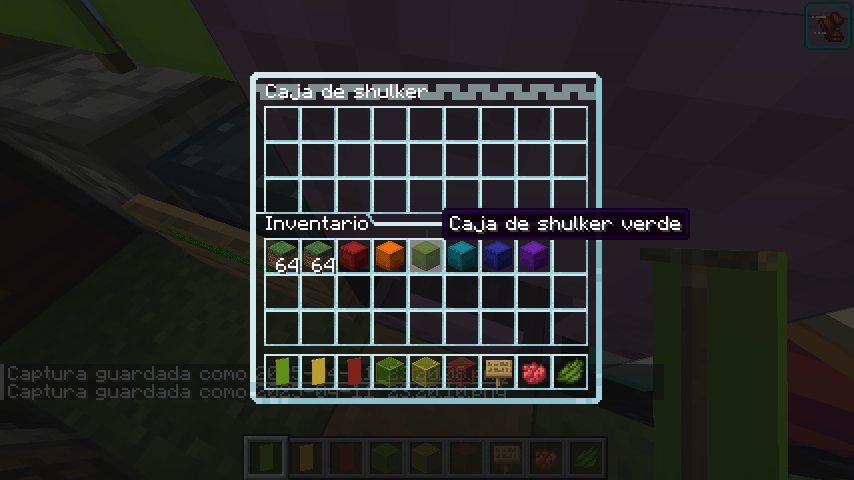
And now, I present Colorful Containers Glass. A pack that every pvper should have! This pack takes original CC, and makes it transparent while keeping the original design.


*Anvil
*Recipe Book
*Blast Furnace
*Brewing Stand
*Cartography Table
*Chests (Large, Small, Ender)
*Crafting Table
*Dispenser
*Dropper
*Enchanting Table
*Furnace
*Grindstone
*Hopper
*Loom
*Shulkers (All Colours)
*Smoker
*Stone Cutter
*Smithing Table
*Barrel
*Custom Villager GUI
*Beacon
*Crafter
*Survival inventory


Requirements

🛈 If you intent to use this pack without any of these it will work properly, but you'll loose some features.

Q: Why are some textures not working?
A: Make sure you have either Optifine or OptiGUI (Fabric only) installed.
Some textures like the chestboat only work with OptiGUI due to Optifine's limitations. Lunar Client has Optifine installed but for some reason its not working properly for GUIs.

Q: Why are the animations not showing?
A: Make sure you have either Optifine or Animatica (Fabric only) installed.

Q: Can I add your pack to my modpack?
A: Yes, you can add any of my resource packs to your modpack and distribute it ONLY in CurseForge or Modrinth, as long as you follow the licence rules and give proper credit.

Q: Something doesn't work!/I have an idea!
A: You can report bugs, get help and suggest ideas in the Discord server (Kingybu's Texture Cave).

Links

Not yet but soon(tm)…

  • Mr. Dexter: CC Glass creator (Aka: me :P)
  • Kingybu (The newest textures were created by him)
  • Chris_XENO (Original pack creator)
  • BurntToast_ (Dark mode editor)
  • Alijic2000 (Useful feedback)
  • Poogy (Useful feedback)
  • vv_22003 (Useful feedback)

Special Thanks

  • Kingybu (For allowing me to upload my edited pack and helping me with it)
  • All my supporters

Terms of Use

Mr. Dexter licensed this pack with CC BY-NC-ND 4.0 with the following exceptions without violating the terms of the license:

You may

  • Include this resource pack in a modpack and distribute it ONLY in CurseForge or Modrinth.
  • Use the resource pack as a server resource pack.
  • Modify the resource pack for personal usage.
  • Use the resource pack in forms of content such as videos, live streams and blog posts.

You may not

  • Redistribute/Reupload this resource pack.
  • Redistribute any of my files in any way or form.
  • Include any assets from this resource pack in a paid product or service.
  • Use the texture pack as a server resource pack without permission.

CC_Glass_V1.2_1.21.6+.zip
MC 1.21.8, 1.21.6, 1.21.7, 1.21.9-snapshot, 1.21.9, 1.21.10, 1.21.11-snapshot, 1.21.11
Release 2025-12-18 Get
colorful-containers-glass-v1.1.0.zip
MC 1.21.8, 1.21.6, 1.21.7, 1.21.9-snapshot, 1.21.9, 1.21.10, 1.21.11-snapshot
Release 2025-12-06 Get
CC_Glass_V1.0_1.16+.zip
MC 1.17.1, 1.16.3, 1.19.3, 1.16.1, 1.18.1, 1.17, 1.16, 1.19.4, 1.16.5, 1.18.2, 1.19.2, 1.19.1, 1.18, 1.16.4, 1.16.2, 1.19
Beta 2025-04-12 Get
CC_Glass_V1.0_1.20+.zip
MC 1.21, 1.21.6-snapshot, 1.20.2, 1.20.5, 1.21.5, 1.21.4, 1.20.1, 1.20, 1.20.6, 1.21.1, 1.21.3, 1.20.4, 1.20.3, 1.21.2
Beta 2025-04-12 Get

Requirements & install

How to use this resource pack in Minecraft
Resolution
16x
Minecraft
1.21.6 – 1.21.11
Install folder
.minecraft/resourcepacks

How to install resource packs

  1. Download the resource pack .zip file (do not extract it).
  2. In Minecraft open Options → Resource Packs → Open Pack Folder.
  3. Drop the .zip into the resourcepacks folder (.minecraft/resourcepacks).
  4. Move the pack to the Selected column and click Done.
Browse more: 16x resource packs 32x resource packs 64x resource packs 128x resource packs 256x resource packs 512x+ resource packs Resource Packs for 1.21.11 All resource packs

More from MrDexter

Advertisement Remove ads with Premium →

You Might Also Like