Badges update automatically and link to the resource pack page on MineUniverse.
#Important Notice
This resource pack was heavily inspired by: Maxi's JourneyMap Cobblemon Minimap Icons. Nothing within this pack has been taken from Maxi’s. This pack was created to include the additional Pokémon added as part of Cobblemon v1.4, which were missing from Maxi’s pack when I began this project. I intend to continue supporting this pack with future updates to align it with new Cobblemon versions as they are released. Sprites used within this pack were taken from PokéSprite and IconDex.
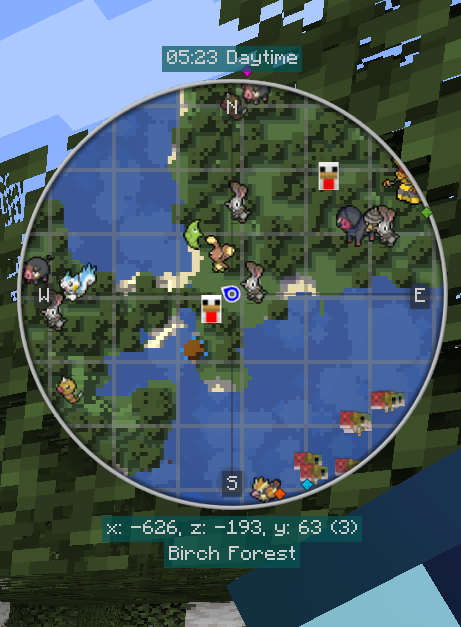
#Description This resource pack, in combination with the Cobblemon and JourneyMap mods, will show Pokemon Sprites in JourneyMap’s various views, allowing you to more easily identify the Pokémon that have spawned around you. This Resource Pack has been programmatically generated. This means that future updates to Cobblemon can be responded to quickly; allowing for quicker updates to this Resource pack. There are some Pokémon forms that do not currently possess a custom sprite. It is my intent to add these moving forward but, in the meantime, sprites for that Pokémon’s default form will appear in their place.
#Requirements
##Installation
Download this Resource Pack (Cobblemon Icons for JourneyMap - v1.1 - SacredProphet.zip)
Load your modded Minecraft installation and launch Minecraft.
Navigate to Options > Resource Packs and click the "Open Pack Folder" button.
Place the Resource Pack (Cobblemon Icons for JourneyMap - v1.1 - SacredProphet.zip) in this folder.
Close the folder and move the “Cobblemon Icons - JourneyMap - v1.1 - SacredProphet” Resource Pack from the left column to the right column.
Click "Done".
Load up your World or Server.
Within the JourneyMap options, change the "Mob Display" setting to "Icons" for your active preset (Defaults to 1) and the Fullscreen Map.
Special thanks to Maxi, PokéSprite , IconDex, JourneyMap, and Cobblemon. Keep up the good work!