Mineuniverse
Resource Packs
Cobblemon Economy Numismatic Integration No coins

Cobblemon Economy Numismatic Integration No coins

RESOURCE PACK
Required Resource pack for Cobblemon Economy Numismatic Integration
by SnKDaisuke
Download Claim this project
Add a badge to your pageLink to Cobblemon Economy Numismatic Integration No coins from a README, website or forum post.
Preview: Badge

Badges update automatically and link to the resource pack page on MineUniverse.

355 downloads
0 likes
0 followers
Updated Oct 14, 2026
0 hypes
Follow0
Data Packs
Advertisement Remove ads with Premium →

Cobblemon Economy Numismatic No-Coins Integration - Resource Pack

Give Numismatic Overhaul a PokeDollar-themed appearance for your Cobblemon server.

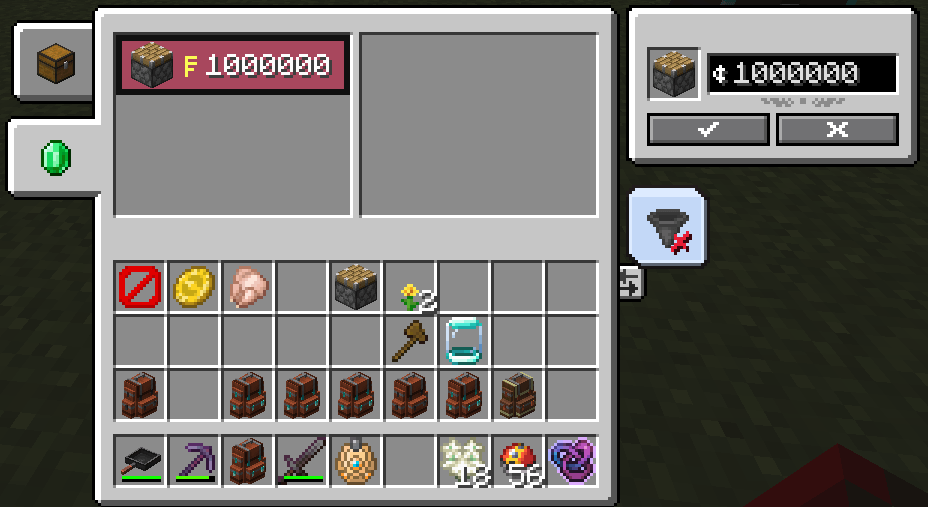
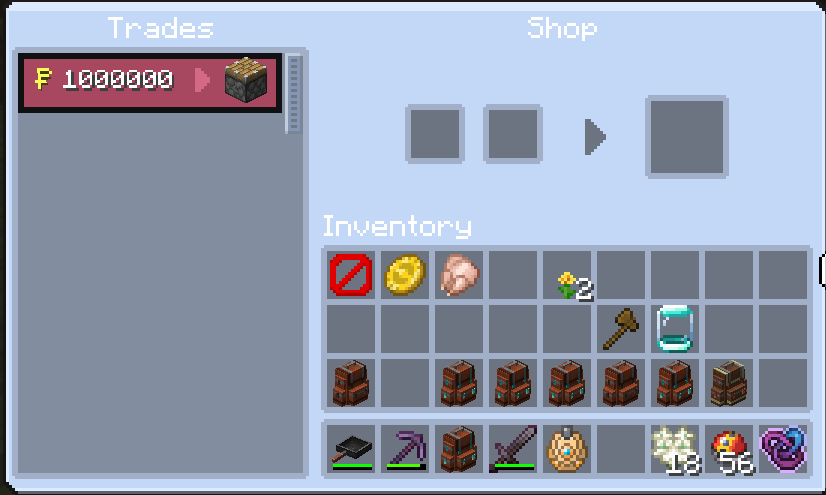
This resource pack replaces Numismatic coin and money bag textures with a yellow PokeDollar-style symbol and updates currency graphics in the shop interface. It is the visual companion to Cobblemon Economy Numismatic Integration.

Features

  • PokeDollar-style replacements for bronze, silver and gold coin textures.
  • Matching money bag textures, including the variants used by Numismatic Overhaul.
  • Updated shop GUI currency graphics.
  • PokeDollar currency labels in the English and French language files.
  • Designed for Minecraft 1.21.1 and tested with Numismatic Overhaul 0.3.5+1.21 on Fabric.

Requirements and Companion Mods

Required: Numismatic Overhaul and its dependencies. This pack changes that mod's resources; it does not add shops to vanilla Minecraft.

Recommended on the client: Cobblemon Economy Numismatic Client Visuals 1.0.5. The client mod displays full PokeDollar prices, combines currency denominations in tooltips, and hides coin-related shop controls. Those interface changes require the client mod and are not provided by this resource pack alone.

Required on the server for actual PokeDollar payments: Cobblemon Economy and Cobblemon Economy Numismatic Integration, alongside their dependencies. The bridge connects shop transactions to the server's PokeDollar balances.

Optional: Global Packs, for modpack creators who want the resource pack to load automatically.

Installation

  1. Install Numismatic Overhaul and its dependencies for Minecraft 1.21.1.
  2. Place the downloaded ZIP in your Minecraft instance's resourcepacks folder. Keep it zipped.
  3. Open Options > Resource Packs and enable the pack.
  4. Place it above other packs that replace Numismatic Overhaul textures.
  5. For the complete shop interface, install the Client Visuals companion mod and restart Minecraft.

Automatic Activation in Modpacks

Install Global Packs on the client and add this path to the existing required list under [resourcepacks] in config/global_packs.toml:

"resourcepacks/Cobblemon-Economy-Numismatic-No-Coins-Resource-Pack-1.0.5.zip"

Keep any other required packs in that list. Include the configuration and resource pack in the distributed modpack. Players need to install or update to that modpack version for the configuration to take effect.

What "No-Coins" Means

The name refers to the replacement of coin textures. This pack is visual only: it does not remove currency items, convert coin values, change prices, or debit and credit player accounts. Economy behavior comes from the server bridge; advanced price formatting comes from Client Visuals.

Credits

  • Numismatic Overhaul by glisco, Pois1x and Noaaan.
  • Cobblemon Economy by Ryvexam.
  • PokeDollar visual integration by SnKDaisuke.

This is an unofficial community resource pack, not an official release from the original mod authors or the Pokemon and Minecraft rights holders.

Cobblemon-Economy-Numismatic-No-Coins-Resource-Pack-1.0.5.zip
MC 1.21.1
Release 2026-09-22 Get

Requirements & install

How to use this resource pack in Minecraft
Resolution
Not specified
Minecraft
1.21.1
Install folder
.minecraft/resourcepacks

How to install resource packs

  1. Download the resource pack .zip file (do not extract it).
  2. In Minecraft open Options → Resource Packs → Open Pack Folder.
  3. Drop the .zip into the resourcepacks folder (.minecraft/resourcepacks).
  4. Move the pack to the Selected column and click Done.
Browse more: 16x resource packs 32x resource packs 64x resource packs 128x resource packs 256x resource packs 512x+ resource packs Resource Packs for 1.21.1 All resource packs

More from SnKDaisuke

Advertisement Remove ads with Premium →

You Might Also Like