Mineuniverse
Resource Packs
Cloud's TRAPPED Chests

Cloud's TRAPPED Chests

RESOURCE PACK
It's a Trap! Distinct Trapped Chests & More
by Cloud7050
Download Claim this project
349 downloads
0 likes
Updated Oct 14, 2026
0 hypes
32x Miscellaneous Traditional
Advertisement Remove ads with Premium →

This pack makes trapped chests' black outlines reddish & their main red highlight more intense. This makes them more distinct & easier to identify in the inventory. On top of this, chests, trapped chests & ender chests have been given dedicated break particles, with nice results!

Here's an image contrasting the look of normal & trapped chests when using this pack:
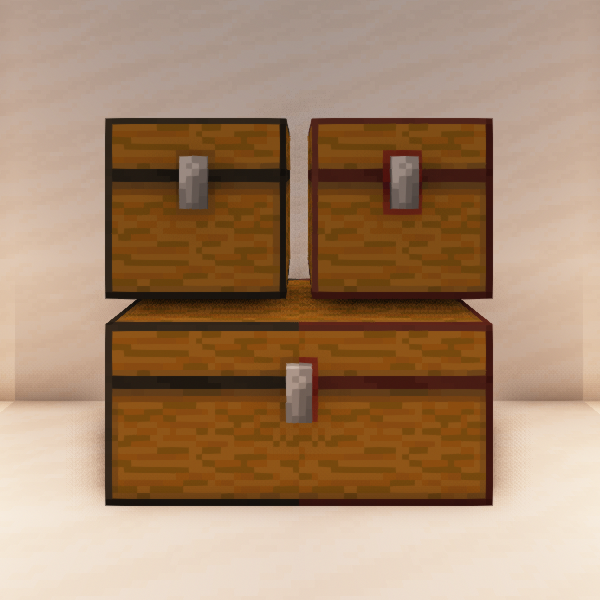
Normal & trapped chest textures (including double chests) have been neatened, though these changes are very hard to notice in-game. I've additionally fixed Faithful trapped chest z-fighting around the reddish part of the latch & made the main red highlight of trapped chests more consistent with vanilla.

PS: Did you know that the latches of chests move upwards when they are opened, becoming flush with the lid?

This paragraph used to be a note about Faithful's relation to this pack. Unfortunately, I am withdrawing my support for Vizzy's Faithful. More context here.

V1.0.0
MC 1.16-Snapshot, 1.16.3, 1.16.1, 1.16, 1.16.4, 1.16.2
Release 2020-12-31 Get

Requirements & install

How to use this resource pack in Minecraft
Resolution
32x
Minecraft
1.16-Snapshot – 1.16.4
Install folder
.minecraft/resourcepacks

How to install resource packs

  1. Download the resource pack .zip file (do not extract it).
  2. In Minecraft open Options → Resource Packs → Open Pack Folder.
  3. Drop the .zip into the resourcepacks folder (.minecraft/resourcepacks).
  4. Move the pack to the Selected column and click Done.
Browse more: 16x resource packs 32x resource packs 64x resource packs 128x resource packs 256x resource packs 512x+ resource packs Resource Packs for 1.16.4 All resource packs

More from Cloud7050

Advertisement Remove ads with Premium →

You Might Also Like