Mineuniverse
Resource Packs
Clear Fog / Transparent Fog

Clear Fog / Transparent Fog

RESOURCE PACK
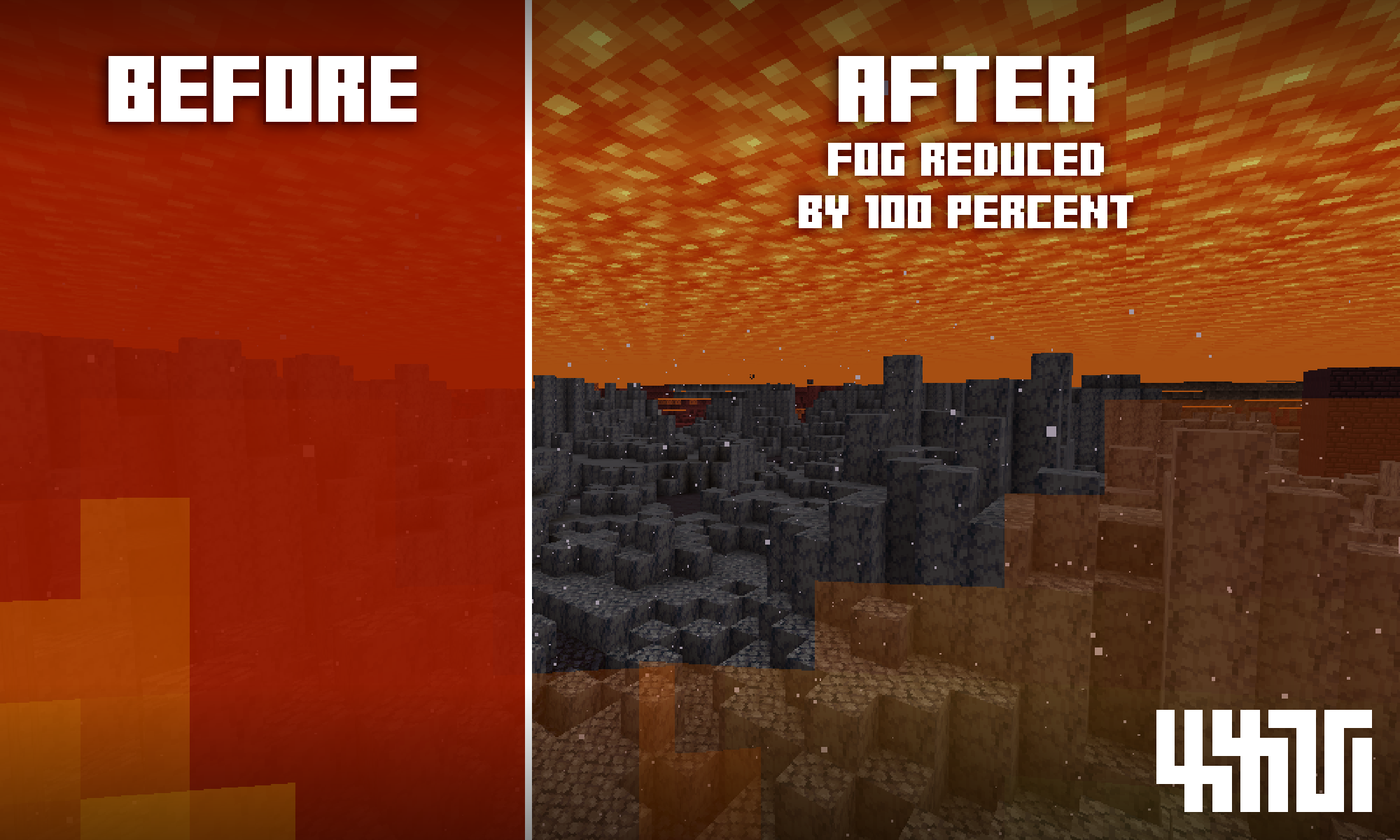
Removes/Reduces Fogs from Lava, PowderSnow, Blindness and Darkness.
by manuxxvy
Download Claim this project
Add a badge to your pageLink to Clear Fog / Transparent Fog from a README, website or forum post.
Preview: Badge

Badges update automatically and link to the resource pack page on MineUniverse.

105,865 downloads
0 likes
0 followers
Updated Oct 14, 2026
0 hypes
Follow0
16x Miscellaneous
Advertisement Remove ads with Premium →
THIS TEXTURE PACK USES VANILLA SHADERS TO IMPROVE VISION UNDER LAVA, UNDER POWDER SNOW AND FOR WHEN THE PLAYER HAS THE DARKNESS/BLINDNESS EFFECT!


- No more annoying fog when under lava or powder snow! (Reduced by 100%)
- Blindness/Darkness effects are no longer obtrusive (Escape from the warden is easier now!)
- Works in any game mode
- Decreased fire overlay transparency
- Ideal for finding ores inside lava.

Clear Fog v3
MC 1.19.4-Snapshot, 1.19.4
Release 2023-05-11 Get
Transparent Fog v3
MC 1.19.4, 1.19.4-Snapshot
Release 2023-05-11 Get
Transparent Fog v2
MC 1.19.3
Release 2023-02-23 Get
Clear Fog v2
MC 1.19.3
Release 2023-02-23 Get

Requirements & install

How to use this resource pack in Minecraft
Resolution
16x
Minecraft
1.19.3 – 1.19.4
Install folder
.minecraft/resourcepacks

How to install resource packs

  1. Download the resource pack .zip file (do not extract it).
  2. In Minecraft open Options → Resource Packs → Open Pack Folder.
  3. Drop the .zip into the resourcepacks folder (.minecraft/resourcepacks).
  4. Move the pack to the Selected column and click Done.
Browse more: 16x resource packs 32x resource packs 64x resource packs 128x resource packs 256x resource packs 512x+ resource packs Resource Packs for 1.19.4 All resource packs

More from manuxxvy

Advertisement Remove ads with Premium →

You Might Also Like