Mineuniverse
Resource Packs
Chinese with Pinyin

Chinese with Pinyin

RESOURCE PACK
A Minecraft: Java Edition resource pack that displays Chinese characters (Hanzi) alongside tone-marked Pinyin for items, blocks, mobs, and UI elements, while keeping all in-game slash commands in standard English.
by MatthewShkolnik
Download Claim this project
113 downloads
0 likes
0 followers
Updated Oct 14, 2026
0 hypes
Follow0
Data Packs Miscellaneous
Advertisement Remove ads with Premium →

Minecraft Chinese with Pinyin (拼音) Resource Pack

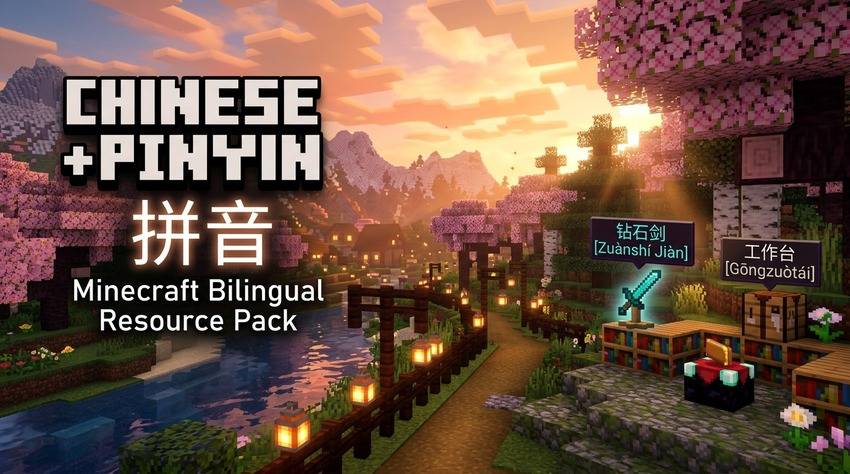
Minecraft Chinese with Pinyin Banner

A Minecraft resource pack (for both Java Edition and Bedrock Edition) that displays Chinese characters (Hanzi) alongside tone-marked Pinyin, Zhuyin (Bopomofo), or Cantonese Jyutping for items, blocks, mobs, and UI elements, while keeping all in-game slash commands and parser feedback in standard English.


Features

  • Dual Hanzi and Phonetic Annotations: Every in-game item, block, mob, and menu string is annotated with pronunciation and tone marks using Chinese NLP tokenization (jieba + pypinyin).
  • Minecraft Bedrock Edition Export (.mcpack): Generates ready-to-install Bedrock resource packs with custom manifest.json, pack_icon.png, and official vanilla .lang translations from Mojang's bedrock-samples repository.
  • Muted Pinyin Styling (§7 Gray): Pronunciation annotations appear in clean subtle gray §7(...)§r so Chinese characters remain visually dominant and easy to read.
  • Regional Phonetic Guides:
    • Mandarin Pinyin (zh_py): Standard Pinyin with tone marks.
    • Taiwan Zhuyin / Bopomofo (zh_zy): Dedicated custom language 中文 (注音) with Bopomofo annotations (e.g. 鑽石劍 §7(ㄗㄨㄢ ㄕˊ ㄐㄧㄢˋ)§r).
    • Cantonese Jyutping (zh_yue): Dedicated custom language 廣東話 (粵拼) with LSHK Jyutping annotations (e.g. 鑽石劍 §7(zyun3 sek6 gim3)§r).
  • Learning Modes & Multi-Variants:
    • Standard Tone Marks: 钻石剑 §7(Zuànshí Jiàn)§r
    • Tone Numbers (--pinyin-style numbers): 钻石剑 §7(Zuan4shi2 Jian4)§r
    • Character Recall Mode (--recall): Inverts display order to test character recognition: Zuànshí Jiàn §7(钻石剑)§r
  • Broad CJK Unicode Coverage: Supports standard BMP Hanzi as well as CJK Extension A, compatibility, and supplementary plane characters (e.g. 䃮 cobblestone, 㭜 acacia, 䦪 creaking, 𥹉).
  • Domain Polyphone Overrides (data/pinyin_overrides.json): Fine-tuned pronunciation for Minecraft-specific terminology (e.g. 重锤 -> Zhòngchuí, 藏宝图 -> Cángbǎotú, 附魔 -> Fùmó, 嘎枝 -> Gāzhī, 粘性活塞 -> Niánxìng Huósāi).
  • 100% English Commands Preserved: All command syntax, arguments, error parsing strings, and command feedback (/give, /teleport, /locate, /gamerule, argument helpers, SNBT parsing) remain in standard English to maintain muscle memory and autocomplete functionality across both Java and Bedrock editions.
  • Multi-Version Compatibility: Includes supported_formats (min_inclusive: 32, max_inclusive: 97+) to eliminate red "Incompatible pack" warnings across 1.20.5 through 1.21.4+ and newer releases.
  • Fast Automated Asset Generation: Includes a cached Python generator that queries Mojang's official piston-meta API with local caching and CLI flags.

Use Cases

  • Language Learning: Learn vocabulary and character pronunciation through in-game context without relying on standalone flashcards.
  • Multiplayer and International Servers: Navigate Chinese-language Minecraft servers, inventories, trade menus, and chat references without translation friction.
  • Heritage Speakers: Bridge existing conversational spoken Mandarin with character recognition using Pinyin phonetic guides.
  • Server Administration: Maintain and execute command blocks, macros, and server commands without broken syntax or localized command arguments.
  • Bilingual Content Creation: Produce dual-language content accessible to both English- and Chinese-speaking audiences.

In-Game Examples

Item / Concept Standard English Vanilla Chinese Pinyin Resource Pack
Diamond Sword Diamond Sword 钻石剑 钻石剑 (Zuànshí Jiàn)
Mace Mace 重锤 重锤 (Zhòngchuí)
Creeper Creeper 苦力怕 苦力怕 (Kǔlì Pà)
Crafting Table Crafting Table 工作台 工作台 (Gōngzuòtái)
Golden Apple Golden Apple 金苹果 金苹果 (Jīnpíngguǒ)
Buried Treasure Map Buried Treasure Map 藏宝图 藏宝图 (Cángbǎotú)
Ender Dragon Ender Dragon 末影龙 末影龙 (Mòyǐnglóng)
Cobblestone (Classical) Cobblestone 䃮 䃮 (Tán)
Commands /gamerule keepInventory true 游戏规则... /gamerule keepInventory true (English)

Installation

Java Edition

  1. Download Minecraft-Chinese-Pinyin-v1.2.0.zip (or Numbers / Recall variants) from Releases.
  2. In Minecraft: Java Edition, go to Options -> Resource Packs… -> Open Pack Folder.
  3. Copy the .zip file into the opened resourcepacks directory.
  4. Move the pack from the Available column to the Selected column, then click Done.
  5. Under Options -> Language…, select:
    • 中文 (拼音) for Mandarin Pinyin
    • 中文 (注音) for Taiwan Bopomofo
    • 廣東話 (粵拼) for Hong Kong Cantonese Jyutping
    • Or any standard Chinese dialect or English (US).

Bedrock Edition

  1. Download Minecraft-Chinese-Pinyin-v1.2.0.mcpack from Releases.
  2. Double-click or open the .mcpack file on Windows, Android, iOS, or iPadOS to import directly into Minecraft.
  3. In Minecraft: Bedrock Edition, navigate to Settings -> Global Resources, select the pack, and click Activate.

Contributing

Feedback, bug reports, and pull requests are welcome:

  • Polyphonic corrections (多音字): Submit updates directly to data/pinyin_overrides.json.
  • New Minecraft versions: Test compatibility with new snapshots or drops.
  • Submit issues and pull requests via the GitHub Issues page.

License

Distributed under the MIT License.

Minecraft is a registered trademark of Mojang AB / Microsoft. This project is an independent community resource pack and is not affiliated with Mojang or Microsoft.

Minecraft-Chinese-Pinyin-v1.2.0.zip
MC 1.21, 1.20.5, 26.1, 26.1.2, 26.2, 26.3
Release 2026-10-13 Get
Minecraft-Chinese-Pinyin-v1.1.0.zip
MC 1.21, 1.20.5, 26.1, 26.1.2, 26.2, 26.3
Release 2026-10-01 Get
Minecraft-Chinese-Pinyin-v1.0.0.zip
MC 1.21, 1.20.5, 26.1, 26.1.2, 26.2, 26.3
Release 2026-09-27 Get

Requirements & install

How to use this resource pack in Minecraft
Resolution
Not specified
Minecraft
1.20.5 – 26.3
Install folder
.minecraft/resourcepacks

How to install resource packs

  1. Download the resource pack .zip file (do not extract it).
  2. In Minecraft open Options → Resource Packs → Open Pack Folder.
  3. Drop the .zip into the resourcepacks folder (.minecraft/resourcepacks).
  4. Move the pack to the Selected column and click Done.
Browse more: 16x resource packs 32x resource packs 64x resource packs 128x resource packs 256x resource packs 512x+ resource packs Resource Packs for 26.3 All resource packs

More from MatthewShkolnik

Advertisement Remove ads with Premium →

You Might Also Like