Mineuniverse
Resource Packs
Camo Creepers

Camo Creepers

RESOURCE PACK
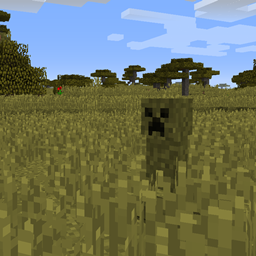
Creepers blend into their environments. Requires Optifine or MCPatcher.
by CodenameAwesome
Download Claim this project
Add a badge to your pageLink to Camo Creepers from a README, website or forum post.
Preview: Badge

Badges update automatically and link to the resource pack page on MineUniverse.

5,192 downloads
0 likes
0 followers
Updated Oct 14, 2026
0 hypes
Follow0
16x Miscellaneous
Advertisement Remove ads with Premium →

Requires RandomMobs. Available through Optifine or MCPatcher.

This texture pack sets Creeper textures based on their biome and altitude. These 16 textures include every color of grass, snow, mycelium, podzol, sand, red sand, smooth stone and gravel Creepers.

These are camouflaged Creepers, not chameleon Creepers. They won't change their texture if they walk to a different environment (unless you exit and re-enter the level). Hopefully, future versions of RandomMobs will allow this but for now, it's not possible.

This basic version is focused on making the creepers harder to see. Future versions will include things that might make Creepers stand out more than some players would want but are neat ideas such as mushroom Creepers and cactus Creepers.

The classic creepers will still spawn in oceans and rivers.

Screenshots:

Sand Creeper

Mycelium Creeper

Snow Creeper

Red Sand Creeper

Stone Creeper

Birch Forest Creeper

Extreme Hills Creeper
Jungle Creeper

Forest Creeper

Sunflower Plains Creeper

Roofed Forest Creeper

Savanna Creeper

Taiga

Swamp Creeper

Gravel Creeper

Podzol Creeper

Camo Creepers - Basic.zip
MC 1.7.6, 1.9.1, 1.9.3, 1.8.7, 1.7.4, 1.7.7, 1.7.5, 1.4.6, 1.6.1, 1.10-Snapshot, 1.9.4, 1.9.2, 1.8.4, 1.7.9, 1.12, 1.2.4, 1.8.8, 1.7.2, 1.4.4, 1.0.0, 1.10.2, 1.8-Snapshot, 1.8.3
Release 2017-07-03 Get

Requirements & install

How to use this resource pack in Minecraft
Resolution
16x
Minecraft
1.8.8 – 1.12
Install folder
.minecraft/resourcepacks

How to install resource packs

  1. Download the resource pack .zip file (do not extract it).
  2. In Minecraft open Options → Resource Packs → Open Pack Folder.
  3. Drop the .zip into the resourcepacks folder (.minecraft/resourcepacks).
  4. Move the pack to the Selected column and click Done.
Browse more: 16x resource packs 32x resource packs 64x resource packs 128x resource packs 256x resource packs 512x+ resource packs Resource Packs for 1.12 All resource packs

More from CodenameAwesome

Advertisement Remove ads with Premium →

You Might Also Like