Mineuniverse
Resource Packs
(Bushy Leaves) dronko's alternative Bushy Leaves

(Bushy Leaves) dronko's alternative Bushy Leaves

RESOURCE PACK
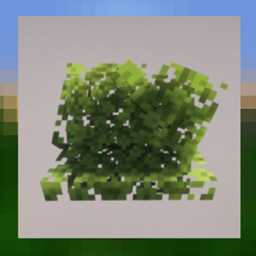
better busy leaves designed to be less lagy than over busy leaves packs
by dronko_fire_blaster
Download Claim this project
Add a badge to your pageLink to (Bushy Leaves) dronko's alternative Bushy Leaves from a README, website or forum post.
Preview: Badge

Badges update automatically and link to the resource pack page on MineUniverse.

153,487 downloads
0 likes
0 followers
Updated Oct 14, 2026
0 hypes
Follow0
16x Medieval Miscellaneous Traditional
Advertisement Remove ads with Premium →

Better Bushy Leaves

designed to be less lagy compared to over bushy leaves packs.
compatible with any resolution of pack!it works with any resource pack with its own leaves, even if it has its own bushy leaves and want this one just put this pack above the over pack in the resource packs tab!

varents

oak, dark oak, birch, azalea, jungle and mangrove have random cubes oak leaves spruce and acacia have more flat cubes spruce leaves


this pack only adds one maby two more cubes to ech leaf bock overs may add up to six per block being the worst of them.

Better Bushy Leaves 5.0.zip
MC 1.21.11, 26.1
Release 2026-03-25 Get
better bushy leaves 4.1.zip
MC 1.19.3, 1.20.2, 1.21, 1.20.5, 1.21.5, 1.19.4, 1.21.4, 1.19.2, 1.20.3, 1.20.1, 1.20, 1.20.6, 1.19.1, 1.20.4, 1.21.3, 1.21.7, 1.21.1, 1.21.6, 1.19, 1.21.2
Release 2025-07-10 Get
better bushy leaves 4.0.zip
MC 1.19.3, 1.20.2, 1.21, 1.20.5, 1.21.5, 1.19.4, 1.21.4, 1.19.2, 1.20.3, 1.20.1, 1.20, 1.20.6, 1.19.1, 1.20.4, 1.21.3, 1.21.1, 1.19, 1.21.2
Release 2025-05-22 Get

Requirements & install

How to use this resource pack in Minecraft
Resolution
16x
Minecraft
1.21.2 – 26.1
Install folder
.minecraft/resourcepacks

How to install resource packs

  1. Download the resource pack .zip file (do not extract it).
  2. In Minecraft open Options → Resource Packs → Open Pack Folder.
  3. Drop the .zip into the resourcepacks folder (.minecraft/resourcepacks).
  4. Move the pack to the Selected column and click Done.
Browse more: 16x resource packs 32x resource packs 64x resource packs 128x resource packs 256x resource packs 512x+ resource packs Resource Packs for 26.1 All resource packs

More from dronko_fire_blaster

Advertisement Remove ads with Premium →

You Might Also Like