Mineuniverse
Resource Packs
Bushy Leaves Add-on for Faithful 32x [DISCONTINUED]

Bushy Leaves Add-on for Faithful 32x [DISCONTINUED]

RESOURCE PACK
A 100% vanilla way to make trees look more natural
by Pomi108
Download Claim this project
Add a badge to your pageLink to Bushy Leaves Add-on for Faithful 32x [DISCONTINUED] from a README, website or forum post.
Preview: Badge

Badges update automatically and link to the resource pack page on MineUniverse.

41,792 downloads
0 likes
0 followers
Updated Oct 14, 2026
0 hypes
Follow0
32x Miscellaneous Traditional
Advertisement Remove ads with Premium →

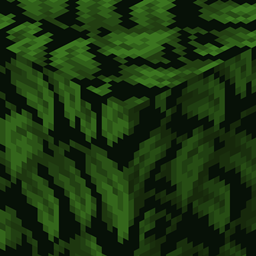
Bushy Leaves is an add-on for Faithful 32x that makes all leaves look prettier and more natural! There are three versions of the pack: Regular Bushy leaves is the main pack intended for normal gameplay on middle-end devices, Bushy Leaves Ultra is for screenshots and/or gameplay on high-end devices and Bushy Leaves Classic is for gameplay on low-end devices or for people that simply prefer the legacy model. See the packs' respective file descriptions for more details; a detailed comparison as well as additional screenshots can be found in the Images tab. Can someone please tell me how to upload images to the Images tab properly? When I try to do it and press the upload button, nothing happens, it's just stuck on the Upload Image window

Anyways, check out the comparison here: https://i.redd.it/l3vgs8fta0h51.png


 While all packs are 100% vanilla, it is highly recommended to use OptiFine and its Smart leaves setting, which gives a ~5 FPS boost while maintaining an almost identical look.


WARNING: Bushy Leaves isn't compatible with Fast graphics. Please use Fancy or Smart leaves with Bushy Leaves!


THIS IS AN ADD-ON! IT NEEDS TO BE PLACED ON TOP OF FAITHFUL TO WORK PROPERLY.


All packs are compatible with all versions from 1.14 to 1.16.2.

Bushy Leaves v2.0 Classic
MC 1.16-Snapshot, 1.15-Snapshot, 1.16.1, 1.14.4, 1.14.1, 1.14.3, 1.15, 1.16, 1.15.2, 1.14, 1.14.2, 1.16.2, 1.14-Snapshot, 1.15.1
Release 2020-08-14 Get
Bushy Leaves v2.0 Ultra
MC 1.16-Snapshot, 1.15-Snapshot, 1.16.1, 1.14.4, 1.14.1, 1.14.3, 1.15, 1.16, 1.15.2, 1.14, 1.14.2, 1.16.2, 1.14-Snapshot, 1.15.1
Release 2020-08-14 Get
Bushy Leaves v2.0
MC 1.16-Snapshot, 1.15-Snapshot, 1.16.1, 1.14.4, 1.14.1, 1.14.3, 1.15, 1.16, 1.15.2, 1.14, 1.14.2, 1.16.2, 1.14-Snapshot, 1.15.1
Release 2020-08-14 Get
§2Bushy Leaves.zip
MC 1.14.4, 1.14.1, 1.14.3, 1.15, 1.14, 1.14.2, 1.14-Snapshot, 1.15.1
Release 2020-01-11 Get

Requirements & install

How to use this resource pack in Minecraft
Resolution
32x
Minecraft
1.15-Snapshot – 1.16.2
Install folder
.minecraft/resourcepacks

How to install resource packs

  1. Download the resource pack .zip file (do not extract it).
  2. In Minecraft open Options → Resource Packs → Open Pack Folder.
  3. Drop the .zip into the resourcepacks folder (.minecraft/resourcepacks).
  4. Move the pack to the Selected column and click Done.
Browse more: 16x resource packs 32x resource packs 64x resource packs 128x resource packs 256x resource packs 512x+ resource packs Resource Packs for 1.16.2 All resource packs

More from Pomi108

Advertisement Remove ads with Premium →

You Might Also Like