
Mineuniverse
Resource Packs
BSL Minipacks

BSL Minipacks

RESOURCE PACK
Clean UI, dense grass, and custom sky color.
by capttatsu
Download Claim this project
20,835 downloads
0 likes
Updated Oct 14, 2026
0 hypes
16x Miscellaneous
Advertisement Remove ads with Premium →

ABOUT
BSL Minipacks is a resource pack for Minecraft: Java Edition which contains small tweaks.
This resource pack was split into multiple packs, hence the name "minipacks".
However, all of the packs are now combined into one for ease of installation.
The latest version (v2) is compatible with MC 1.21+, while v1 is compatible with MC 1.15-1.20.

UI
Simple and clean UI to improve immersion.
Foliage Tweaks
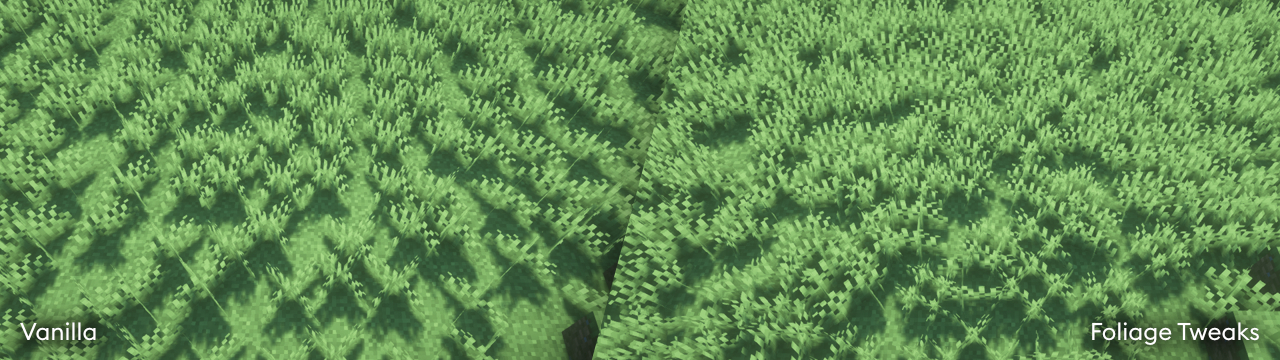
Increased grass and crops density improved cross model to prevent clipping from shader's waving blocks, and random rotation. May impact performance.

Sky Color
Sky colormap which is used for subtle sky color change when using BSL Shaders with vanilla sky color enabled.

QUICK LINKS

AGREEMENT
You're allowed to…

  • Use this resource pack for taking screenshots and videos.
  • Integrate some features to your own resource pack with my permission.*

You're not allowed to…

  • Redistribute the resource pack without my permission.
  • Claim (and rename) my resource pack as your own.
  • Use monetized URL shorteners to my site or files.

*My resource pack and myself (the author) should be credited clearly, add link to my site if possible.

INSTALLATION

  • Download and install Optifine or Polytone. (for sky color)
  • Download the bundled resource packs.
  • Unzip the bundle and put the resource pack inside .minecraft\resourcepacks.
  • Launch Minecraft.
  • Open Options, Resource Packs.
  • Select any of the minipack(s).
BSL Minipacks v1.0
MC 1.17.1, 1.19.4, 1.16.5, 1.18.2, 1.15.2, 1.20.6
Release 2024-12-12 Get
BSL Minipacks v2.0
MC 1.21.4
Release 2024-12-12 Get

Requirements & install

How to use this resource pack in Minecraft
Resolution
16x
Minecraft
1.15.2 – 1.21.4
Install folder
.minecraft/resourcepacks

How to install resource packs

  1. Download the resource pack .zip file (do not extract it).
  2. In Minecraft open Options → Resource Packs → Open Pack Folder.
  3. Drop the .zip into the resourcepacks folder (.minecraft/resourcepacks).
  4. Move the pack to the Selected column and click Done.
Browse more: 16x resource packs 32x resource packs 64x resource packs 128x resource packs 256x resource packs 512x+ resource packs Resource Packs for 1.21.4 All resource packs

More from capttatsu

Advertisement Remove ads with Premium →

You Might Also Like