Mineuniverse
Resource Packs
Broken Tools

Broken Tools

RESOURCE PACK
Tools that change texture based on their Durability
by Stereo528
Download Claim this project
Add a badge to your pageLink to Broken Tools from a README, website or forum post.
Preview: Badge

Badges update automatically and link to the resource pack page on MineUniverse.

118,113 downloads
0 likes
0 followers
Updated Oct 14, 2026
0 hypes
Follow0
16x Animated Miscellaneous Traditional
Advertisement Remove ads with Premium →

This pack has been discontinued! Find a continuation here!

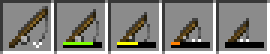
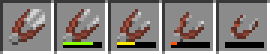
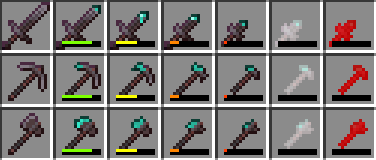
A resource pack that makes your tool's texture change as it loses durability. This is a 16x16 pack that includes most tools. When your tools get below 10% they will flash white, and at 1% (on Netherite and Diamond Tools) they will flash red. This pack is an "Edit" of Vanilla.

Do not Redistribute this pack or any changes you make to it!

FAQ:

Q: Does this pack require OptiFine/CIT Resewn?

A: No, It makes use of the vanilla model files. you do not need to use either mod.

Q: Why no updates?

A: I got busy, you can find an updated version/continuation here.

Broken Tools V2
MC 1.18.2, 1.19.1
Release 2021-12-02 Get
Broken Tools V2
MC 1.17.1
Release 2021-11-06 Get
Broken Tools V2
MC 1.16.5
Release 2021-03-06 Get
Broken Tools V1 - 1.12.2
MC 1.12.2
Release 2020-09-02 Get
Broken Tools V1- 1.16.5
MC 1.16.3, 1.16.1, 1.16, 1.16.5, 1.16.4, 1.16.2
Release 2020-09-02 Get
Degrading Tools v0.6 - 1.16
MC 1.16-Snapshot
Release 2020-03-29 Get
Degrading Tools v0.6 - 1.12.2
MC 1.12.2
Release 2020-03-29 Get
Degrading Tools v0.5 1.15.2
MC 1.16-Snapshot
Release 2020-03-08 Get
Degrading-Tools-v0.5-1.12.2
MC 1.12.2
Release 2019-10-20 Get
Degrading tools v0.3.1
MC 1.14.4
Release 2019-08-27 Get

Requirements & install

How to use this resource pack in Minecraft
Resolution
16x
Minecraft
1.16.1 – 1.19.1
Install folder
.minecraft/resourcepacks

How to install resource packs

  1. Download the resource pack .zip file (do not extract it).
  2. In Minecraft open Options → Resource Packs → Open Pack Folder.
  3. Drop the .zip into the resourcepacks folder (.minecraft/resourcepacks).
  4. Move the pack to the Selected column and click Done.
Browse more: 16x resource packs 32x resource packs 64x resource packs 128x resource packs 256x resource packs 512x+ resource packs Resource Packs for 1.19.1 All resource packs

More from Stereo528

Advertisement Remove ads with Premium →

You Might Also Like