Mineuniverse
Resource Packs
break08's Red String

break08's Red String

RESOURCE PACK
You can't be trapped by tripwire hook with string anymore
by break08
Download Claim this project
1,073 downloads
0 likes
Updated Oct 14, 2026
0 hypes
16x Miscellaneous
Advertisement Remove ads with Premium →

What this resourcepack do ?

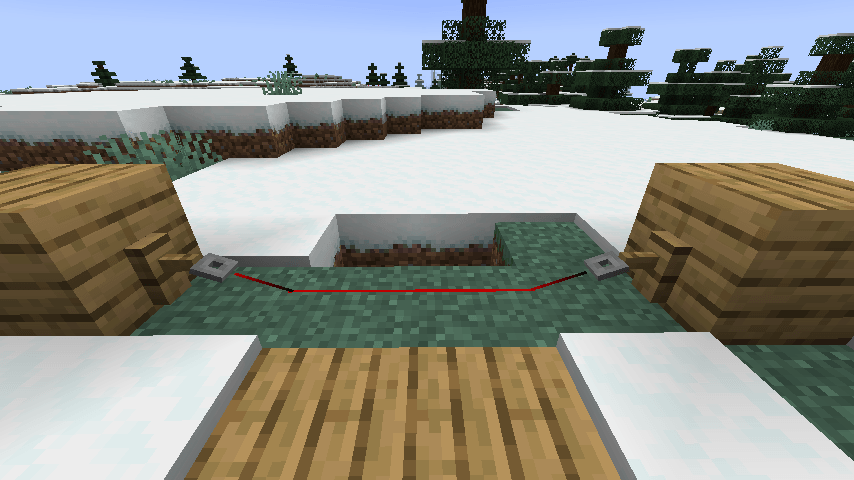
This resource pack will colour the string (tripwire) red when it placed. You now can see the string clearly and cannot be trapped by tripwire hook trap. You can see how it changed in Show case section.

Bugs and issues

I don't have chance for testing the new version of this resource pack, if there is any issues, please report here : https://github.com/break08/red-string/issues and you can also try download tested older versions (which doesn't support many versions of minecraft).

Show case

Before using this:

You can't see anything

After using this resource pack:

Now you can see the string

Try my other resource packs:

1. Lined Redstone - Replace the vanilla dusty redstone lines with straight-line designed redstone

2. Mark the Powder Snow - Border the powder snow blocks and help you to avoid falling into them

red_string-1.0.0-resourcepack-1.13.zip
MC 1.16.3, 1.13.1, 1.16-Snapshot, 1.17.1, 1.21.2-Snapshot, 1.21, 1.21.6-snapshot, 1.15-Snapshot, 1.16.1, 1.18.1, 1.20.2-Snapshot, 1.20.5-Snapshot, 1.14.3, 1.15, 1.16, 1.13
Release 2026-05-08 Get
updated_red_string-1.0.0-resourcepack-1.9.zip
MC 1.9.3, 1.9.1, 1.10.2, 1.10-Snapshot, 1.9.4, 1.9.2, 1.12.1, 1.12, 1.11, 1.10, 1.10.1, 1.11.1, 1.11.2, 1.12-Snapshot, 1.11-Snapshot, 1.12.2, 1.9
Release 2026-05-08 Get
updated_red_string-1.0.0-resourcepack-1.6.zip
MC 1.8.7, 1.7.4, 1.7.7, 1.7.6, 1.7.5, 1.6.1, 1.7.3, 1.7.2, 1.8.8, 1.8.4, 1.7.9, 1.8-Snapshot, 1.8.3, 1.7.10, 1.8, 1.7.8, 1.6.4, 1.8.6, 1.8.9, 1.8.1, 1.6.2, 1.8.5, 1.8.2
Release 2026-05-08 Get

Requirements & install

How to use this resource pack in Minecraft
Resolution
16x
Minecraft
1.16.3 – 1.21.6-snapshot
Install folder
.minecraft/resourcepacks

How to install resource packs

  1. Download the resource pack .zip file (do not extract it).
  2. In Minecraft open Options → Resource Packs → Open Pack Folder.
  3. Drop the .zip into the resourcepacks folder (.minecraft/resourcepacks).
  4. Move the pack to the Selected column and click Done.
Browse more: 16x resource packs 32x resource packs 64x resource packs 128x resource packs 256x resource packs 512x+ resource packs Resource Packs for 1.21.6-snapshot All resource packs

More from break08

Advertisement Remove ads with Premium →

You Might Also Like