Mineuniverse
Resource Packs
BM: Air Balloons

BM: Air Balloons

RESOURCE PACK
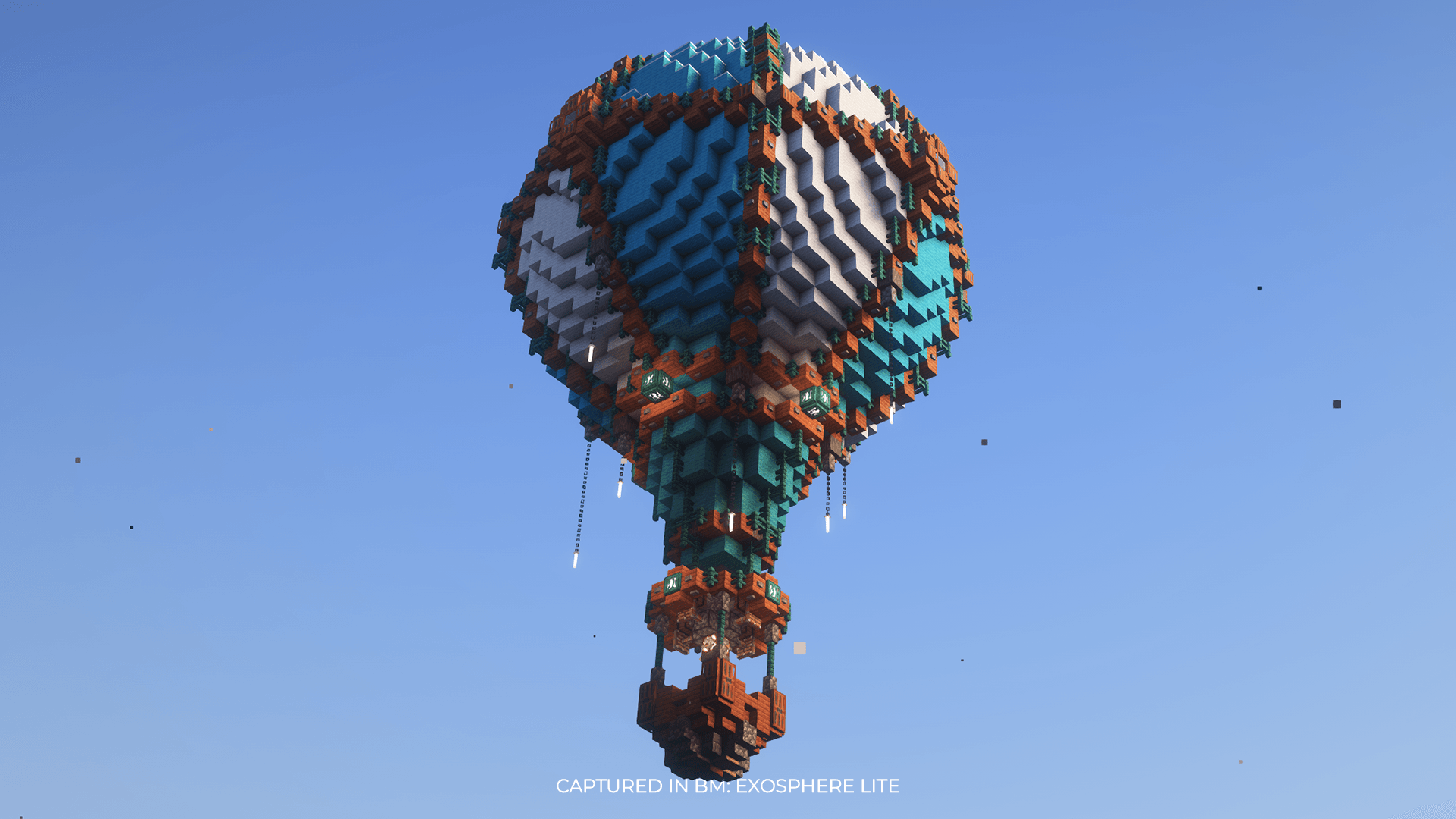
Adds Hot Air Balloons with Loot high up in the sky!
by Leonniclass
Download Claim this project
355,048 downloads
0 likes
Updated Oct 14, 2026
0 hypes
Data Packs Miscellaneous Mod Support Steampunk
Advertisement Remove ads with Premium →

Beyond Mines: Air Balloons is a Datapack that adds 9 different hot air balloons as overworld structures. These balloons appear high in the sky and contain loot that fits the vanilla balance. The datapack is part of the BM: Exosphere modpack series. Currently there are 6 different color variations, and 3 additional rare biome-specific variants with better loot(Cherry Grove, Desert, Ice).

The Datapack has 3 different loot tables:

  • payload (the main chest inside the basket)
  • payload_rare (better loot for the 3 rare air balloons)
  • barrels (4 slightly hidden barrels on top of the basket

Credits for the initial structure design:

Trydar

BM modpacks:

Usage in other modpacks is permitted when using a resource pack loader, such as Global Packs

BM: Air Balloons 1.0.2
MC 1.21.2-Snapshot, 1.21, 1.21.1-Snapshot, 1.21.4, 1.21.5-Snapshot, 1.21-Snapshot, 1.21.3, 1.21.1, 1.21.4-Snapshot, 1.21.2
Release 2025-01-26 Get
BM: Air Balloons 1.0.2
MC 1.19.3, 1.20.2, 1.19.4-Snapshot, 1.20.5, 1.20.2-Snapshot, 1.20.5-Snapshot, 1.19.4, 1.19-Snapshot, 1.18.2, 1.19.2, 1.20.3-Snapshot, 1.20.3, 1.20.1, 1.20, 1.20.6, 1.19.1, 1.20.4
Release 2025-01-26 Get
BM: Air Balloons 1.0.1
MC 1.19.3, 1.20.2, 1.19.4-Snapshot, 1.20.5, 1.20.2-Snapshot, 1.20.5-Snapshot, 1.19.4, 1.19-Snapshot, 1.18.2, 1.19.2, 1.20.3-Snapshot, 1.20.3, 1.20.1, 1.20, 1.20.6, 1.19.1, 1.20.4
Release 2025-01-23 Get
BM: Air Balloons 1.0.0
MC 1.19.3, 1.20.2, 1.19.4-Snapshot, 1.20.5, 1.20.2-Snapshot, 1.20.5-Snapshot, 1.19.4, 1.19-Snapshot, 1.18.2, 1.19.2, 1.20.3-Snapshot, 1.20.3, 1.20.1, 1.20, 1.20.6, 1.19.1, 1.20.4
Release 2025-01-22 Get

Requirements & install

How to use this resource pack in Minecraft
Resolution
Not specified
Minecraft
1.21.1-Snapshot – 1.21.5-Snapshot
Install folder
.minecraft/resourcepacks

How to install resource packs

  1. Download the resource pack .zip file (do not extract it).
  2. In Minecraft open Options → Resource Packs → Open Pack Folder.
  3. Drop the .zip into the resourcepacks folder (.minecraft/resourcepacks).
  4. Move the pack to the Selected column and click Done.
Browse more: 16x resource packs 32x resource packs 64x resource packs 128x resource packs 256x resource packs 512x+ resource packs Resource Packs for 1.21.5-Snapshot All resource packs

More from Leonniclass

Advertisement Remove ads with Premium →

You Might Also Like