Mineuniverse
Resource Packs
Blue Axolotl Highlighter by imLoffi

Blue Axolotl Highlighter by imLoffi

RESOURCE PACK
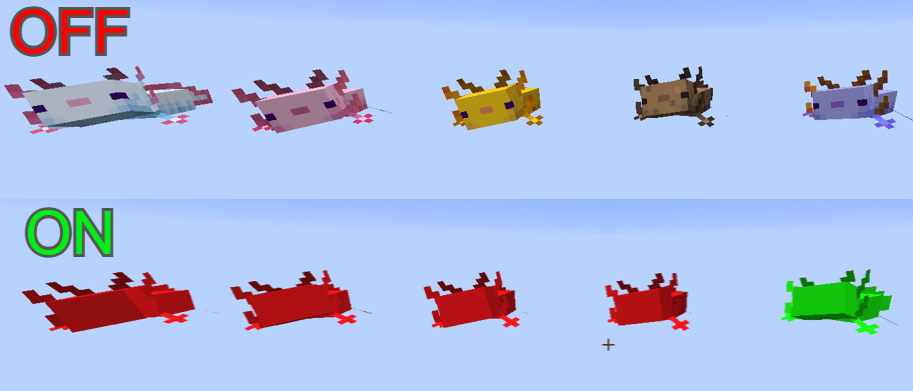
Makes the rare Blue Axolotl easy to spot! All regular axolotls are recolored red, while the rare Blue Axolotl is recolored green, so you can instantly identify it in large breeding farms. Gameplay remains unchanged.
by imLoffiii
Download Claim this project
Add a badge to your pageLink to Blue Axolotl Highlighter by imLoffi from a README, website or forum post.
Preview: Badge

Badges update automatically and link to the resource pack page on MineUniverse.

452 downloads
0 likes
0 followers
Updated Oct 14, 2026
0 hypes
Follow0
16x
Advertisement Remove ads with Premium →

Have you ever spent hours breeding axolotls only to struggle to find the rare Blue Axolotl among a huge crowd of offspring? This resource pack was created to solve exactly that problem.

The Blue Axolotl is one of the rarest mobs in Minecraft, and obtaining one often requires a large breeding setup with dozens or even hundreds of axolotls. In large farms, it can be difficult to quickly identify whether a Blue Axolotl has appeared.

This pack improves visibility by recoloring all regular axolotl variants to red while changing the rare Blue Axolotl to green. As a result, the rare variant stands out immediately, making it much easier to spot during breeding sessions.

Features

  • All common axolotl variants are recolored red.
  • The rare Blue Axolotl is recolored green.
  • Makes breeding projects more convenient.
  • Helps quickly identify rare spawns in crowded farms.
  • Texture-only change; gameplay is completely unaffected.

If you're managing a massive breeding farm, this pack helps you find the rare variant at a glance.

Blue_Axolotl_Highlighter.zip
MC 26.1, 26.1.1, 26.1.2
Release 2026-06-08 Get

Requirements & install

How to use this resource pack in Minecraft
Resolution
16x
Minecraft
26.1 – 26.1.2
Install folder
.minecraft/resourcepacks

How to install resource packs

  1. Download the resource pack .zip file (do not extract it).
  2. In Minecraft open Options → Resource Packs → Open Pack Folder.
  3. Drop the .zip into the resourcepacks folder (.minecraft/resourcepacks).
  4. Move the pack to the Selected column and click Done.
Browse more: 16x resource packs 32x resource packs 64x resource packs 128x resource packs 256x resource packs 512x+ resource packs Resource Packs for 26.1.2 All resource packs
Advertisement Remove ads with Premium →

You Might Also Like