Mineuniverse
Resource Packs
Blazing Souls

Blazing Souls

RESOURCE PACK
Makes Blazes in Soul Sand Valleys soul blue
by MincraftEinstein
Download Claim this project
2,022 downloads
0 likes
Updated Oct 14, 2026
0 hypes
16x Miscellaneous
Advertisement Remove ads with Premium →


📘 Description

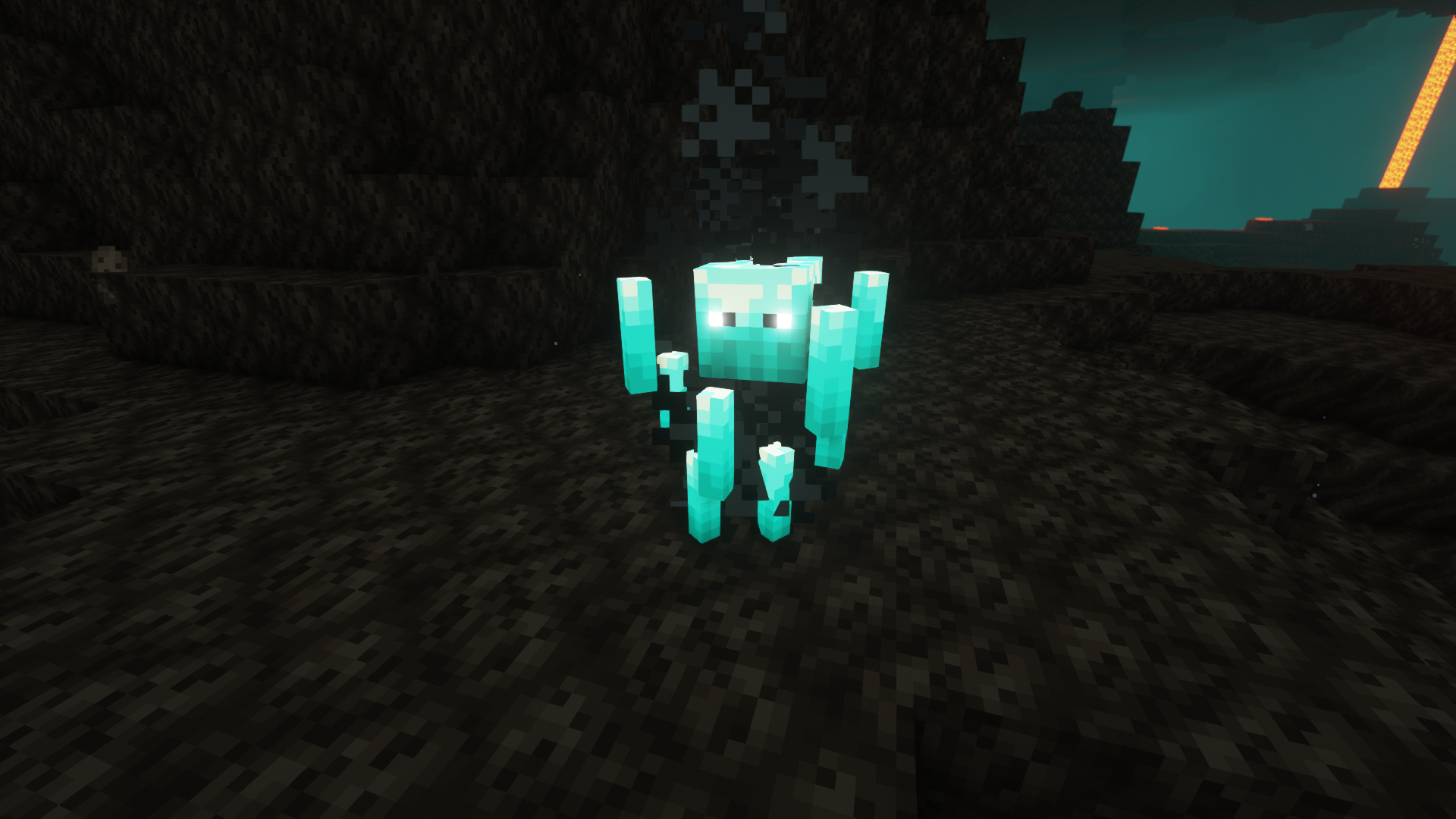
A simple resource pack that makes blazes spawned in soul sand valleys (or standing on soul sand or soul soil) a nice soul blue


Requires Optifine OR Entity Texture Features
Optifine Settings: Video Settings > Quality > Random Entities: ON
ETF Settings: Resource Packs > ETF > Random / Custom Mob Settings > Enable Optifine Random Mobs: ON


This pack should work on most versions of Minecraft


📜 Terms of Use

You may
✅ Use this resource pack as a reference to understand and or create something of your own, as long as it is not a copy or recreation
✅ Use this resource pack in modpacks with credit and one or more links to any of the project pages*
✅ Edit for personal use
✅ Use this resource pack for/in YouTube videos with credit and one or more links to any of the project pages*


You may not
❌ Reupload/publish this resource pack to any website without explicit permission from me and one or more links to any of the project pages*
❌ Redistibute edited or unedited assets** from this resource pack without permission from me and credit


* Project pages include CurseForge, Modrinth, Planet Minecraft, GitHub
** Assets include logos, banners, textures, models etc



📷 IMAGES

A soul blaze in a soul sand valley


Click the banner above to get started!

Blazing Souls 1.21-1.0.3
MC 1.20.2, 1.21, 1.20.5, 1.20.3, 1.20.6, 1.20.4, 1.21.1
Release 2024-07-30 Get
Blazing Souls 1.20.2-1.0.2
MC 1.20.2, 1.20.2-Snapshot, 1.20.3, 1.20.4
Release 2023-09-30 Get
Blazing Souls 1.20-1.0.1
MC 1.20.1, 1.20
Release 2023-06-27 Get
Blazing Souls 1.19-1.0.0
MC 1.19.3, 1.19.4, 1.19.2, 1.19.1, 1.19
Release 2023-05-14 Get

Requirements & install

How to use this resource pack in Minecraft
Resolution
16x
Minecraft
1.20.2-Snapshot – 1.21.1
Install folder
.minecraft/resourcepacks

How to install resource packs

  1. Download the resource pack .zip file (do not extract it).
  2. In Minecraft open Options → Resource Packs → Open Pack Folder.
  3. Drop the .zip into the resourcepacks folder (.minecraft/resourcepacks).
  4. Move the pack to the Selected column and click Done.
Browse more: 16x resource packs 32x resource packs 64x resource packs 128x resource packs 256x resource packs 512x+ resource packs Resource Packs for 1.21.1 All resource packs

More from MincraftEinstein

Advertisement Remove ads with Premium →

You Might Also Like