Mineuniverse
Resource Packs
Better Candles

Better Candles

RESOURCE PACK
Adds small pools of melted wax beneath candles for a subtle, more natural look while keeping the vanilla style intact.
by Doomed_Artemis
Download Claim this project
Add a badge to your pageLink to Better Candles from a README, website or forum post.
Preview: Badge

Badges update automatically and link to the resource pack page on MineUniverse.


326 downloads
0 likes
0 followers
Updated Oct 14, 2026
0 hypes
Follow0
16x Miscellaneous
Advertisement Remove ads with Premium →
Better Candles

A small vanilla-style improvement that gives every candle its own pool of melted wax.

Overview

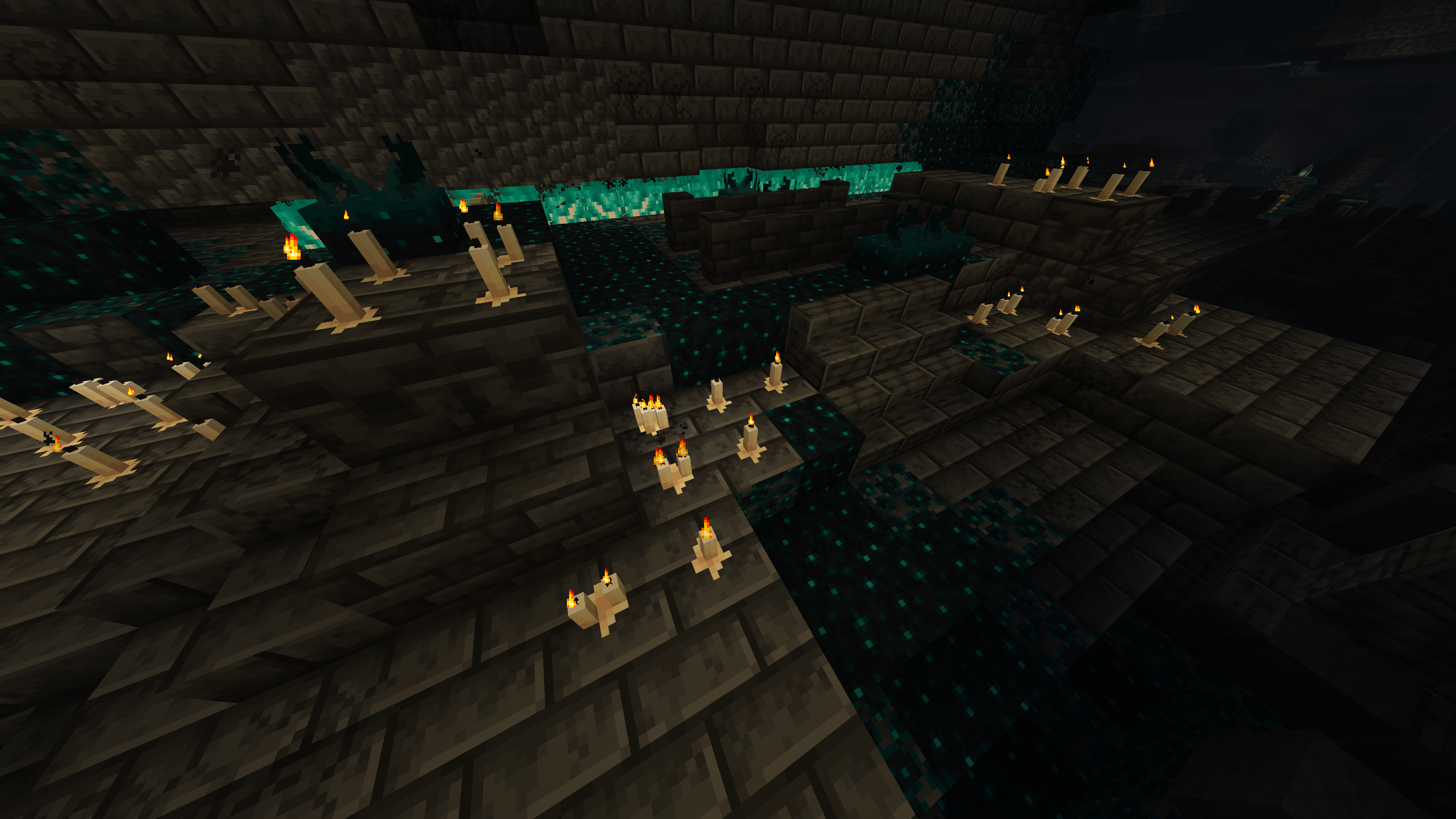
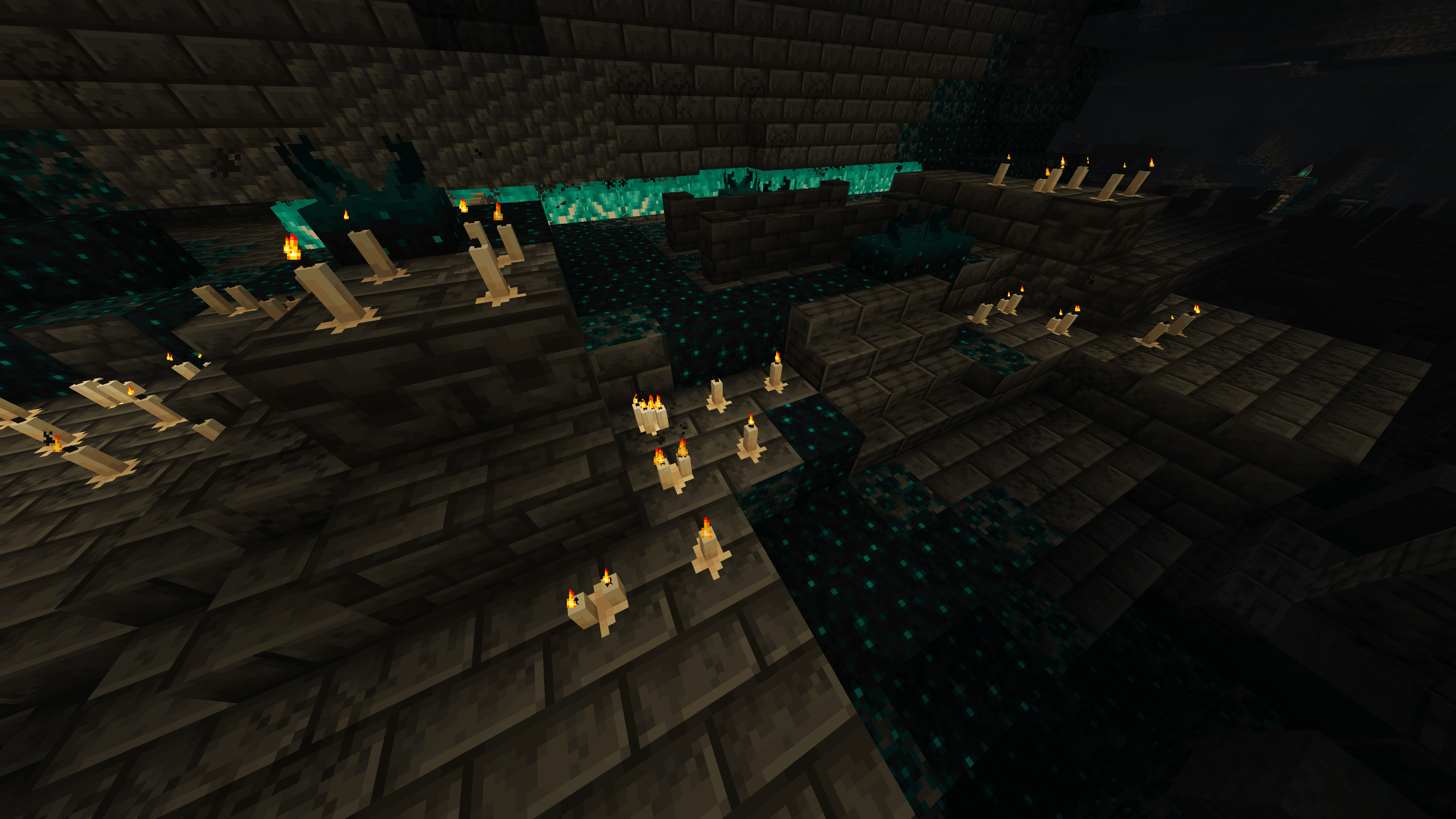
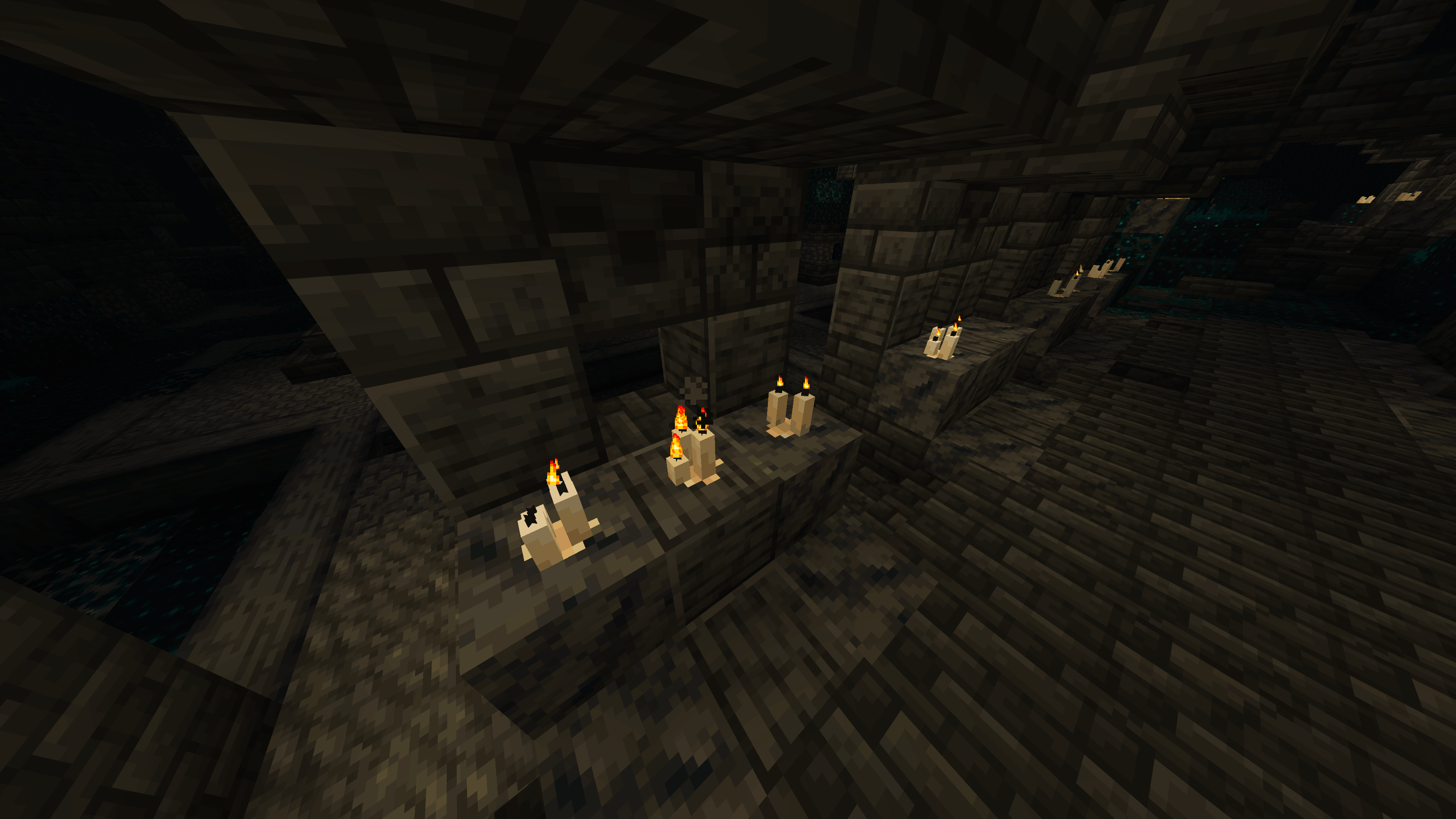
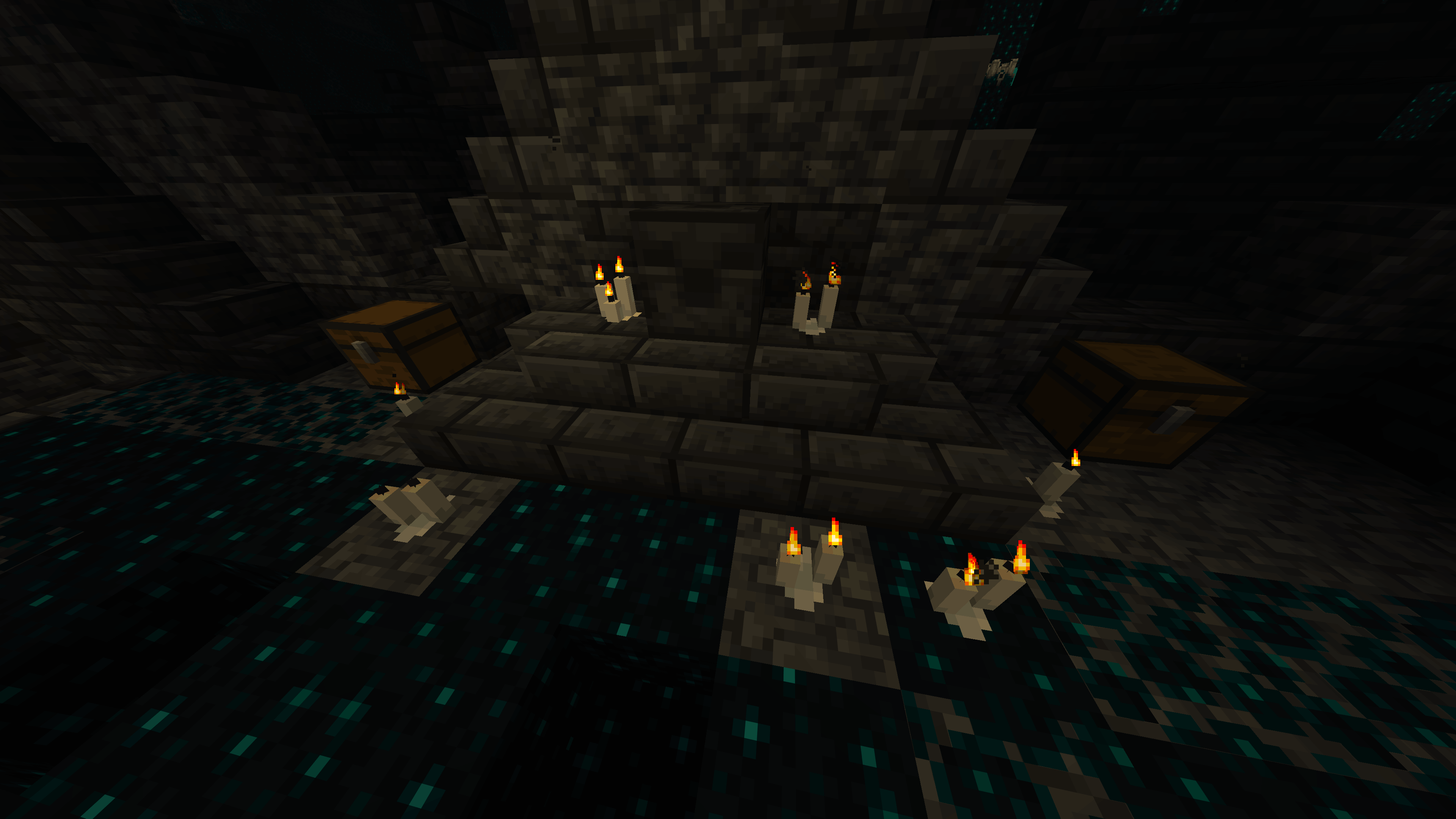
Better Candles improves all vanilla candles by adding a small puddle of molten wax around their base.

Each puddle matches the color of its respective candle, adding a little more detail and character while staying close to Minecraft's original visual style.

The change is intentionally subtle: candles still look unmistakably vanilla, but now feel as though they have actually been burning and melting over time.

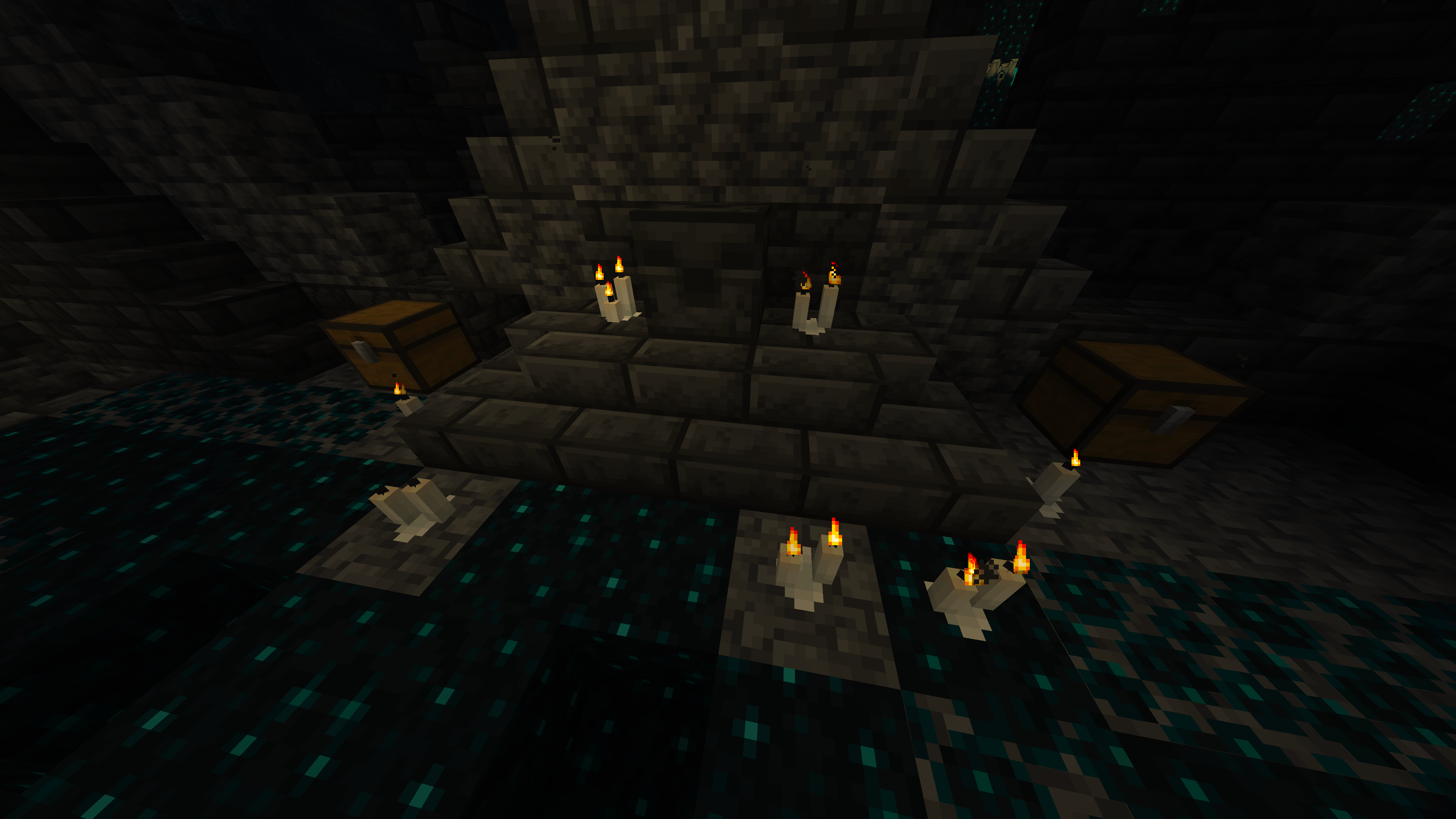
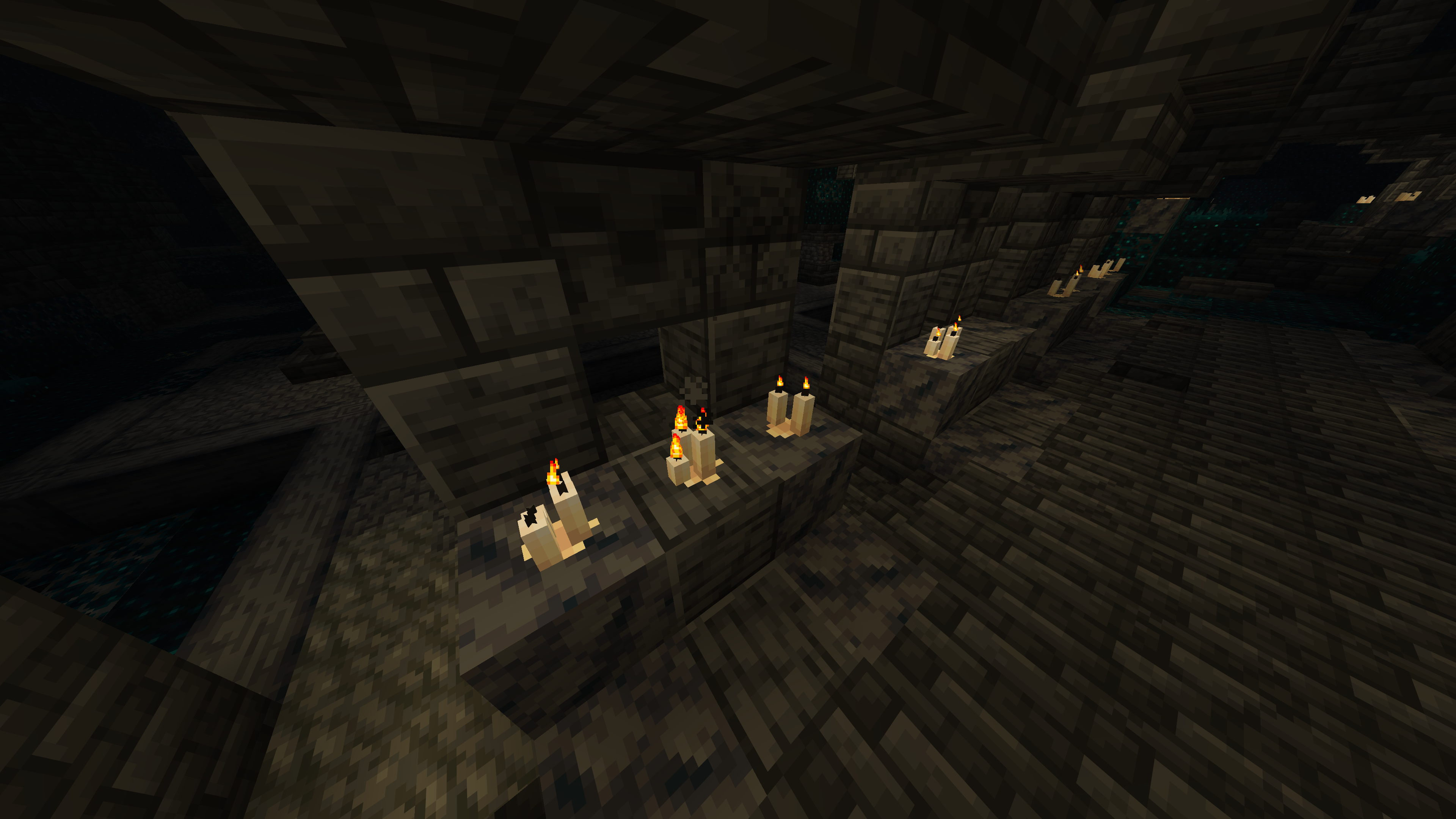
Gallery


Click an image to view it in full size.


Features

🕯️ All Vanilla CandlesEvery vanilla candle color is supported.
🎨 Color-Matched WaxEvery wax puddle matches the candle placed above it.
✨ Subtle DetailAdds extra detail without dramatically changing the original candle design.
🌿 Vanilla-FriendlyDesigned to blend naturally with Minecraft's existing art style.
📦 LightweightA focused resource pack that changes only what it needs to.


🧩 Compatibility


Dye Depot is fully supported.

Better Candles includes matching melted wax textures for all 16 additional candle colors added by Dye Depot.

The extra candles receive the same treatment as the vanilla variants, keeping their wax colors consistent with the candles themselves.


📥 Installation


Recommended — CurseForge

The easiest way to install Better Candles is directly through CurseForge.

If you use the CurseForge App, simply add Better Candles to your Minecraft profile and CurseForge will handle the installation for you.

When browsing on the CurseForge website, use the available install option to open the project directly in the CurseForge App.

This is the recommended installation method, as it makes selecting and managing the correct resource pack version much easier.


Manual Installation

1. Download the appropriate Better Candles version.
2. Place the downloaded .zip file inside your Minecraft resourcepacks folder.
3. Open Options → Resource Packs in Minecraft.
4. Move Better Candles to the active resource packs.
5. Enjoy!



Community

Have feedback, found a problem, or want to follow future projects?

Join the Intelligence Modding community for project updates, previews, support, and general Minecraft modding discussion.


Discord YouTube

GitHub Modrinth


Better Candles is created by DoomedArtemis as part of Intelligence Modding.

better_candles-1.1.0-mc1.17
MC 1.17
Release 2026-10-13 Get
better_candles-1.1.0-mc1.17.1
MC 1.17.1
Release 2026-10-13 Get
better_candles-1.1.0-mc1.18
MC 1.18
Release 2026-10-13 Get
better_candles-1.1.0-mc1.18.1
MC 1.18.1
Release 2026-10-13 Get
better_candles-1.1.0-mc1.18.2
MC 1.18.2
Release 2026-10-13 Get
better_candles-1.1.0-mc1.19
MC 1.19
Release 2026-10-13 Get
better_candles-1.1.0-mc1.19.1
MC 1.19.1
Release 2026-10-13 Get
better_candles-1.1.0-mc1.19.2
MC 1.19.2
Release 2026-10-13 Get
better_candles-1.1.0-mc1.19.3
MC 1.19.3
Release 2026-10-13 Get
better_candles-1.1.0-mc1.19.4
MC 1.19.4
Release 2026-10-13 Get
better_candles-1.1.0-mc1.20
MC 1.20
Release 2026-10-13 Get
better_candles-1.1.0-mc1.20.1
MC 1.20.1
Release 2026-10-13 Get
better_candles-1.1.0-mc1.20.2
MC 1.20.2
Release 2026-10-13 Get
better_candles-1.1.0-mc1.20.3
MC 1.20.3
Release 2026-10-13 Get
better_candles-1.1.0-mc1.20.4
MC 1.20.4
Release 2026-10-13 Get
better_candles-1.1.0-mc1.20.5
MC 1.20.5
Release 2026-10-13 Get
better_candles-1.1.0-mc1.20.6
MC 1.20.6
Release 2026-10-13 Get
better_candles-1.1.0-mc1.21
MC 1.21
Release 2026-10-13 Get
better_candles-1.1.0-mc1.21.1
MC 1.21.1
Release 2026-10-13 Get
better_candles-1.1.0-mc1.21.2
MC 1.21.2
Release 2026-10-13 Get
better_candles-1.1.0-mc1.21.3
MC 1.21.3
Release 2026-10-13 Get
better_candles-1.1.0-mc1.21.4
MC 1.21.4
Release 2026-10-13 Get
better_candles-1.1.0-mc1.21.5
MC 1.21.5
Release 2026-10-13 Get
better_candles-1.1.0-mc1.21.6
MC 1.21.6
Release 2026-10-13 Get
better_candles-1.1.0-mc1.21.7
MC 1.21.7
Release 2026-10-13 Get
better_candles-1.1.0-mc1.21.8
MC 1.21.8
Release 2026-10-13 Get
better_candles-1.1.0-mc1.21.9
MC 1.21.9
Release 2026-10-13 Get
better_candles-1.1.0-mc1.21.10
MC 1.21.10
Release 2026-10-13 Get
better_candles-1.1.0-mc1.21.11
MC 1.21.11
Release 2026-10-13 Get
better_candles-1.1.0-mc26.1
MC 26.1
Release 2026-10-13 Get
better_candles-1.1.0-mc26.1.1
MC 26.1.1
Release 2026-10-13 Get
better_candles-1.1.0-mc26.1.2
MC 26.1.2
Release 2026-10-13 Get
better_candles-1.1.0-mc26.2
MC 26.2
Release 2026-10-13 Get
better_candles-1.1.0-mc26.3
MC 26.3
Release 2026-10-13 Get
better_candles-1.0.0-mc1.17
MC 1.17
Release 2026-10-07 Get
better_candles-1.0.0-mc1.17.1
MC 1.17.1
Release 2026-10-07 Get
better_candles-1.0.0-mc1.18.1
MC 1.18.1
Release 2026-10-07 Get
better_candles-1.0.0-mc1.18.2
MC 1.18.2
Release 2026-10-07 Get
better_candles-1.0.0-mc1.19
MC 1.19
Release 2026-10-07 Get
better_candles-1.0.0-mc1.19.1
MC 1.19.1
Release 2026-10-07 Get
better_candles-1.0.0-mc1.19.2
MC 1.19.2
Release 2026-10-07 Get
better_candles-1.0.0-mc1.19.3
MC 1.19.3
Release 2026-10-07 Get
better_candles-1.0.0-mc1.19.4
MC 1.19.4
Release 2026-10-07 Get
better_candles-1.0.0-mc1.20
MC 1.20
Release 2026-10-07 Get
better_candles-1.0.0-mc1.20.1
MC 1.20.1
Release 2026-10-07 Get
better_candles-1.0.0-mc1.20.2
MC 1.20.2
Release 2026-10-07 Get
better_candles-1.0.0-mc1.20.3
MC 1.20.3
Release 2026-10-07 Get
better_candles-1.0.0-mc1.20.4
MC 1.20.4
Release 2026-10-07 Get
better_candles-1.0.0-mc1.20.5
MC 1.20.5
Release 2026-10-07 Get
better_candles-1.0.0-mc1.20.6
MC 1.20.6
Release 2026-10-07 Get

Requirements & install

How to use this resource pack in Minecraft
Resolution
16x
Minecraft
1.21.9 – 26.3
Install folder
.minecraft/resourcepacks

How to install resource packs

  1. Download the resource pack .zip file (do not extract it).
  2. In Minecraft open Options → Resource Packs → Open Pack Folder.
  3. Drop the .zip into the resourcepacks folder (.minecraft/resourcepacks).
  4. Move the pack to the Selected column and click Done.
Browse more: 16x resource packs 32x resource packs 64x resource packs 128x resource packs 256x resource packs 512x+ resource packs Resource Packs for 26.3 All resource packs

More from Doomed_Artemis

Advertisement Remove ads with Premium →

You Might Also Like