Mineuniverse
Resource Packs
Beeyond - 3D Ores

Beeyond - 3D Ores

RESOURCE PACK
Makes some ores more ... 3D ! Designed for the "Beeyond - Cobblemon Neo" pack
by Epoxidd
Download Claim this project
4,783 downloads
0 likes
0 followers
Updated Oct 14, 2026
0 hypes
Follow0
16x Mod Support
Advertisement Remove ads with Premium →

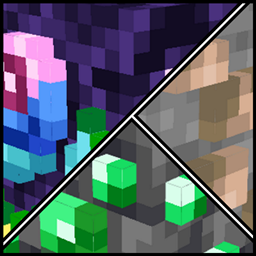
Beeyond – 3D Ores is a lightweight resource pack designed to enhance your mining experience by adding custom 3D models to ore blocks across both vanilla and modded content.

This pack was created for use in a 1.21.1 modpack, and brings added depth and visibility to ores from a variety of sources.

✨ Features:

  • Fully custom 3D models for all vanilla ores
  • Extended support for ores from the following mods:
    • Create
    • Cobblemon
    • CobblemonParts
    • ExpandedDelight
    • Cobblemon MegaShowdown
  • Built with compatibility in mind:
    This pack reuses default Minecraft textures, which means it can be used alongside other resource packs.
    👉 Just place Beeyond – 3D Ores above your other packs in the resource pack list.
  • Designed to stay visually consistent with the default Minecraft aesthetic
  • Shader-friendly — emissive textures supported (where applicable)

🔧 Compatibility:

  • Minecraft 1.21.1
  • Works with Sodium + Iris shaders
  • No OptiFine required
  • Ideal for use with modpacks — especially ones focused on exploration or automation

📸 Screenshots:

Minecraft - Vanilla Ores

Cobblemon - Evolution Stones Ores

Cobblemon MegaShodown - Evolutions Stones + Mega Ores


📥 Installation:

  1. Download the .zip file (do not unzip)

  2. Move it to your Minecraft resourcepacks folder

  3. Enable it in-game via the Resource Pack menu

 

Beeyond - 3D Ores
MC 1.21.1
Release 2025-04-17 Get

Requirements & install

How to use this resource pack in Minecraft
Resolution
16x
Minecraft
1.21.1
Install folder
.minecraft/resourcepacks

How to install resource packs

  1. Download the resource pack .zip file (do not extract it).
  2. In Minecraft open Options → Resource Packs → Open Pack Folder.
  3. Drop the .zip into the resourcepacks folder (.minecraft/resourcepacks).
  4. Move the pack to the Selected column and click Done.
Browse more: 16x resource packs 32x resource packs 64x resource packs 128x resource packs 256x resource packs 512x+ resource packs Resource Packs for 1.21.1 All resource packs

More from Epoxidd

Advertisement Remove ads with Premium →

You Might Also Like