Mineuniverse
Resource Packs
Bedwars Rotating Items

Bedwars Rotating Items

RESOURCE PACK
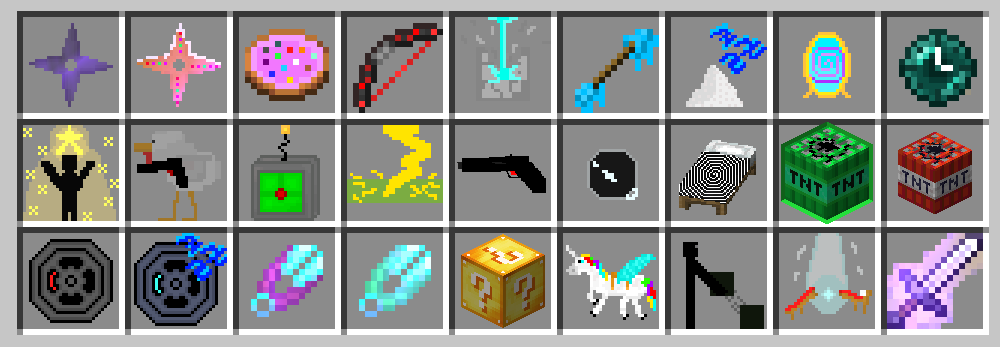
Custom item textures for all bedwars rotating items
by GLIFL
Download Claim this project
Add a badge to your pageLink to Bedwars Rotating Items from a README, website or forum post.
Preview: Badge

Badges update automatically and link to the resource pack page on MineUniverse.

253 downloads
0 likes
0 followers
Updated Oct 14, 2026
0 hypes
Follow0
32x Miscellaneous
Advertisement Remove ads with Premium →

This resource pack adds custom item textures to some bedwars rotating items which would make more sense as a separate texture. I might update the textures of the items of the week if they are bad. 

This resource pack requires optifine!

Changes the texture of:

-Shuriken AND Sugarken

-Sugar Cookie

-Chicken Turret

-Miracle of The Stars

-Time Warp Pearl (also changes the skywars one)

-Unstable Teleportation Device

-Bridge Zapper

-Sharpness II (all swords affected)

-Upgradable Shears

-Devastator Bow

-Block Zapper

-Machine Gun Bow

-Mystic Mirror

-Frostbite Arrow

-Sleeping Dust

-Black Hole

-Illusion Trap

-Throwable TNT

-Mega TNT

-Proximity Mine

-Sleeping Mine

-Lucky Chest

-Block Shuffler

-Charlie The Unicorn

-Final Revive Beacon

The ones I dont think have to be changed:

-Portable Enderchest

-Portable Shopkeeper

-Packed Ice

-Hay Bale

-Cobweb

-Snowman

-Wall of Steel (ew)


Thanks to the BedWars+ resource pack I figured out how to make custom blocks. It also looks nicer than this pack but does not retexture most of the rotating items

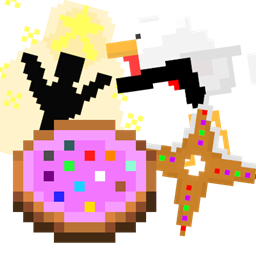
 

Bedwars Rotating Items (better icon)
MC 1.8.9
Release 2025-01-20 Get
Bedwars Rotating Items (beacon)
MC 1.8.9
Release 2025-01-17 Get
Bedwars Rotating items (4 more items)
MC 1.8.9
Release 2025-01-15 Get
Bedwars Rotating Items (utd texture)
MC 1.8.9
Release 2025-01-14 Get
Bedwars Rotation Items
MC 1.8.9
Release 2025-01-12 Get

Requirements & install

How to use this resource pack in Minecraft
Resolution
32x
Minecraft
1.8.9
Install folder
.minecraft/resourcepacks

How to install resource packs

  1. Download the resource pack .zip file (do not extract it).
  2. In Minecraft open Options → Resource Packs → Open Pack Folder.
  3. Drop the .zip into the resourcepacks folder (.minecraft/resourcepacks).
  4. Move the pack to the Selected column and click Done.
Browse more: 16x resource packs 32x resource packs 64x resource packs 128x resource packs 256x resource packs 512x+ resource packs Resource Packs for 1.8.9 All resource packs

More from GLIFL

Advertisement Remove ads with Premium →

You Might Also Like