Mineuniverse
Resource Packs
Bed Plus

Bed Plus

RESOURCE PACK
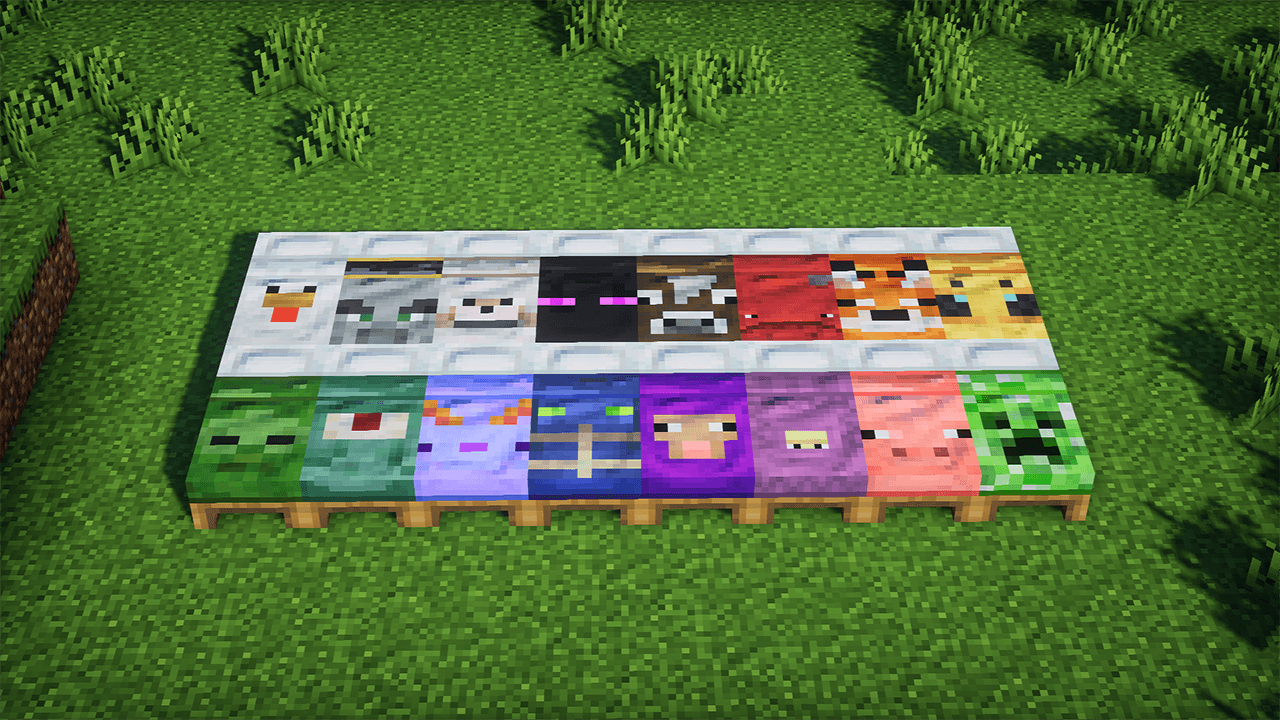
This texture pack transforms all Minecraft beds into fun, mob-themed versions inspired by creatures like creepers, zombies, and skeletons. Each bed color features a unique mob design.
by KalanCraft
Download Claim this project
735 downloads
0 likes
Updated Oct 14, 2026
0 hypes
16x Miscellaneous Traditional
Advertisement Remove ads with Premium →

Bring your Minecraft world to life with this unique texture pack! All beds in the game are reimagined with designs inspired by iconic mobs. Each bed color now features a custom look based on classic creatures like zombies, creepers, skeletons, animals, and many more.

It’s perfect for players who want to add personality, humor, or a thematic touch to their base. Despite the new appearance, all beds still function normally — they just look a lot more alive!

Great for survival worlds, themed maps, and creative servers.
Give your game a fresh twist with these mob-themed beds!

bedsplus-1.0.0-resourcepack-1.21.8.zip
MC 1.16.3, 1.13.1, 1.9.3, 1.16-Snapshot, 1.17.1, 1.9.1, 1.21.2-Snapshot, 1.21, 1.21.6-snapshot, 1.15-Snapshot, 1.16.1, 1.18.1, 1.20.2-Snapshot, 1.20.5-Snapshot, 1.14.3, 1.15, 1.16
Release 2025-12-09 Get

Requirements & install

How to use this resource pack in Minecraft
Resolution
16x
Minecraft
1.16.3 – 1.21.6-snapshot
Install folder
.minecraft/resourcepacks

How to install resource packs

  1. Download the resource pack .zip file (do not extract it).
  2. In Minecraft open Options → Resource Packs → Open Pack Folder.
  3. Drop the .zip into the resourcepacks folder (.minecraft/resourcepacks).
  4. Move the pack to the Selected column and click Done.
Browse more: 16x resource packs 32x resource packs 64x resource packs 128x resource packs 256x resource packs 512x+ resource packs Resource Packs for 1.21.6-snapshot All resource packs

More from KalanCraft

Advertisement Remove ads with Premium →

You Might Also Like