Mineuniverse
Resource Packs
Annoying Villagers Custom Textures and Sounds

Annoying Villagers Custom Textures and Sounds

RESOURCE PACK
Custom textures and sounds inspired in the Annoying Villagers Series by MrFudgeMonkeyz.
by DanielhackerXD
Download Claim this project
Add a badge to your pageLink to Annoying Villagers Custom Textures and Sounds from a README, website or forum post.
Preview: Badge

Badges update automatically and link to the resource pack page on MineUniverse.

8,053 downloads
0 likes
0 followers
Updated Oct 14, 2026
0 hypes
Follow0
16x Miscellaneous Mod Support
Advertisement Remove ads with Premium →

Annoying Villagers Custom Textures and Sounds ResourcePack


This resourcepack split from the Annoying Villagers: Herobrine Invasion Mod adds different sounds, models and textures inspired by Annoying Villagers Series. This resourcepack is highly recommended to be used with Annoying Villagers: Herobrine Invasion Mod.

It is mandatory to install this mod to make the resourcepack work properly Sprite Arrows

Features without addons (only normal minecraft):

-3D arrows model

-Vanilla 3D weapons and 3D tools

-3D fishing rod

-Custom variey of sounds

-Bigger blocks model

-And much more!


Compatibility:

-Epic Fight (custom sounds and textures)

-IronBows (Custom item models)

-Dynamic Surroundings (Custom sounds)

-Grappling Hook Reforged (Custom models and textures)

-Archers Paradox (Custom models and textures)

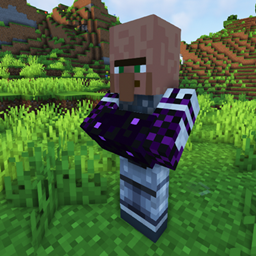
To check how does some of the textures look like check the images section!


Credits:

MrFudgeMonkeyz for creating the Annoying Villagers Series

The Annoying Villagers Server Pack for some models and textures

Pugilist Steve for some sounds, models and textures

Zhing Za for 3d cactus model


AnnoyingVillagers Textures and Sounds.zip
MC 1.20.1
Release 2026-07-07 Get
AnnoyingVillagers Textures and Sounds.zip
MC 1.20.1
Release 2026-06-13 Get
AnnoyingVillagers Textures and Sounds.zip
MC 1.20.1
Release 2026-06-01 Get

Requirements & install

How to use this resource pack in Minecraft
Resolution
16x
Minecraft
1.20.1
Install folder
.minecraft/resourcepacks

How to install resource packs

  1. Download the resource pack .zip file (do not extract it).
  2. In Minecraft open Options → Resource Packs → Open Pack Folder.
  3. Drop the .zip into the resourcepacks folder (.minecraft/resourcepacks).
  4. Move the pack to the Selected column and click Done.
Browse more: 16x resource packs 32x resource packs 64x resource packs 128x resource packs 256x resource packs 512x+ resource packs Resource Packs for 1.20.1 All resource packs

More from DanielhackerXD

Advertisement Remove ads with Premium →

You Might Also Like