Mineuniverse
Resource Packs
AllTheMasks - By StefanJ2

AllTheMasks - By StefanJ2

RESOURCE PACK
AllTheMasks adds a huge collection of wearable masks, without any required mods. Perfect for roleplay on servers.
by stefanj2_
Download Claim this project
Add a badge to your pageLink to AllTheMasks - By StefanJ2 from a README, website or forum post.
Preview: Badge

Badges update automatically and link to the resource pack page on MineUniverse.

592 downloads
0 likes
0 followers
Updated Oct 14, 2026
0 hypes
Follow0
16x
Advertisement Remove ads with Premium →

AllTheMasks is more fun with friends.

Get your own server with the discount code below. Shockbyte

AllTheMasks

AllTheMasks is a Resource Pack + Datapack that adds a huge collection of wearable masks, without any required mods.

  • A complete list of all available masks can be found on the website.
  • The datapack can be downloaded here.
  • Can be used with Optifine/Cit mods instead of datapack.

Features

  • 🎭 Over 100 unique masks
  • 🌍 Fully vanilla
  • 👥 Multiplayer compatible
  • 🔄 Switch each mask between two wearable positions (Datapack exclusive)

Getting Masks

Masks are obtained by renaming any helmet in an anvil. Rename it to the name of any supported mask. A complete list of all available masks can be found on the website.
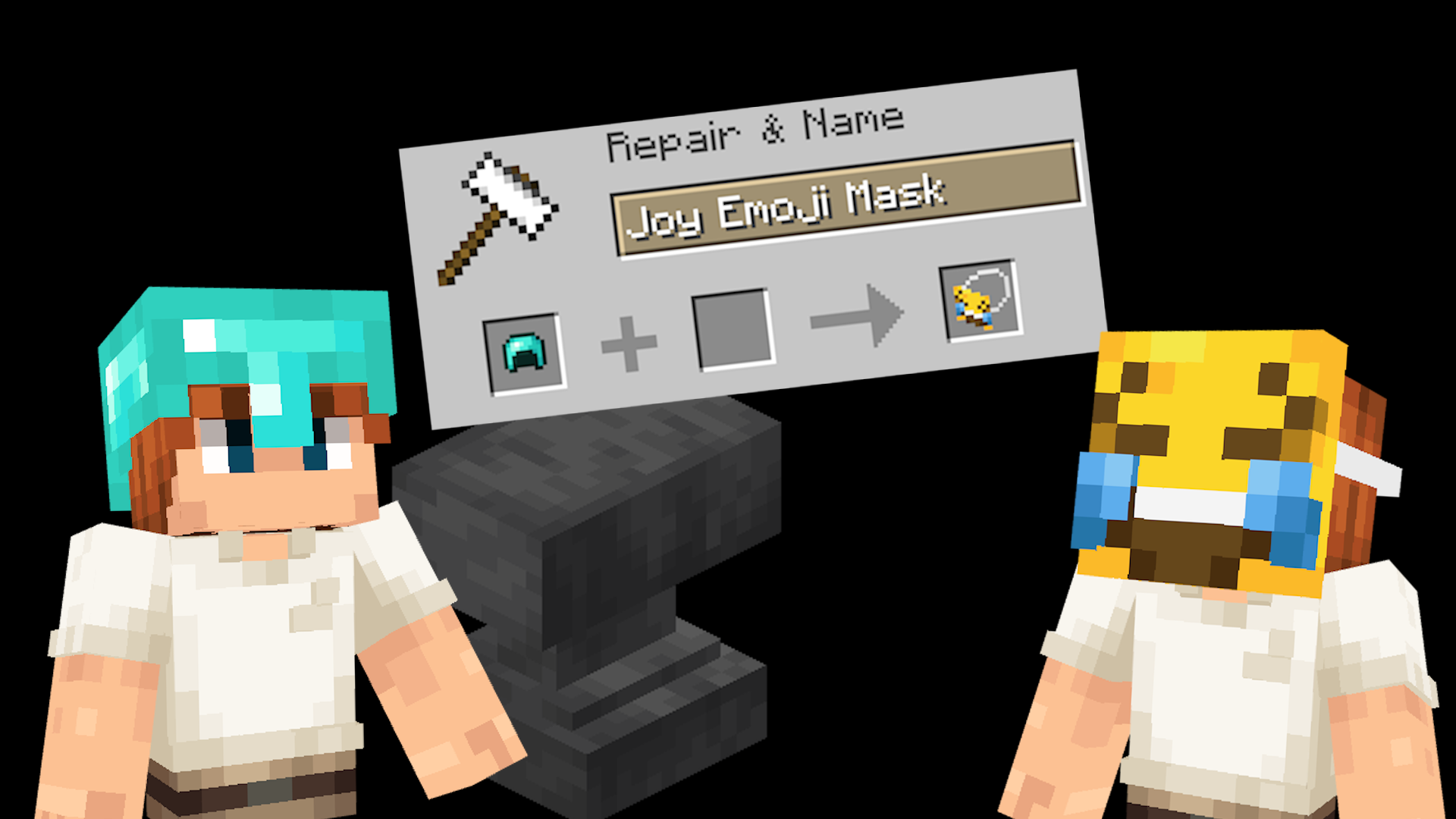
Example mask making

Switching mask position

Every mask can be worn in two different ways:

  • In front of your face, like actually wearing it.
  • On top of your head, like holding the mask up.

Simply press your Sneak + Sprint keys (Shift + Control by default) to switch between these two positions.

Installation

Both the Resource Pack and Datapack are required.

  1. Place the Resource Pack in your resourcepacks folder.
  2. Place the Datapack in your world's datapacks folder.
  3. Load the world and run /reload if necessary.

Multiplayer

For multiplayer, only the server needs the datapack installed, while every player must use the matching resource pack.

All Masks

A complete list of all available masks can be found on the website.

Website

Non-vanilla

The resource pack also works without the datapack when using CIT mods such as OptiFine. However, the Sneak + Sprint switching feature is only available when using the datapack.

Help

Need help? Join the Discord server.

AllTheMasks v2.2 - Resource Pack.zip
MC 1.21, 1.18.1, 1.19.3, 1.20.2, 1.19.4, 1.21.8, 1.20.5, 1.21.5, 1.18, 1.21.4, 1.20.1, 1.20, 1.20.6, 1.21.1, 1.21.6, 1.21.3, 1.21.7, 1.19.1, 1.20.4, 1.18.2, 1.19.2, 1.20.3, 1.19
Release 2026-07-27 Get
AllTheMasks v2.3 - Resource Pack.zip
MC 1.21, 1.18.1, 1.19.3, 1.20.2, 1.19.4, 1.21.8, 1.20.5, 1.21.5, 1.18, 1.21.4, 1.20.1, 1.20, 1.20.6, 1.21.1, 1.21.6, 1.21.3, 1.21.7, 1.19.1, 1.20.4, 1.18.2, 1.19.2, 1.20.3, 1.19
Release 2026-07-27 Get
AllTheMasks v2.1 - Resource Pack.zip
MC 1.21, 1.18.1, 1.19.3, 1.20.2, 1.19.4, 1.21.8, 1.20.5, 1.21.5, 1.18, 1.21.4, 1.20.1, 1.20, 1.20.6, 1.21.1, 1.21.6, 1.21.3, 1.21.7, 1.19.1, 1.20.4, 1.18.2, 1.19.2, 1.20.3, 1.19
Release 2026-07-26 Get
AllTheMasks v2.0 - Resource Pack.zip
MC 1.21.8, 1.21.6, 1.21.7, 1.21.9, 1.21.10, 1.21.11, 26.1, 26.1.1, 26.1.2, 26.2
Release 2026-07-19 Get
AllTheMasks v1.0 - Resource Pack.zip
MC 1.21.8, 1.21.6, 1.21.7, 1.21.9, 1.21.10, 1.21.11, 26.1, 26.1.1, 26.1.2, 26.2
Release 2026-07-06 Get

Requirements & install

How to use this resource pack in Minecraft
Resolution
16x
Minecraft
1.21.8 – 26.2
Install folder
.minecraft/resourcepacks

How to install resource packs

  1. Download the resource pack .zip file (do not extract it).
  2. In Minecraft open Options → Resource Packs → Open Pack Folder.
  3. Drop the .zip into the resourcepacks folder (.minecraft/resourcepacks).
  4. Move the pack to the Selected column and click Done.
Browse more: 16x resource packs 32x resource packs 64x resource packs 128x resource packs 256x resource packs 512x+ resource packs Resource Packs for 26.2 All resource packs

More from stefanj2_

Advertisement Remove ads with Premium →

You Might Also Like