Mineuniverse
Resource Packs
Alex's Mobs - Ben's Sharks Consistency (Discontinued)

Alex's Mobs - Ben's Sharks Consistency (Discontinued)

RESOURCE PACK
Consistency in some items between Alex's Mobs and Ben's Sharks
by Vinzound
Download Claim this project
Add a badge to your pageLink to Alex's Mobs - Ben's Sharks Consistency (Discontinued) from a README, website or forum post.
Preview: Badge

Badges update automatically and link to the resource pack page on MineUniverse.

1,975 downloads
0 likes
0 followers
Updated Oct 14, 2026
0 hypes
Follow0
16x Font Packs Mod Support Traditional
Advertisement Remove ads with Premium →

This resource pack has been discontinued, so it may become unstable at any time depending on updates to any of the mods. I suggest you download The Rename Compat Project instead.

About

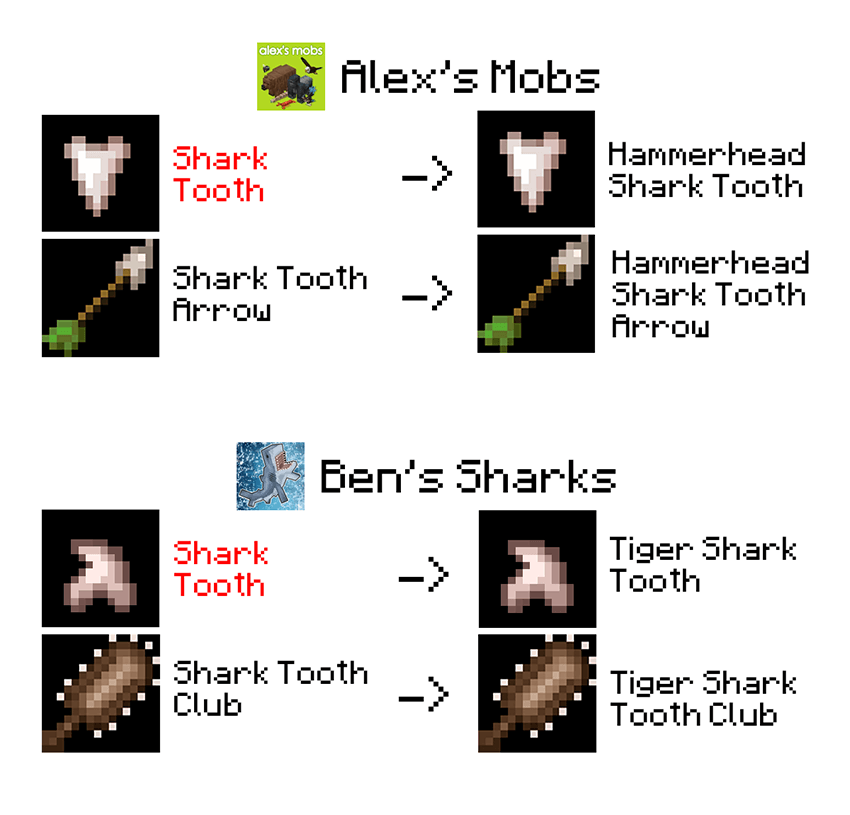
This is a simple resource pack that eliminates the inconsistency in duplicated names in some items between Alex's Mobs and Ben's Sharks.


Below, I show you the changes made.


  • You can use this resource pack to accompany your Modpack that has Alex's Mobs and/or Ben's Sharks installed.

  • This resource pack only modifies the en_us files and there are no plans to include other languages.

  • I am not affiliated with the creators or team behind the original mods.

  • Suggestions, observations, and advice are welcome, as long as they are respectful.
 

Credits

benndevs - Creator of Ben's Sharks

sbom_xela and his team - Creators of Alex's Mobs


Special thanks to SlayDigger and their resource pack Alex's Naturals for serving as my inspiration.

Alexsmobs - Bensshark Consistency 1.2.zip
MC 1.20.1
Release 2025-12-03 Get
Alexsmobs - Bensshark Consistency 1.1.zip
MC 1.20.1
Release 2025-12-02 Get
Alexsmobs - Bensshark Consistency.zip
MC 1.20.1
Release 2025-12-01 Get

Requirements & install

How to use this resource pack in Minecraft
Resolution
16x
Minecraft
1.20.1
Install folder
.minecraft/resourcepacks

How to install resource packs

  1. Download the resource pack .zip file (do not extract it).
  2. In Minecraft open Options → Resource Packs → Open Pack Folder.
  3. Drop the .zip into the resourcepacks folder (.minecraft/resourcepacks).
  4. Move the pack to the Selected column and click Done.
Browse more: 16x resource packs 32x resource packs 64x resource packs 128x resource packs 256x resource packs 512x+ resource packs Resource Packs for 1.20.1 All resource packs

More from Vinzound

Advertisement Remove ads with Premium →

You Might Also Like