Mineuniverse
Resource Packs
Advanced Redstone Blocks

Advanced Redstone Blocks

RESOURCE PACK
Unobtrusive QoL redstone texture tweaks
by D1mndnThR0ugh
Download Claim this project
514 downloads
0 likes
Updated Oct 14, 2026
0 hypes
16x Miscellaneous
Advertisement Remove ads with Premium →

This pack makes various changes to redstone blocks to make them easier to distinguish from each other


Features:

 - Pistons

  > Back shows extended state

  > Sticky on all faces (including back)

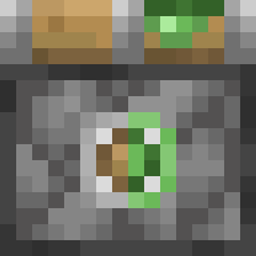
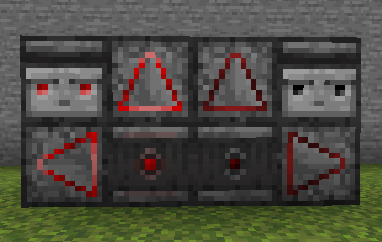
 - Observers

  > Shows direction and powered state on all faces

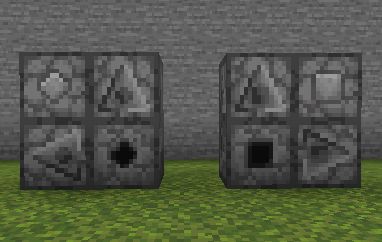
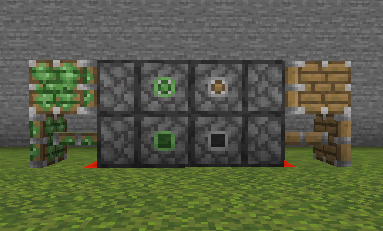
 - Droppers + Dispensers

  > Shows type and direction on all faces 

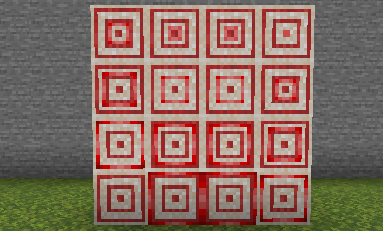
 - Targets

  > Rings light up when hit

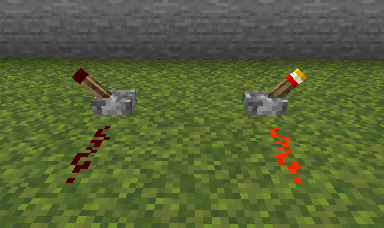
  - Levers

  > Shows powered state on stick

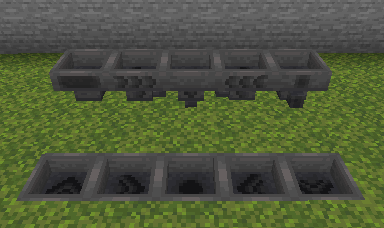
 - Hoppers

  > Shows direction on all sides


Planned:

 - Nothing, it's done for now (: 


Possibilities:

 - Buttons + Pressure Plates

 - Comparator + Repeater

 - Composter, Cauldron, Beehive/nest etc

AdvancedRedstoneBlocks[1.14+]_1.1
MC 1.17, 1.15, 1.16, 1.14, 1.18, 1.19
Release 2023-03-07 Get
AdvancedRedstoneBlocks[1.14+]_1.0
MC 1.17, 1.15, 1.16, 1.14, 1.18, 1.19
Release 2023-01-30 Get
AdvancedRedstoneBlocks[1.14+]_0.2
MC 1.17, 1.15, 1.16, 1.14, 1.18, 1.19
Release 2023-01-24 Get
AdvancedRedstoneBlocks[1.14+]_0.1
MC 1.17, 1.15, 1.16, 1.14, 1.18, 1.19
Release 2023-01-23 Get

Requirements & install

How to use this resource pack in Minecraft
Resolution
16x
Minecraft
1.14 – 1.19
Install folder
.minecraft/resourcepacks

How to install resource packs

  1. Download the resource pack .zip file (do not extract it).
  2. In Minecraft open Options → Resource Packs → Open Pack Folder.
  3. Drop the .zip into the resourcepacks folder (.minecraft/resourcepacks).
  4. Move the pack to the Selected column and click Done.
Browse more: 16x resource packs 32x resource packs 64x resource packs 128x resource packs 256x resource packs 512x+ resource packs Resource Packs for 1.19 All resource packs

More from D1mndnThR0ugh

Advertisement Remove ads with Premium →

You Might Also Like