Mineuniverse
Resource Packs
[16x] Packed Up (Backpacks)

[16x] Packed Up (Backpacks)

RESOURCE PACK
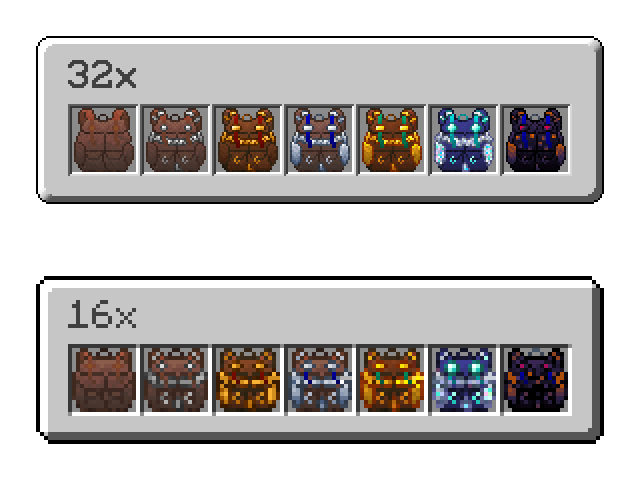
This pack changes the textures for SuperMartijn642's Packed Up mod to be 16x instead of 32x.
by SamTheGoldenFox
Download Claim this project
1,145 downloads
0 likes
0 followers
Updated Oct 14, 2026
0 hypes
Follow0
16x Miscellaneous Mod Support
Advertisement Remove ads with Premium →

This project contains 16x versions of the textures from SuperMartijn642's "Packed Up (Backpacks)" mod.

I made this almost purely out of aesthetic desire. I don't play modded with resource packs very frequently since typically any mods I'd encounter are already in the vanilla style. This wasn't, and I wanted to fix that.

It felt a little jarring to me, frankly, but I also highly respect the dude for keeping such an old mod maintained to this day. Thanks for the backpacks, man.


[16x] Packed Up (Backpacks) v1.0.0
MC 1.16.3, 1.17.1, 1.21, 1.16.1, 1.18.1, 1.14.3, 1.15, 1.16, 1.16.5, 1.19.3, 1.20.2, 1.19.4, 1.21.8, 1.14.4, 1.14.1, 1.12.1, 1.17, 1.12, 1.20.5, 1.21.5, 1.18, 1.21.4, 1.20.1
Release 2026-06-24 Get

Requirements & install

How to use this resource pack in Minecraft
Resolution
16x
Minecraft
1.19.4 – 1.21.8
Install folder
.minecraft/resourcepacks

How to install resource packs

  1. Download the resource pack .zip file (do not extract it).
  2. In Minecraft open Options → Resource Packs → Open Pack Folder.
  3. Drop the .zip into the resourcepacks folder (.minecraft/resourcepacks).
  4. Move the pack to the Selected column and click Done.
Browse more: 16x resource packs 32x resource packs 64x resource packs 128x resource packs 256x resource packs 512x+ resource packs Resource Packs for 1.21.8 All resource packs

More from SamTheGoldenFox

Advertisement Remove ads with Premium →

You Might Also Like