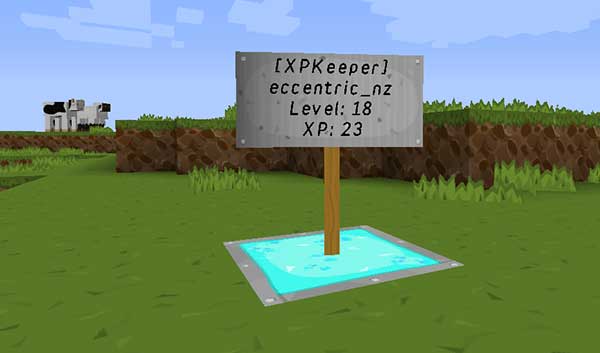
XPKeeper lets you save and retrieve your current XP level by clicking on a sign.
Yes, I know there are quite a few XP bank type plugins out there, but I wanted one without any other plugin dependencies, and one that was simple to use without any economy features - I just want to save my XP, so I don't lose it - no need for anything else.
Quote from eccentric_nz:Still alive! Get builds here: http://tardisjenkins.duckdns.org:8080/job/XPKeeper/
XPKeeper is sign based, you place a sign post or wall sign and put [XPKeeper] on the first line. The text between the square brackets can be changed by editing the config file and is case-insensitive.
NOTE You can configure the plugin so that you don't have to click with your fist, but it saves mistakenly placing a block :)
XPKeeper signs cannot be removed by breaking them. You must use a command instead. Type:
/xpkremove
And then click on the sign you want to remove. You must have nothing (AIR) in your hand.
You can only remove your own signs.
There are some configuration options:
firstline: XPKeeper
This determines what must be inside the square brackets on the first line of the sign, you could change this to 'Bank' for instance.
must_use_fist: [true|false]
This determines whether you must use your fist to click the sign.
set_limits: [true|false]
This determines whether the deposit limit feature is enabled.
limits:
  - 30
  - 50
  - 100
If set_limits is true, set the limits used by the xpkeeper.limit.[amount] permission nodes here.
withdraw: [amount]
Set the amount of XP levels you will withdraw when you right-click the sign. Set to 0 to use the old behaviour of withdrawing all your XP.
messages:
    deposit: You deposited %d XP and have reached level %d :)
    withdraw_all: You withdrew all your XP!
    withdraw_some: You withdrew %d XP Levels!
    [...]
Use this to localise the player messages in game. Some message strings contain the symbols %s and %d these must not be removed as they are replaced in game with values calculated in real time. You can move them to any position that makes sense with the message.
A French translation courtesy of DragonSlayer875 can be found here
There are some:
xpkeeper.use - allow players to make XPKeeper signs, default: TRUE
xpkeeper.fist - allow players to use the /xpkfist command, default: OP
xpkeeper.pay - allow players to use the /xpkpay command, default: OP
xpkeeper.force - allow players to use the /xpkforceremove command, default: OP
xpkeeper.admin - allow players to use the /xpkgive, /xpkset and /xpkwithdraw commands, default: OP
xpkeeper.editsign - allow players to edit signs, default: OP
xpkeeper.limit - allow players to use the /xpklimit command, default: OP
xpkeeper.limit.[amount] - limit the amount of level a player a player can deposit up to, [amount] must match one of the limit options in the config
xpkeeper.limit.bypass - allow players to by pass deposit limits, default: OP
There are seven:
| Command | Description | Alias | Permission |
|---|---|---|---|
/xpkremove |
Use to remove your XPKeeper sign, see Removing an XPKeeper sign above |
/xpkr |
- |
/xpkfist |
Toggle the must_use_fist config optionbetween true and false or vice versa |
/xpkf |
xpkeeper.fist |
/xpklimit |
Toggle the set_limits config optionbetween true and false or vice versa |
/xpkl |
xpkeeper.limit |
/xpkwithdraw [amount] |
Set the withdraw config optionto the amount of levels specified |
/xpkw |
xpkeeper.admin |
/xpkreload |
Reload changes to the config | /xpkrl |
xpkeeper.admin |
/xpkgive [player] [amount] |
Add XP to a player | /xpkg |
xpkeeper.admin |
/xpkset [player] [amount] |
Set a player's total XP amount | /xpks |
xpkeeper.admin |
/xpkpay [player] [amount] |
Pay a player some XP | /xpkp |
xpkeeper.use |
/xpkforceremove [player] |
Use to remove all XPKeeper data for the specified player from the database. When using the command from the console, you must specify a player name, otherwise it runs using the player that types the command. USE WITH CARE! |
/xpkfr |
xpkeeper.force |
Basic statistics are collected by this plugin using MCStats / Plugin Metrics , such as:
You can opt out at any time by setting opt-out: true in plugins/PluginMetrics/config.yml
Get new builds here: http://tardisjenkins.duckdns.org:8080/job/XPKeeper/
v1.4
v1.3.10
v1.3.9
firstline_colour to a colour code (&2, &c etc) in the config, or use the command xpkc [colour code] Note colour will only apply to newly created signs.v1.3.8
v1.3.7
/xpkpay commandv1.3.6
v1.3.5
/xpkreload command to reload changes made to the config filev1.3.4
firstline config option not being set when the plugin is run for the first timeset_limits: true - command is /xpklimit to toggle true|falsexpkeeper.limit.[one of the configured amounts]xpkeeper.limit.bypass (default OP)v1.3.3
v1.3.2
v1.3.1
v1.3
withdraw: [amount]withdraw: 0withdraw amount, right-click the XPKeeper sign while sneaking/xpkwithdraw [amount] to set the withdrawal amount in the config./xpkremove you now get all your XP back and the sign drops naturally.v1.2.3
/xpkpay [player] [amount] to pay a player some XPv1.2.2
/xpkgive [player] [amount] to add XP to a player/xpkset [player] [amount] to set a player's total XP amountv1.2.1
xpkeeper.force for the command /xpkforceremovev1.2
/xpkforceremove to delete all player data from the database USE WITH CARE When using the command from the console, you must specify a player name, otherwise it runs using the player that types the command.v1.0.2
[XpKeEpeR] and [xpkeeper] are now both validmust_use_fist to false to click with anythingxpkeeper.use The default is OP. You must have this permission in order to create an XPKeeper signv1.1
Includes all the v1.0.2 changes as well as:
/xpkfist to toggle the config option must_use_fist true or falsexpkeeper.fist The default is OP. You must have this permission to use the /xpkfist command