With this plugin you can send other players items,texts, and money with a physical mailbox.
Every player has an default mailbox which can be accessed by left clicking a mailbox sign. Also a mailbox can be created from a chest to add additional space in a players inbox.
Items can be sent either through right clicking with an item or by right clicking a mailbox sign.
Texts which are sent through a command get converted to a physical letter and get placed inside the recipients mailbox.
Money may be sent through the ItemMail GUI by right clicking a mailbox or letterpaper. Inside the ItemMail GUI, there is now a gold Bar item that appears if Sending money is enabled in the config. You may left click to increase the amount and right click to decrease the amount. When you are done, click send and your money will be converted into a "Bank Note" item(a piece of paper) and be sent to the recipient! The recipient may then hold this Bank Note in their hand and right click it to deposit the money into their account.
Because pictures say more than 1000 words here some pictures:


Plugin Showcase by bobby1727mc :
Special thanks to ApacheMC and Sparky12387 for making this video!
To get started with the item mailing you need to create a mailbox sign or craft some letterpaper to send a itemletter.
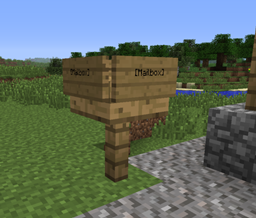
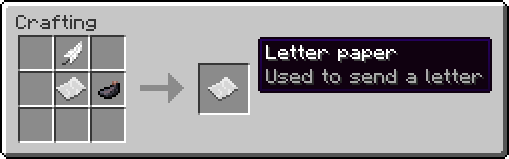
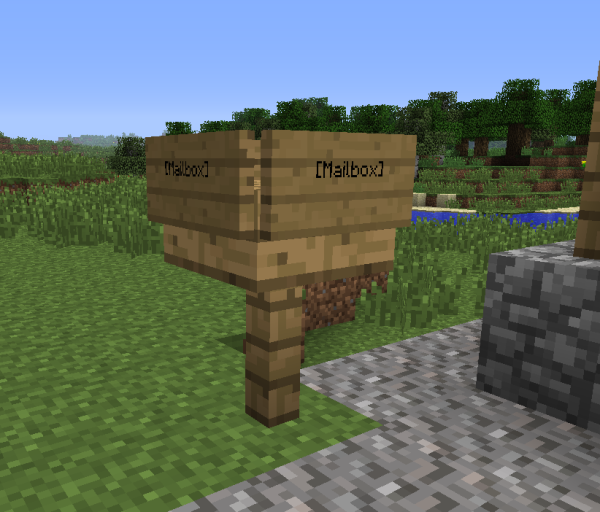
You can create the sign by placing a sign and putting "[Mailbox]" in the second line, letter paper can be created by placing paper, a feather and an ink sac into the crafting grid in any shape.
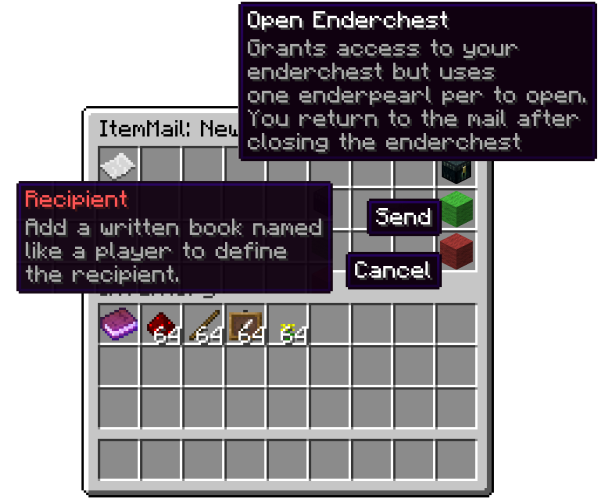
When right-clicking, either the mailbox sign or with the letter paper, the mail window opens.
To define the recipient of the mail add a written book in the top-left slot of the window and add the other items you want to send.
When clicking the send button (the green wool on the right side) your mail will be sent.
To send a text mail simply enter the command
/papermail sendtext
followed by the recipient and your message.
Allows to use the command /papermail sendtext Is set by default
Allows to use mailbox signs or rightclick with letter paper to send items Is set by default
Allows to create inbox chests using /papermail createbox Is set by default
Makes the user exempt from mailing costs. is false by default.
general:
  EnableTextMail: true       //Allow the use of Text mail messages with /papermail sendtext
  EnableItemMail: true      // Allow the use of Item Mailing
  EnableEnderchest: true     // Allow access to Enderchest from ItemMail GUI
  EnableMailCosts: false     // Enable costs to send texts and Item Mails
  EnablePerItemCosts: false     // Enable Costs per item instead of per mail instance
 EnableSendMoney: false    //Enable the Ability to send Money through the PaperMail GUI
  CostToText: 0.0    // Cost to send Text mail messages with /papermail sendtext
  SendItemCost: 0.0   // Cost to send an item(or PerItemCost if PerItemCosts is enabled)
  MailWindowRows: 3   // Size of the mail window
  DefaultBoxRows: 4   // Size of the default inbox which is accessed by left clicking the sign
  EnderChestRequirementID: 368
  EnderChestRequirementDV: 0
  MailItemID: 339   // Item ID of the Item which is used to create item mails
  MailItemDV: 1     // Data value of the Item which is used to create item mails
  MailItemName: Letter paper  // Name of the Item which is used to create item mails
messages:
  inbox-full-send: The mailbox of %recipient% is full, the items have been sent back to you.  // Message displayed when recipients mailbox is full
  ingredient-missing: You are missing %item% to create a new letter.   // Message displayed when missing ingredients to create Letter Paper Item.
1.0.0.7 and above softdepends on vault if you want to use the MailCosts or Send Money options with an economy plugin. If no economy is detected but MailCosts is still on, Papermail will default to a Gold Ingot barter system.
Want to see the source code? Here it is! https://github.com/BukkitCodersUnited/paperMail
I REALLY NEED BUG TESTERS! IF INTERESTED PLEASE PM ME!I I WILL GIVE YOU CREDIT ON THE PLUGIN PAGE AND PLUGIN ITSELF FOR YOUR HELP! (This plugin is provided donation free. It takes a lot of time to code a plugin and testing for all possible scenarios is not easy for me :/ To Eliminate time with releasing stable copies of updated PaperMail versions with new features, bug testing helps alot, plus you/your server will have access to early releases of the plugin before they are hosted on bukkit.)
This plugin was featured on Curse! Check out the Spotlight here : http://www.curse.com/spotlight/bukkit-plugins/minecraft/49271-minecraft-spotlight-papermail
"I use a lot of plugins, but this has got to be the most awesome plugin I have ever used!" -DrkMatr1984