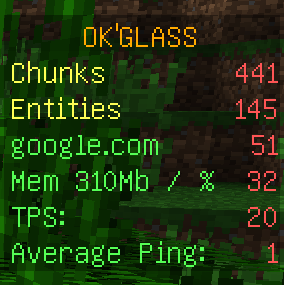
OkGlass is a highly configurable performance monitor that uses a scoreboards to display a system information: memory usage, ticks-per-second (TPS), ping result of pinging a host, etc.

If you need to see a system information without typing additional command you need OkGlass!
You can find more information about OkGlass gadgets here: http://dev.bukkit.org/bukkit-mods/okglass/pages/gadgets/
Warning! One of included gadgets - gadget PlayerPing (GadgetPlayerPing.jar) requires a FakePlayersOnline plugin installed. If FakerPlayersOnline is not installed at your server this gadget will be disabled
To configure plugin, you must edit config.yml and gadgets.yml and type /okg reload command (or restart server).
config.yml:
general:
  check-updates: true # Check plugin updates at dev.bukkit.org
  language: english    # Language, Russian is included.
  language-save: false # Save the translation file
OkGlass:
  display-refresh-delay: 10  # Delay between OkGlass display refreshes.
  title: '&6OK''GLASS' # Title of OkGlass window
  default-color: a # Default color of gadget's title
  debug: false # debug-mode
gadgets.yml
Chunks:      # Gadget name
  enabled: true  # Enable gadget, every gadget could be disabled
Entities:
  enabled: true
Memory:
  enabled: true
  gigabytes: false
Ping:
  enabled: true
  delay-time: 30
  number-of-repeats: 5
  host: google.com
  show-host-name: true
  use-java-ping: false
PlayerPing:
  enabled: true
TPS:
  enabled: true
  tps-update-delay: 10
OkGlass includes two features that use your server internet connection. First one is Metrics, using to collect information about plugin (versions of plugin, of Java.. etc.) and second is update checker (required to find newer version of OkGlass at dev.bukkit.org). If you don't like this features you can easy disable it. To disable update checker you need to set parameter "version-check" to "false" in config.yml. Obtain more information about Metrics and learn how to switch off it, you can read here.