JobSuite adds a (relatively) simple way of posting requested items for a reward to the server's population. This requires no interaction from the part of an admin - all of a job's administrative functions are available to the person who posted it (the economy can be entirely player-driven).
To get help with the available commands, just type: /job
Creates a job with the specified name. This name is shown in the job info header and when players search for it in the job list. Also displays the next step in creating the job.
Example: /job make Demo
Sets the newly created job's description to the specified value. This is shown when players see your job in the job list. Also displays the next step in job creation.
Example: /job desc This is a demo job. Deliver 64 stone blocks and 32 dark wood.
Sets the reward for successfully delivering the items that you request. This amount is taken from you immediately when you post the job. You cannot set a reward with funds you don't have. Also shows the next step in creating the job.
Example: /job reward 100
Attempts to add the specified item by either ID (first) or name (second), with the specified data value. Command will fail if the amount provided is higher than the maximum stack size for that item.
Examples: /job additem 1 64, /job additem 17:1 64
Removes the specified item by its id from your current job creation session. Fails if there is no item at the specified index. Job items start at index 0.
Example: /job remitem 0
Attempts to add an enchantment to the specified item by its id. While creating a job, you can do /job listitems to show available items and their ID. This command will fail if the power level provided is too high (or too low), if the enchantment doesn't exist, or if the enchantment can't be added to the item.
Example: /job addenchant 0 16 5
Tries to remove any enchantments from the item with the specified enchantment ID. This command will fail if the item doesn't exist or if the specified enchantment isn't on the item.
Example: /job remenchant 0 16
Posts the job that you are currently created and exits "job make" mode. This also assigns the job ID, which is how you will interact with it in-game. This command will fail if you skipped any of the steps in creation and the job is not complete.
Example: /job post
Quits the job creation process and clears out anything you've already done. This command can't be un-done, so be sure before you use it!
Example: /job quit
Cancels the job specified by the ID you provide. This command will fail if you are not the owner of the job. If you have the permission jobsuite.admin.cancel, you can bypass the owner requirement. Also works from the console.
Example: /job cancel 1
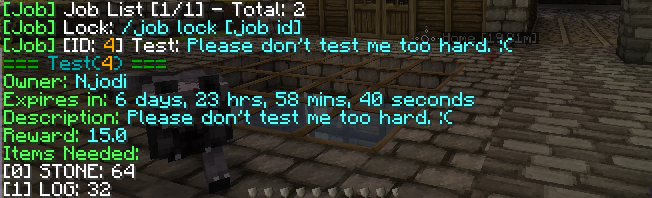
Shows a list of available jobs, by their ID - Name - Description.
Example: /job list
Shows all of the relevant information about a job and the required items to fulfill it. If you specify the optional [item id] argument, you can see more specific information about that item (such as enchantments or data values).
Example: job info 1