Introduction:
Do you feel that the vanilla drop is too difficult while keepInventory enabled is too simple and lose balance?
Then this plugin is very suitable for you.
How does it works?
This plugin provided specific items (virtual or physical item) or permission to restore players' inventory and exp. When player dies, the matched item with highest priority will be consumed to restore player's inventory.
Only works when gamerule keepInventory set to false.
Features:
Commands & Permissions:
Admin commands:
/invkeep - Main command
/invkeep get <v/p> <item-name> [amount] - Get the specific item.
/invkeep give <v/p> <item-name> <player> [amount] - Give the item to a specific player.
(v -> Virtual item p->Physical item)
/invkeep take <player> <item-name> [amount ] - Take the virtual item from a player
/invkeep set <player> <item-name> [amount] - Set the amount of the virtual item of a player
/invkeep check [player] - Check the amount of virtual items
/invkeep reload - Reload config.
Permission: inventorykeeper.admin
Default OP has access to these commands.
Player commands:
/invkeep check [player] - Allow players to check the amount of virtual item.
Permissions:
inventorykeeper.check - Allow to use /invkeep check (Default)
inventorykeeper.check.others - Allow to check the amount of other players.
inventorykeeper.unlimited.<Item Name> - Player with the permission can restore their inventory while the item (physical/virtual) will not be consumed, which means this player has unlimited quantity of the item. (Default:OP)
Note: Permission inventorykeeper.keep has been abandoned, use the new one instead.
Installation:
Configuration:
config.yml
# ********************
#
# Item Configuration
#
# ********************
# This configuration file is to set the custom items use to keep players' inventory.
# You can set multiple items. A higher priority item will be consumed first in players' inventory on death to keep their inventory.
# Here is an example of the custom item:
items:
#Group name, used to save player data. Once you set this, don't change it again.
default:
# In 1.13-, number and Sub-id(item damage) is accepted.
# Accepted examples: 273, '397:3', 'SKULL_ITEM:3', PLAYER_HEAD, 'WOOL:4'
item-id: 'STICK'
#The display name that will show in plugin commands. (Not the real item name)
name: '&6&lDeath amulet'
# TO use custom head texture, add it. (Optional)
# custom-texture: eyJ0ZXh0dXJlcyI6eyJTS0lOIjp7InVybCI6Imh0dHA6Ly90ZXh0dXJlcy5taW5lY3JhZnQubmV0L3RleHR1cmUvNWRmZjhkYmJhYjE1YmZiYjExZTIzYjFmNTBiMzRlZjU0OGFkOTgzMmMwYmQ3ZjVhMTM3OTFhZGFkMDA1N2UxYiJ9fX0=
# If you wish to use custom model, add custom-model-data. (Optional)
# custom-model-data: 1
# The display name of the item, remove this if you want to use vanilla item. (Optional)
item-name: '&6&lDeath amulet'
# The lore of the item. Remove it if not needed. (Optional)
item-lore:
- '&7Keeping this in your inventory,'
- '&7This amulet will restore your'
- '&7inventory if you died.'
# Set the enchantments of the item, Remove it if not needed. Format: ENCHANTMENT_NAME-LEVEL (Optional)
item-enchantments:
- durability-10
# Will the experience points be retained when the player dies.
save-exp: false
# The amount of exp the player will lose when he dies. If save-exp set to true, this will not work.
# Fixed value: exp-lose-percentage: 50 -> lose 50% exp
# Random value (minimum-maximum): exp-lose-percentage: 10-30 -> lose 10%-30% exp
exp-lose-percentage: 10-30
# Customize the food level on respawn.
# Available types:
# keep -> Keep the food level on respawn instead of reset to full.
# reset -> Reset the food level on respawn like vanilla.
# set -> Customize the food level on respawn. Format: set,amount or set,min,max if you need a random food level.
# example: set,10 -> set the food level to 10 on respawn. set,5,10 -> set the food level to 5 - 10 on respawn.
hunger-level: reset
# Customize the saturation level on respawn.
saturation-level: set,3,7
# The item will not work on the following worlds. Leave it empty or remove it to disable the function. (Optional)
disabled-worlds: []
# Execute commands on player death if this item is comsumed. The same as the settings in config.yml. (Optional)
# Leave it empty (Do not remove it) to disable the function.
run-commands-on-death: []
# One of command groups will be chose randomly and executed on player death. The same as the settings in config.yml. (Optional)
run-random-commands-on-death: []
# Execute commands on player respawn if this item is comsumed. The format is the same as above. (Optional)
run-commands-on-respawn:
- 15|90|effect %player% minecraft:fire_resistance %random% 1
# One of command groups will be chose randomly and executed on player respawn. (Optional)
run-random-commands-on-respawn:
- 10|30|effect %player% minecraft:strength %random% 1
- 10|30|effect %player% minecraft:speed %random% 1
filter-entities-list:
#if set to true (Blacklist mode), the inventory will NOT BE RESTORED if a player killed by the entity in the list.
#if set to false (Whitelist mode), the inventory will BE RESTORED if a player killed by the entity in the list.
is-blacklist: true
#To disable, leave the list empty. -> entities: []
#Entity name should be the namespace of minecraft.
# For example: MAGMA_CUBE, PLAYER, ENDER_DRAGON, ZOMBIE, ZOMBIE_VILLAGER, etc.
#You can find it out here: https://minecraft-ids.grahamedgecombe.com/entities
entities: []
filter-entities-name:
# if set to true (Blacklist mode), the inventory will NOT BE RESTORED if a player killed by a entity which name is in the list.
#if set to false (Whitelist mode), the inventory will BE RESTORED if a player killed by a entity which name is in the list.
is-blacklist: true
#To disable, leave the list empty. -> names-list: []
names-list: []
#Items with this lore will get removed on death.
#This works if you are using SoulBind plugin that will give the item repeatedly when a player respawns.
items-with-lore-to-be-removed-on-death:
- '&6Soul bind'
# The custom message sent when player dies.
death-message: '&aThe &eAncient amulet &ain your backpack &asaved your inventory!!'
#The highest one will be consumed first.
priority: 10
# Set the effective death type of the item.
#When the death type is set to true, this item will work if the player died from this death type
#If set it to false, the saving stick will not work.
#For a detailed explanation of death types, see https://hub.spigotmc.org/javadocs/spigot/org/bukkit/event/entity/EntityDamageEvent.DamageCause.html
enabled-death-type:
CONTACT: true
LAVA: true
CRAMMING: true
ENTITY_SWEEP_ATTACK: true
FIRE_TICK: true
ENTITY_EXPLOSION: true
WITHER: true
FIRE: true
MAGIC: true
PROJECTILE: true
CUSTOM: true
FALL: true
SUICIDE: true
DRAGON_BREATH: true
DROWNING: true
LIGHTNING: true
FALLING_BLOCK: true
FLY_INTO_WALL: true
THORNS: true
ENTITY_ATTACK: true
BLOCK_EXPLOSION: true
HOT_FLOOR: true
STARVATION: true
VOID: true
PVP: true
SUFFOCATION: true
To use custom head:
To use custom head:
Add custom-texture below item-id
Example:
custom-texture: eyJ0ZXh0dXJlcyI6eyJTS0lOIjp7InVybCI6Imh0dHA6Ly90ZXh0dXJlcy5taW5lY3JhZnQubmV0L3RleHR1cmUvMjQyMmIwNTU5ZjkwZTZhOTk2ZjA0OTlkNDM0NGU5NTJkYzg4OTM0MGVkYmE1N2I4MzU5N2NlMTExMjk5MjQ3In19fQ==
To set custom model data:
To set custom model data:
Add custom-model-data below item-id.
Example:
settings:
  keep-inventory-item:
    item-id: player_head
    custom-model-data: 0
    item-name: '&a&lSaving Stick'
To run commands on death / respawn:
When player died (respawn), the commands in run-commands-on-death (run-commands-on-respawn) will be executed.
Example:
run-commands-on-death:
- 'eco take %player% 100'
- '[OP]fly off'
- '100|200|eco take %player% %random%'
To run random commands:
(Support multiple commands, using ";" to separate multiple commands, dont ADD ANY SPCAES after ";"!!)
Example:
run-random-commands-on-death:
- 'tell %player% Oops! You died!;eco take %player% 100'
- '[OP]fly off'
- '100|200|eco take %player% %random%;tell %player% Oops! You have lost %random% coins!'
It will randomly choose one of the groups and execute the commands in the group.
Placeholders:
%player% -> The player name
%random% -> Replaces random number.
To run a command as OP, add "[OP]" in the head of a command.
To use random number, the command format should be:
minimum|maximum|command 1;command 2...
PlaceholderAPI Support
Placeholders:
%inventorykeeper_amount_<Item name>% - Returns the amount of virtual item of a player.
%inventorykeeper_amount_<Item name>,<player name>% - Returns the virtual item amount of other players. (Only for online players.)
PAPI placeholders now can be add to death / respawn commands directly.
Screenshots:
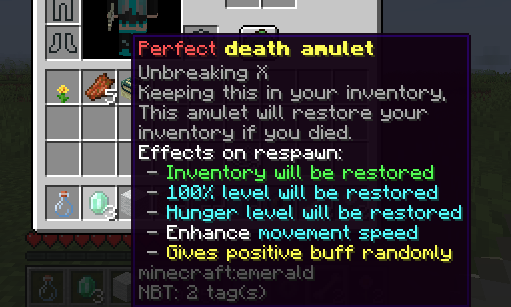
An example that gives negative buff and keep hunger level on respawn
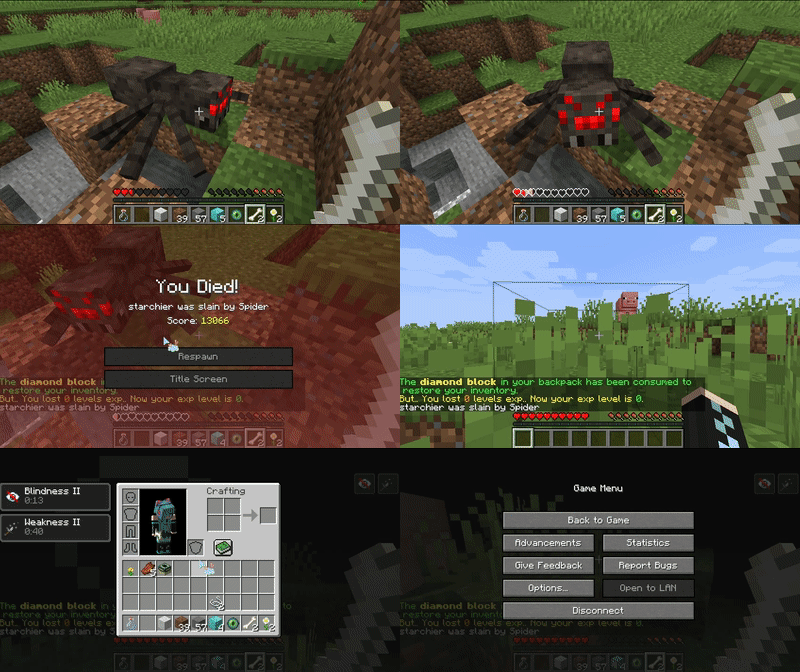
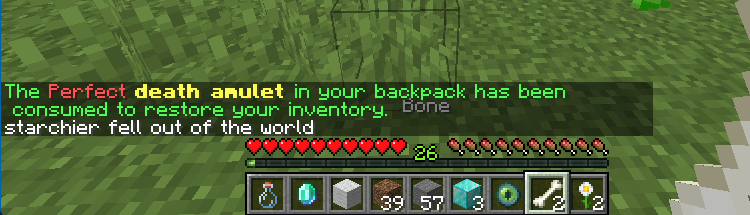
consume an item with highest priority to restore inventory.

Bugs:
For issues and suggestions, create a comment here!
Donation:
Welcome to donate us if you think this plugin is good to use!
Donate link:Click here
Links: bStats
Plugin Statistics