Item orders: a player pays for what they need up front, and whoever has it hands the goods in and gets paid right away.
InOrders is an order plugin that works the other way round from an auction house. Nobody waits for a buyer here: the player writes what they need, for example "64 oak logs at 2 coins each". The full amount is withdrawn at once and held in the order, so sellers never have to take the buyer's word for it.
Anyone who has matching items hands them in with a couple of clicks and gets paid on the spot. The buyer collects the goods whenever it suits them, even if they were offline when the items arrived.
diamond and алмаз, mending and починка find the same thing.640, 10st or 2.5k. The price is per item, in Vault money or PlayerPoints.auto everyone sees the menus in their game language. English and Russian are included, texts use MiniMessage.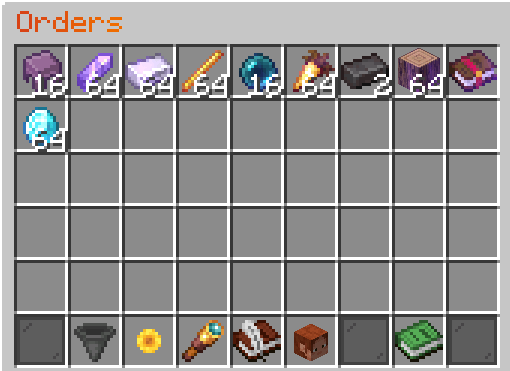
Order list
Buyer
/orders and press "Create an order"./orders my).Seller
/orders. Orders you have items for are highlighted.Integrations:
| Plugin | Adds |
| Vault (required) | Orders paid with money |
| PlayerPoints | Orders paid with points |
| LuckPerms | Number of slots through the inorders-limit meta, per world and server |
| Floodgate | Native input forms for Bedrock players |
| ViaVersion | Chest menus for clients older than 1.21.6 |
Item icons on the catalog buttons show up from 1.21.11 on both server and client; on older versions the buttons only show the name.
InOrders-x.x.x.jar into the plugins folder.plugins/InOrders/config.yml if needed and run /orders reload.| Command | Description |
/orders |
Open the order list |
/orders my |
Your orders: how much was delivered, collecting, cancelling |
/orders create [hand] |
Create an order; with hand for the item in your hand |
/orders search <text> |
Find orders by item name |
/orders open <player> [my] |
Open the menu for another player, for example from an NPC |
/orders reload |
Reload the configuration and translations |
Aliases: /order, /inorders.
| Permission | Default | Access |
inorders.player |
everyone | All player permissions |
inorders.use |
everyone | The order list and My orders |
inorders.create |
everyone | Creating orders |
inorders.deliver |
everyone | Delivering items |
inorders.cancel |
everyone | Cancelling own orders |
inorders.currency.money |
everyone | Orders paid with Vault money |
inorders.currency.playerpoints |
everyone | Orders paid with points |
inorders.limit.<number> |
none | How many orders can be kept open |
inorders.limit.unlimited |
none | No limit on open orders |
inorders.bypass.fee |
none | No fee when creating an order |
inorders.bypass.tax |
none | No tax on deliveries |
inorders.admin |
op | All staff permissions |
inorders.admin.cancel |
op | Remove other players' orders, the buyer gets the money back |
inorders.admin.open |
op | /orders open |
inorders.admin.reload |
op | Reloading the settings |
inorders.admin.worlds |
op | Orders in worlds from disabled-worlds |
Wildcards: inorders.*, inorders.currency.*, inorders.bypass.*.
Orders from a certain rank. Set in the config:
permissions:
  open-to-everyone: false
Run /orders reload and give access to the group you need:
/lp group rank3 permission set inorders.player trueWith group inheritance set up, higher ranks get access too. Single currencies are opened the same way, for example money from rank 5 only:
/lp group rank3 permission set inorders.currency.money false
/lp group rank5 permission set inorders.currency.money true
Order slots. Without permissions orders.max-active from the config applies. The inorders.limit.<number> permission replaces that value, and the highest one wins, so the limit can be lowered as well:
/lp group default permission set inorders.limit.3 true
/lp group vip permission set inorders.limit.5 true
/lp group admin permission set inorders.limit.unlimited true
With LuckPerms a meta value is handier, it follows group weights and contexts such as world or server:
/lp group vip meta set inorders-limit 5Checked in this order: inorders.limit.unlimited, the inorders-limit meta, the highest inorders.limit.<number>, max-active.
# InOrders configuration.
# Messages and menu texts are in lang/<language>.yml.

# "auto" shows every player the messages in their game language. English and Russian are included,
# other languages can be added as new files in lang/. Any other value (for example "ru") uses one
# language for everyone.
language: auto
# Used for the console and for game languages without a file in lang/.
default-language: en

permissions:
  # true: all players can use orders by default.
  # false: players need inorders.player (or individual permissions) from a permissions plugin such as LuckPerms.
  # Staff permissions are always limited to operators by default.
  open-to-everyone: true

menus:
  # How forms are shown: creating an order, choosing an amount, entering a price or a search.
  # auto: game dialogs (Minecraft 1.21.6 and newer), chest menus for Bedrock players and older clients.
  # dialog: dialogs wherever the client supports them.
  # chest: chest menus and chat input for everyone.
  # With dialogs the item catalog is a dialog too, with item icons for clients 1.21.11 and newer.
  # Order lists are always chest menus.
  forms: auto
  # Creative tabs hidden from the item catalog. Tab ids: building_blocks, colored_blocks, natural_blocks,
  # functional_blocks, redstone_blocks, tools_and_utilities, combat, food_and_drinks, ingredients, spawn_eggs.
  hidden-tabs:
    - spawn_eggs

orders:
  # Open orders per player without a limit permission. inorders.limit.<number> or the LuckPerms meta
  # inorders-limit replace it, inorders.limit.unlimited removes the limit.
  max-active: 7
  # Largest number of items in one order. 2304 is a full inventory of 64-item stacks.
  max-amount: 2304
  # Durations in days a player can choose from.
  durations: [1, 3, 7]
  default-duration: 3
  # Paid on top of the order price when it is created. Not returned when the order is cancelled.
  fee-percent: 0
  # Taken from the money a seller receives for delivered items.
  tax-percent: 0

currencies:
  # Requires Vault and an economy plugin.
  money:
    enabled: true
    # Price limits for one item. 0 as max-price means no limit.
    min-price: 0.01
    max-price: 0
  # Requires PlayerPoints.
  playerpoints:
    enabled: true
    min-price: 1
    max-price: 0

# Items that cannot be ordered.
blocked-items: []
#  - BEDROCK
#  - BARRIER

# Worlds where the order menus cannot be opened.
disabled-worlds: []

notifications:
  # Tell online owners when items are delivered to their orders.
  deliveries: true
  # Remind players on join that they have items or refunds to collect.
  join-reminder: true

# Format: "<sound> [volume] [pitch]". Leave empty to turn a sound off.
sounds:
  click: "ui.button.click 0.4 1.2"
  success: "entity.player.levelup 0.6 1.4"
  sell: "entity.experience_orb.pickup 0.8 1.1"
  claim: "entity.item.pickup 0.8 0.9"
  notify: "block.note_block.chime 0.8 1.2"
  error: "entity.villager.no 0.6 1"

# Changes in this section require a server restart.
storage:
  # sqlite: local file plugins/InOrders/orders.db, no setup required.
  # mysql: MySQL or MariaDB server, configured below.
  type: sqlite
  # Unique name of this server. Only needed when several servers use the same MySQL database.
  server-id: main
  # true: orders from every server sharing the database are visible everywhere.
  # Only enable this when all these servers share one economy, otherwise money moves between economies.
  shared-orders: false
  mysql:
    host: localhost
    port: 3306
    database: minecraft
    user: root
    password: ""
    # Number of connections.
    pool-size: 4
    # Additional JDBC driver properties.
    properties:
      useSSL: false
allowPublicKeyRetrieval: trueSQLite needs no setup, the database lives in plugins/InOrders/orders.db. For MySQL or MariaDB set storage.type: mysql, fill in the storage.mysql section and restart the server. The inorders_orders table is created automatically.
Every change to an order runs as a single transaction, and all writes of one server go one after another. Amounts are stored as whole hundredths, so there are no rounding errors.
Server networks. Servers sharing a database are told apart by storage.server-id and only see their own orders by default. storage.shared-orders: true makes orders shared across the whole network, but it is only worth enabling with a shared economy.
The api module gives access to orders and events. Add it as compileOnly and put InOrders into depend or softdepend of your plugin.
import me.spolzer.inorders.api.InOrders;

InOrders orders = InOrders.get();
orders.orders(player.getUniqueId()).thenAccept(list ->
    getLogger().info(player.getName() + " has " + list.size() + " orders"));
OrderCreateEvent fires before the payment is taken, OrderDeliverEvent before the items are taken from the seller, OrderCancelEvent on cancellation. All three can be cancelled.InOrders#openMenu(Player) opens the order list.CompletableFuture. Switch back to the server thread before touching Bukkit objects.Order#priceCents() returns the price in hundredths: 250 for 2.50, 500 for 5 points.Does the client need a mod or a resource pack?
No, everything uses the standard Minecraft windows.
Why does the catalog not fit a small window?
The server does not know the size of the player's window, so the catalog has a fixed width. Maximize the game or lower the GUI scale.
Can I do without the game dialogs?
Yes, menus.forms: chest switches every form to chest menus.
Can some items be excluded from orders?
Yes, through the blocked-items list in the config.
What if the buyer is offline when an order is filled or cancelled?
Items and money wait in the order, and the plugin reminds the buyer about them on join.
How do I add my own language?
Create lang/<code>.yml based on en.yml or ru.yml.
Is the plugin safe against server crashes?
The seller's player file is saved right after every delivery, so items never end up both with the seller and in the order. Operations the database has already saved are finished even when the server shuts down. Still, the economy plugin and the database are separate systems, so a hard crash in the middle of an operation cannot be fully ruled out.
Links
Found a bug or have an idea? Leave a comment on the project page or open an issue on GitHub.