Mineuniverse
Plugins
Hub/Lobby + FireWorks & Titles - Hat - Particles - PlayerToggle - BossBar - ActionBar

Hub/Lobby + FireWorks & Titles - Hat - Particles - PlayerToggle - BossBar - ActionBar

PLUGIN
Hub/Lobby For 1.8
by _ForgeUser16177763
Download Claim this project
Add a badge to your pageLink to Hub/Lobby + FireWorks & Titles - Hat - Particles - PlayerToggle - BossBar - ActionBar from a README, website or forum post.
Preview: Badge

Badges update automatically and link to the plugin page on MineUniverse.

18,435 downloads
0 likes
0 followers
Updated Oct 14, 2026
0 hypes
Follow0
Admin Tools General Teleportation
Advertisement Remove ads with Premium →

HiGuys

I've created a new plugin : "HUB". You can set ONE Hub Location and go to that point when you want or when players join and MULTIPLES Lobby Locations ! Now you have 4 plugins ! HatGUI, ParticlesGUI, PlayerToggle and Hub

NEW IN THIS UPDATE:

  • Clear inventory when a player change world (when a player leave the HUB world ! )
  • Clear inventory when a player leave the server

Hub

Features

  • One Hub Points
  • Multiple Lobby Points
  • Firework on Join
  • Boosts
  • Customizable Title on Join
  • Teleport to Hub Point on Join
  • Give Saturation on Join
  • Give Items for HatGUI, ParticlesGUI & PlayerToggle
  • Teleport to Hub when a Player Fall in the Void
  • BossBar Support !
  • Console Sender Support
  • ActionBar

Commands

  • /HubPlugin -> Help ( No Permission Needed )
  • /SetHub -> Set Hub Location ( Permission : hub.set / Default : op )
  • /Hub -> Teleport to Hub Location ( Permission : hub.tp / Default : all )
  • /Hub <player> -> Teleport a player to Hub Location ( Only op )
  • /SetLobby <id> -> Set Multiple Lobby Location( Permission : hub.set / Default : op )
  • /Lobby <name> -> Teleport to a Lobby Location ( Permission : hub.tp / Default : all )
  • /Lobby <name> <player> -> Teleport a player to a Lobby Location ( Only op )
  • /RemoveLobby <id> -> Remove a Lobby Location ( Permission : hub.remove / Default : op )
  • /RemoveHub <id> -> Remove Hub Location ( Permission : hub.remove / Default : op )
  • /Fw -> Launch a Firework ( Permission : hub.firework / Default : op )
  • /Title -> Send Title to all players ( Permission : hub.titlesend / Default : op )
  • /SetTitle -> Set Title ( Permission : hub.titlesend / Default : op )
  • /SetSubTitle -> Set SubTitle ( Permission : hub.titlesend / Default : op )
  • /ActionBar -> Send an ActionBar Message to all players ( Permission : hub.actionbarsend / Default : op )
  • /SetActionBar-> Set the ActionBar ( Permission : hub.actionbarsend / Default : op )

Config

  • Number_Of_Lobbies -> Don't touch that !

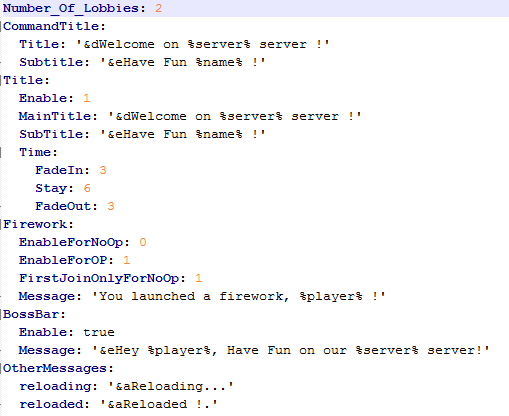
Config1.yml

Config2.yml

DOWNLOAD BOSSBARAPI : http://dev.bukkit.org/bukkit-plugins/bar-api/

Videos

French :

English (Thanks to DirectorDoc) :

HatsGUI

Config

  • SlotItem: 6
  • Message: '&d[HatGui] &aYou have %hat% particles !'
  • MessageRemoved: '&d[HatGui] &aHats Removed !'

The First line is for the slot. When the player join, item will be give in this slot.

The second line is the message which display when a player select a hat. You can use %hat%. It will be replace by the Hat !

The third line is the message which display when a player remove his Hat.

Commands

Type /hmenu to display the menu ! Or right click on the Hat Item.

Permissions

Permission to use every hats:

  • hat.pumpkin
  • hat.stone
  • hat.workbench
  • hat.furnace
  • hat.glass
  • hat.jukebox
  • hat.goldblock
  • hat.diamondblock
  • hat.ironblock
  • hat.redstoneblock
  • hat.sponge
  • hat.sealantern
  • hat.tnt
  • hat.beacon

ParticlesGUI

Config

  • SlotItem: 4
  • Message: '&d[ParticlesGui] &9You have %particle% particles !'
  • MessageRemoved: '&d[ParticlesGui] &9Particles Removed !'

The First line is for the slot. When the player join, item will be give in this slot.

The second line is the message which display when a player select a hat. You can use %particle%. It will be replace by the Particle !

The third line is the message which display when a player remove his Particle.

Commands

Type /pmenu to display the menu ! Or right click on the Particle Item.

Permissions

Permission to use every particles:

  • particles.smoke
  • particles.heart
  • particles.villagerhappy
  • particles.note
  • particles.lava
  • particles.water
  • particles.redstone

PlayerToggle

Just right click on the item to hide/show all players

Config

  • SlotItem: 2 -> When the player join, item will be give in this slot.
  • Hide: '&aPlayers are invisible !' -> Message on invisble.
  • Show: '&aPlayers are shown !' -> Message on show.

-------------------------------- ----------------------------------

In The Future

  • Sounds
  • Gadgets
  • Double Jump
  • Tab - Head & Footer Support
  • More Particles/Hats
  • Don't hide players who poccess certains permissions
  • (Pets)
  • ( What you want ( Tell me about this in comments ) )

Bugs

  • If you see any bugs, tell me !

Thanks

Thanks for your download ! If you makes a video, send me a tweet by Twitter : @azen0xgaming If you wants to pay me a cookie : https://www.paypal.me/AlexisHAYAT

Hub - Little Thing Added
MC 1.8.1
Release 2016-02-18 Get
Hub - ActionBar
MC 1.8.1
Release 2016-01-30 Get
Hub - BossBar Support !
MC 1.8.1
Release 2016-01-25 Get
Hub - Boosts Added !
MC 1.8.1
Release 2015-09-28 Get
Hub - Fireworks & Titles Added !
MC 1.8.1
Release 2015-09-26 Get
Hub_(with_new_features).zip
MC 1.8.1
Release 2015-07-30 Get
Hub_2.2.jar
MC 1.8.1
Release 2015-07-23 Get
Hub_2.0.jar
MC 1.8.1
Release 2015-07-22 Get
Hub_1.1.jar
MC 1.8.1
Release 2015-07-07 Get
Hub_1.0.jar
MC 1.8.1
Release 2015-07-06 Get

More from _ForgeUser16177763

Advertisement Remove ads with Premium →

You Might Also Like