Fully compatible with Paper/Spigot/Folia/Bukkit 1.13 - 1.21.11


GUIShop is a powerful, feature-rich shop plugin that allows server owners to create beautiful GUI-based shops with extensive customization options. Say goodbye to confusing sign shops and chest-based systems. GUIShop provides players with an intuitive shopping experience while giving administrators complete control over pricing, items, and layout.
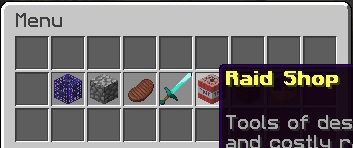
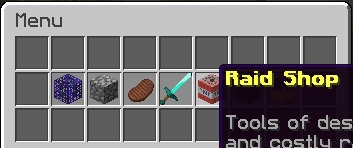
Main Menu
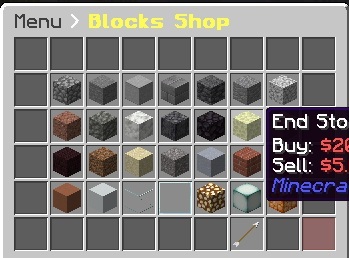
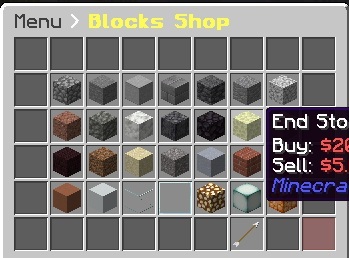
Shop View
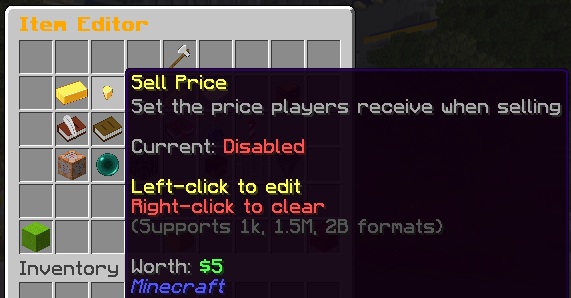
Item Editor
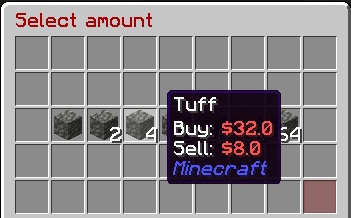
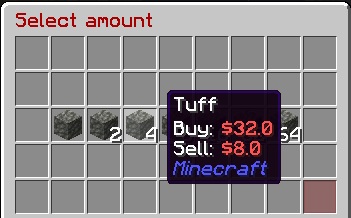
Quantity Selector
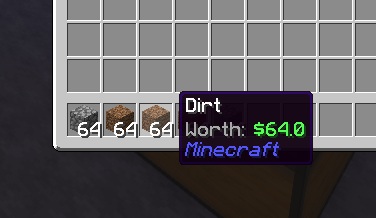
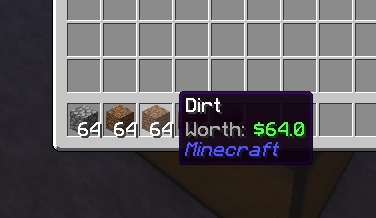
Worth Display
/shop, /buy          - Open the shop menu
/sell                - Open the sell GUI
/value, /val         - Check the buy/sell value of held item
/gs reload           - Reload all configuration files
/gs edit             - Enter creator mode for the main menu
/gs edit menu        - Enter creator mode for the main menu
/gs edit transaction - Enter creator mode for the transaction GUI
/gs edit [shop]      - Enter creator mode for a specific shop
/gs edit [shop] [page] - Edit a specific page of a shop
/gs parsemob <type>  - Validate a mob type for spawners
/gs toggleworth      - Toggle worth display for yourself (session only)
/gs iteminfo         - Display comprehensive info about held item
(Only available when internal economy is enabled)
Player Commands:
/bal, /balance, /money          - Check your balance
/bal <player>                   - Check another player's balance
/pay <player> <amount>          - Send money to a player
/togglepay                      - Toggle payment notifications on/off
Admin Commands:
/gs eco give <player> <amount>  - Give money to a player
/gs eco take <player> <amount>  - Take money from a player
/gs eco set <player> <amount>   - Set a player's balance
/gs eco balance <player>        - Check a player's balance
/gs eco reset <player>          - Reset to starting balance
All amounts support abbreviations: 1k, 1.5M, 100B, etc.
The /gs iteminfo command is a powerful debugging and configuration helper. Hold any item and run the command to see:
SHARPNESS:5 UNBREAKING:3)This makes it easy to configure complex items - just create the item you want, then use /gs iteminfo to get the exact format needed for your shops.yml.
guishop.use          - Access to the shop (default: op)
guishop.shop.*       - Access to all shop items (default: op)
guishop.shop.<shop>.<item> - Access to specific items
guishop.reload       - Permission to reload the plugin (default: op)
guishop.creator      - Access to the in-game shop editor (default: op)
guishop.value        - Access to /value command (default: true)
guishop.sell         - Access to /sell command (default: true)
guishop.admin        - Full admin access (default: op)
GUIShop uses several configuration files for maximum flexibility:
shops:
  Blocks:
    pages:
      Page0:
        '0':
          type: SHOP              # Item type (SHOP, COMMAND, SHOP_SHORTCUT, DUMMY, BLANK)
          id: STONE               # Material ID
          buy-price: 10.0         # Price to buy (or 'false' to disable)
          sell-price: 5.0         # Price to sell (or 'false' to disable)
          shop-name: '&7Stone'    # Display name in shop
          buy-name: '&7Stone'     # Name on purchased item
          shop-lore:              # Lore shown in shop
            - '&fA basic building block'
          enchantments: 'DURA:1 SHARP:2'  # Enchantments (space separated)
          quantity: 64            # Stack size to give
          permission: 'shop.vip'  # Required permission (optional)
GUIShop features a powerful, fully GUI-based item editor that eliminates the need for manual config editing. Configure every aspect of shop items through intuitive click-based menus.
/gs edit (for menu) or /gs edit <shop> (for shops)Left-click - Pick up / place items (works between shop and your inventory) Right-click - Open Item Editor for the clicked item Shift+click - Open Item Editor for the clicked item Navigation Buttons (pagination, back, balance): Left-click - Pick up and move the button Right-click - Open Item Editor for the button Shift+click - Activate the button (navigate pages, go back, etc.)
GUIShop includes a powerful worth display feature that shows item sell values directly in the item lore. This uses packet manipulation to display worth client-side only, meaning your actual items are never modified.
Requirements: PacketEvents plugin
enabled: true
format: "&7Worth: &a%worth%"
position: BOTTOM
add-blank-line: true
only-show-sellable: true
not-sellable-format: "&7Worth: &cNot sellable"

# Hide worth in specific inventories
blacklisted-inventories:
  - "Auction House"
  - "Crate Preview"

# Hide worth on items with specific names
blacklisted-item-names:
  - "Crate Key"
  - "Vote Token"

# Hide worth on equipped armor
hide-armor-slots: true
Sell commands that execute when purchased. Use placeholders like {PLAYER_NAME}, {PLAYER_UUID}, {PLAYER_WORLD}, or any PlaceholderAPI placeholder:
'19':
  type: COMMAND
  id: NETHER_STAR
  shop-name: '&6VIP Rank'
  buy-price: 10000
  sudo: false          # Run as console (default) or as player (true)
  commands:
    - 'lp user {PLAYER_NAME} parent set vip'
    - 'broadcast {PLAYER_NAME} purchased VIP!'
Available Placeholders:
{PLAYER_NAME} or %player_name% - Player's name{PLAYER_UUID} or %player_uuid% - Player's UUID{PLAYER_WORLD} or %player_world% - Player's current world{PLAYER_BALANCE} or %player_balance% - Economy balanceSudo Mode: Set sudo: true to run commands as the player instead of console. Useful for commands that check player permissions or are player-only.
'20':
  type: SHOP
  id: ENCHANTED_BOOK
  buy-price: 1000
  enchantments: 'SHARP:5 FIRE_ASPECT:2'
Configure potions with the potion-info section. Supports regular, splash, and lingering potions.
# Regular Potion (Extended Speed)
'21':
  type: SHOP
  id: POTION
  buy-price: 500
  potion-info:
    type: SPEED
    splash: false
    lingering: false
    extended: true
    upgraded: false

# Splash Potion (Healing II)
'22':
  type: SHOP
  id: SPLASH_POTION
  buy-price: 600
  potion-info:
    type: HEALING
    splash: true
    lingering: false
    extended: false
    upgraded: true

# Lingering Potion
'23':
  type: SHOP
  id: LINGERING_POTION
  buy-price: 700
  potion-info:
    type: POISON
    splash: false
    lingering: true
    extended: true
    upgraded: false
Potion Info Fields:
| Field | Description |
|---|---|
type |
Potion effect (SPEED, HEALING, STRENGTH, POISON, etc.) |
splash |
Whether it's a splash potion |
lingering |
Whether it's a lingering potion |
extended |
Extended duration version |
upgraded |
Level II/stronger effect version |
Native spawner support with any valid entity type (use /gs parsemob <type> to validate):
'22':
  type: SHOP
  id: SPAWNER
  buy-price: 50000
  mob-type: ZOMBIE
  shop-name: '&6Zombie Spawner'
'23':
  type: SHOP
  id: FIREWORK_ROCKET
  buy-price: 100
  firework-info:
    flight: 2
    explosions:
      - shape: ball_large
        flicker: true
        trail: true
        colors: [11743532, 2437522]
        fade-colors: [1973019, 15790320]
Support for player UUIDs or Base64 skin textures:
# Using player UUID
'24':
  type: SHOP
  id: PLAYER_HEAD
  buy-price: 1000
  skull-uuid: 'player-uuid-here'

# Using Base64 skin texture (from minecraft-heads.com, etc.)
'25':
  type: SHOP
  id: PLAYER_HEAD
  buy-price: 500
  skull-uuid: 'eyJ0ZXh0dXJlcyI6eyJTS0lOIjp7InVybCI6Imh0dHA6Ly90ZXh0dXJlcy5taW5lY3JhZnQubmV0L3RleHR1cmUvYWJjMTIzIn19fQ=='
GUIShop tracks player shop statistics and integrates with PlaceholderAPI for use in scoreboards, holograms, and chat.
%guishop_total_spent%           - Money spent (with commas)
%guishop_total_spent_formatted% - Money spent (abbreviated: 1.5M)
%guishop_total_earned%          - Money earned (with commas)
%guishop_total_earned_formatted% - Money earned (abbreviated)
%guishop_items_bought%          - Items purchased count
%guishop_items_bought_formatted% - Items purchased (abbreviated)
%guishop_items_sold%            - Items sold count
%guishop_items_sold_formatted%  - Items sold (abbreviated)
%guishop_top_bought_1%          - #1 most bought item (Material: Qty)
%guishop_top_sold_1%            - #1 most sold item (Material: Qty)
Statistics are stored in SQLite (plugins/GUIShop/Data/player_statistics.db).
GUIShop includes a built-in supply/demand economy system that makes item prices fluctuate based on trading activity.
Enable in config.yml:
dynamic-pricing: true
Configure in dynamicpricing.yml:
price-change-per-item: 0.01    # 1% change per item
max-price-multiplier: 2.0      # Up to 200% of base price
min-price-multiplier: 0.5      # Down to 50% of base price
normalization-rate: 0.001      # How fast prices return to normal
normalization-interval: 300    # Seconds between normalization ticks
Configure different volatility settings for specific items:
item-overrides:
  DIAMOND:
    price-change-per-item: 0.005  # More stable (0.5% per item)
    max-price-multiplier: 1.5
    min-price-multiplier: 0.75
Make items affect other items' prices - perfect for crafting relationships:
item-overrides:
  DIAMOND_BLOCK:
    affects:
      DIAMOND: 9.0           # 1 block = 9 diamonds in crafting
      DIAMOND_ORE: 1.0       # Also affects ore prices

  BREAD:
    affects:
      WHEAT: 3.0             # 1 bread = 3 wheat in crafting
When a player buys 1 DIAMOND_BLOCK, DIAMOND prices change as if 9 diamonds were bought. This creates realistic economic relationships!
Exempt specific items from dynamic pricing:
'0':
  id: DIAMOND
  buy-price: 100
  sell-price: 50
  dynamic: false  # Uses static pricing
| Command | Description |
|---|---|
/gs market status |
View system status |
/gs market info <item> |
Check item's market status |
/gs market reset <item> |
Reset item to base price |
/gs market resetall |
Reset all prices |
GUIShop provides a comprehensive API for developers to integrate with:
// Check if an item can be sold
boolean canSell = GUIShopAPI.canBeSold(itemStack);

// Get buy/sell prices
BigDecimal buyPrice = GUIShopAPI.getBuyPrice(itemStack, quantity);
BigDecimal sellPrice = GUIShopAPI.getSellPrice(itemStack, quantity);

// Sell items programmatically
GUIShopAPI.sellItems(player, SellType.COMMAND, items);

// Worth Display API
BigDecimal worth = GUIShopAPI.getItemWorth(itemStack);
BigDecimal stackWorth = GUIShopAPI.getStackWorth(itemStack);

// Per-player worth toggle
GUIShopAPI.toggleWorthForPlayer(player);
GUIShopAPI.enableWorthForPlayer(player);
GUIShopAPI.disableWorthForPlayer(player);

// Hook for persistent per-player worth settings
GUIShopAPI.setExternalWorthCheck(player -> {
    return myPlugin.hasWorthDisabled(player.getUniqueId());
});
Full API documentation available on the Wiki.
Required:
Optional:
Note: GUIShop includes its own economy system! Enable it in economy.yml to use GUIShop as your server's economy without needing EssentialsX or similar plugins.
Folia Support:
GUIShop fully supports Folia - Paper's regionized multithreading fork for improved performance on large servers. No additional configuration required!
plugins/GUIShop/shops.yml/gs reload to apply changesDeveloped by pablo67340
If you enjoy GUIShop, please consider leaving a review!