Badges update automatically and link to the plugin page on MineUniverse.
| Command | Permission | Group | Function | |
|---|---|---|---|---|
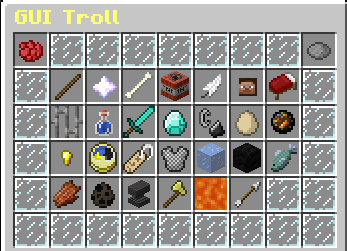
| /trolls | F_Troll.usar | OP | Opens the menu troll | |
| /trolls list | F_Troll.usar | OP | See the list of commands | |
| /trolls reload | F_Troll.usar | OP | Reloads the configuration | |
| /trolls join | F_Troll.usar | OP | It starts to trollagem chat | |
| /trolls nick | F_Troll.usar | OP | Change the name of a player |
Use /trolls to open the menu.
Select a trolling path through the menu and see that she will appear in your inventory.
Place the item you won when selecting the trolling path on hand and then right-click on a player.
Ready, trollado player!

| Comando | Permissão | Grupo | Função | |
|---|---|---|---|---|
| /trolls | F_Troll.usar | OP | Abre o menu Troll | |
| /trolls list | F_Troll.usar | OP | Vê todos os comandos do plugin | |
| /trolls reload | F_Troll.usar | OP | Recarrega a configuração | |
| /trolls join | F_Troll.usar | OP | Inicia uma trollagem por chat | |
| /trolls nick | F_Troll.usar | OP | Muda o nick de um jogador |
Utilize /trolls para abrir o menu troll.
Selecione uma trollagem pelo menu e veja que ela irá aparecer no seu inventário.
Coloque o item que você ganhou ao selecionar a trollagem na mão e depois clique com o botão direito em um jogador !
Pronto, jogador trollado !