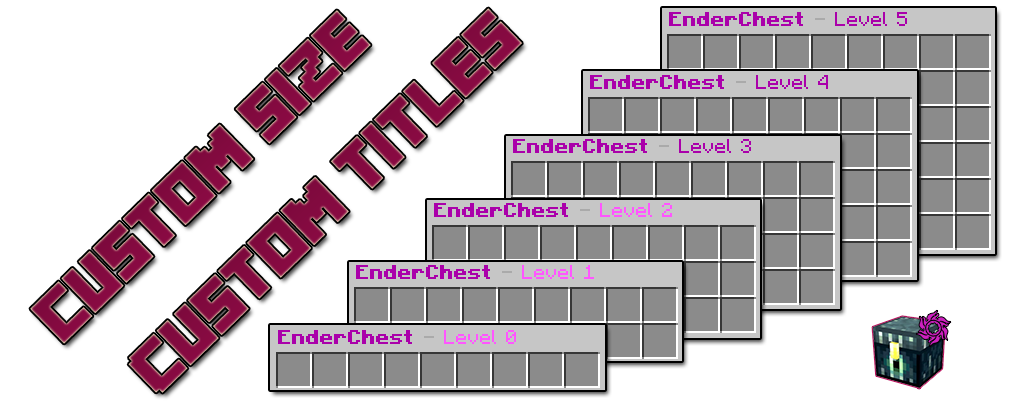
This plugin allows you to change the size of the players EnderChest, allowing you to store more or less than the vanilla version. It works the same way as a normal EnderChest just opening an EnderChest, but also features commands to access it. Everything can be customized with full color support, EnderChest title and chat messages.
Setting EnderChest size is done using permissions. By default players will not have permission to open the EnderChest.
CustomEnderChest.level.0 - For 9 slots(1 raw) EnderChest size
CustomEnderChest.level.1 - For 18 slots(2 raw's) EnderChest size
CustomEnderChest.level.2 - For 27 slots(3 raw's) EnderChest size
CustomEnderChest.level.3 - For 36 slots(4 raw's) EnderChest size
CustomEnderChest.level.4 - For 45 slots(5 raw's) EnderChest size
CustomEnderChest.level.5 - For 54 slots(6 raw's) EnderChest size
CustomEnderChest.commands - Allows players to open the EnderChest with command /customec open
CustomEnderChest.admin - Access to administration command to open and edit or delete other players enderchests, and reload the plugin config and import data commands.
Commands
The main command is /customenderchest , /customec , /ec
/ec or /ec help - Open the help page.
/ec open - Open your EnderChest
/ec open <name> - Open other player's EnderChest.
/ec delete <name> - Delete a players EnderChest.
/ec reload - Reload plugin configuration file.
/ec importFromFlatFile - Import data from FlatFile to MySQL database skipping existing database data.
/ec importFromFlatFile overwrite - Import data from FlatFile to MySQL database overwriting existing database data.
Useful Info
MySQL Data Storage By default the plugin will use the FlatFile storage, so you need to go to config and enable it and set the database details. Note that you need to create the database then the plugin will create the tables when the server starts. Also you can enable a maintenance task to remove old inactive players from the database.
FlatFile Data Storage A similar Flat File storage system like the popular Essentials plugin. The plugin will create a folder near the config file called PlayerData, each player will have a file to store his data.
Server Reload Server reload can break plugins so we do not recommend it. If you have issues after server reload don't use it with this plugin.
Best Data Storage The recommended storage type is MySQL, so if you can use it. On flat file there are more limitations.
Import data from FlatFile Storage to MySQL database If for some reason you want to change the plugin storage type to MySQL you can import existing data with 2 commands: /ec importFromFlatFile will import data skipping existing players in the mysql database and /ec importFromFlatFile overwrite will import data overwriting existing players in the database. To import data you first need to go to the plugin config and change the plugin storage type to mysql and also make sure the plugin is connected to the database.
Note!
The plugin was tested with Spigot 1.7.10/1.8 Protocol Hack; Spigot 1.8.9, 1.9.4, Spigot 1.10 and latest 1.12.2.
If you like this resource and want to say thank you with a donation please use this PayPal button. Thanks!
This plugin is made by CraftersLand Minecraft Community.