This heavy-duty Biome Brush can place or replace any biome to whatever you please! From forests and deserts to ice-lands and the nether, you have a full hands-on control over the precise shape of your desired biome. Though Minecraft Vanilla is currently unable to recognize the immediate change of biomes, there are a few tricks available to see the changes quickly.
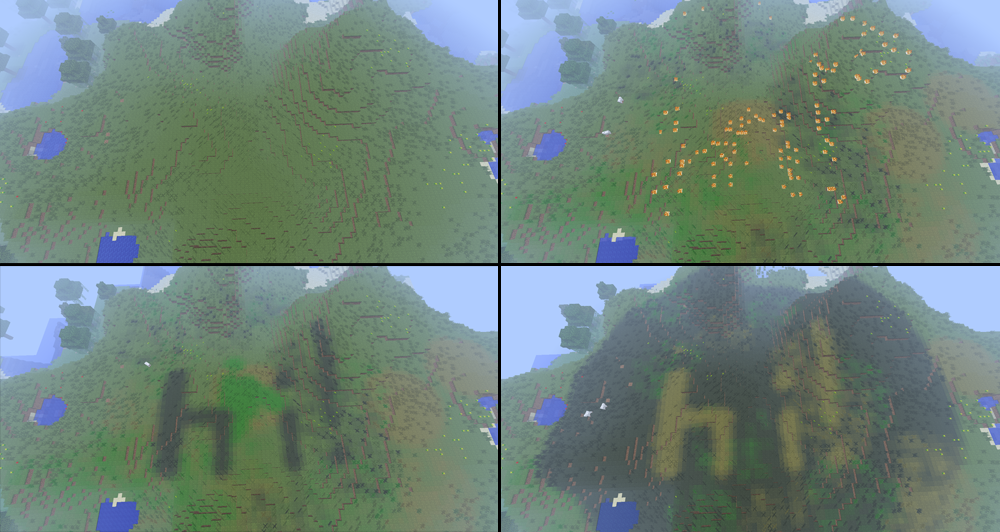
Here's an extremely simple demonstration of what you can do with biome brush.

Biome Brush is default to operators only. The permission node is: biome.brush
If you want to replace a desert biome with a mushroom biome, you could do the following:
/biome place mushroom
/biome replace desert
/biome radius 20
Then apply using a Golden Hoe wherever you aim (with a right click).
If you want to place a mushroom biome (replacing all other biomes), simply use a Diamond Hoe instead of a Gold Hoe.
Changes will not be shown immediately unless you have either /biome display or /biome refresh enabled.
But since I don't think the mushroom biome fits well where I placed it, I'm going to give it a nice "/biome undo". :)
- MaxRadius: 150
- Warnings: true (displays various warnings if the radius is high)
- Refresh-Distance: 200 (how far /biome refresh causes you to travel)
- Max-Undos: 20 (Remember, the higher this number is, more memory will be consumed.)
- PlaceBrushItem: 293 (the item ID for the placement brush)
- ReplaceBrushItem: 294 (the item ID for the replacement brush)
Just like most people, I don't have all the time in the world. Any donations will encourage me to continue with my projects, and your contribution will be made known!