Mineuniverse
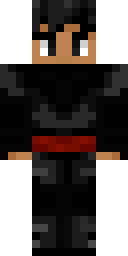
Staind’s Minecraft skin

// MINECRAFT JAVA PLAYER

Staind

Classic Black and Grey OptiFine Cape
UUID 0c696692-fb74-4d75-94c6-0b4ca632eaec
Other UUID formats
Undashed
0c696692fb744d7594c60b4ca632eaec
Int array
[I;208234130,-76264075,-1798960308,-1506612500]
Offline
786c8dd8-1dc0-3b03-934d-97e76073593c
  • 4views
  • 0followers
  • Nov 2026first seen
  • 0name changes
  • 0skin changes
Follow0 Download skin Apply to Minecraft

Last checked 6 d ago

Name history

1
  1. StaindCurrentFirst seen

Tracked by MineUniverse since . Mojang no longer publishes name history, so this list only shows names we have seen ourselves.

Skin history

1Click a skin to try it on in 3D

Capes

1
Black and Grey OptiFine CapeSince Current

About Staind

Staind is a Minecraft: Java Edition player with the UUID 0c696692-fb74-4d75-94c6-0b4ca632eaec. MineUniverse first saw this profile on and has recorded 1 name and 1 skin since then.

Staind currently wears a classic skin (the Steve model with 4 px wide arms) with an OptiFine cape.

Get Staind’s player head

Run one of these commands in a world with cheats enabled. The head shows Staind’s current skin.

Java 1.20.5+/give @p minecraft:player_head[profile={name:"Staind"}]
Java 1.13–1.20.4/give @p minecraft:player_head{SkullOwner:"Staind"}

Use this skin

  1. Click Download skin above to save the PNG file.
  2. Open the Minecraft Launcher, go to Skins and choose New skin, or open your profile on minecraft.net.
  3. Pick the Classic player model, upload the file and save. On Bedrock Edition, import it in the Dressing Room under Classic skins.

Is this you? Request removal Data from Mojang’s public profile API · skins © their creators

Report Staind

Moderators review every report. To remove your own profile, use the removal form instead.

What is wrong?