Mineuniverse
Mods
Twitch Chat In Game

Twitch Chat In Game

MOD
A client-side mod that integrates Twitch chat directly into Minecraft. Messages merge seamlessly with the native game chat while preserving original Twitch username colors.
by poule_trempee
Download Claim this project
1,393 downloads
0 likes
0 followers
Updated Oct 14, 2026
0 hypes
Follow0
Twitch Integration
Advertisement Remove ads with Premium →

Logo

Twitch Chat In Game

Twitch Chat In Game is a simple yet powerful client-side Minecraft mod that brings your Twitch chat directly into your game. Whether you're playing solo or on a massive server like Hypixel, you can see your viewers' messages in real-time without needing a second monitor or overlay software.

Key Features

  • Client-Side Only: This mod works entirely on your client. You can use it on any server, including singleplayer worlds, Realms, and public servers like Hypixel, without the server needing to install anything.
  • Universal Compatibility: Works everywhere!
  • Color Support: Displays usernames with their Twitch chat colors.

Screenshots

Works in Singleplayer

Singleplayer

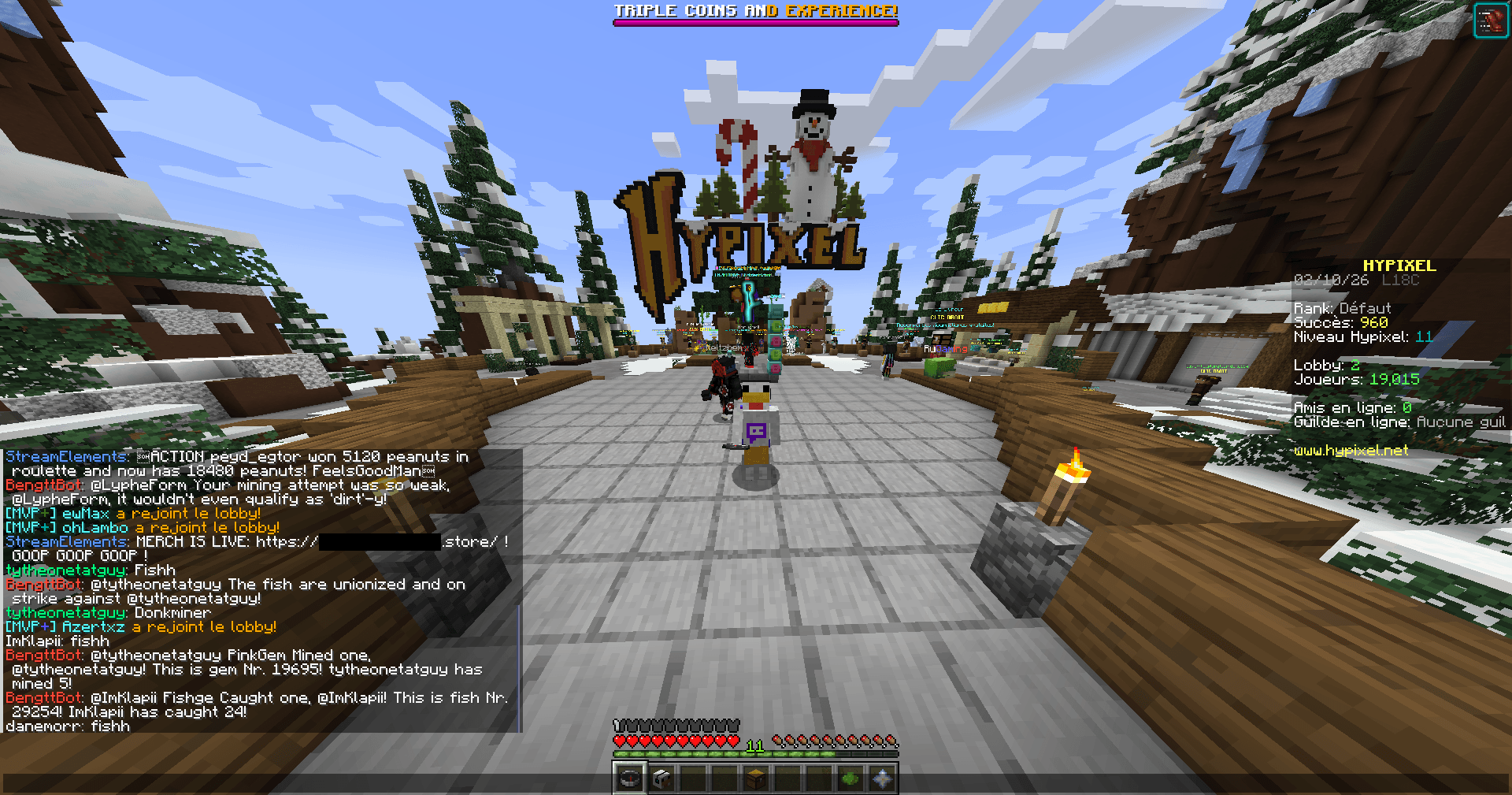
Works on Multiplayer (e.g., Hypixel)

Hypixel

How to Use

[!IMPORTANT] THIS MOD REQUIRES FABRIC API TO WORK! CE MOD NÉCESSITE FABRIC API POUR FONCTIONNER !

  1. Install the Mod: Place the .jar file into your mods folder (requires Fabric API).
  2. Launch Minecraft: Start your game.
  3. Connect: The first time you launch, just type /twitchchat start <channel_name> to connect to a Twitch channel chat!
    • Example: /twitchchat start poule_trempee
  4. Play: Join any world or server. Your Twitch chat will now appear in your game chat!
  5. Disconnect: Type /twitchchat stop to disconnect from the chat at any time.
  6. Blacklist: Type /twitchchat blacklist <pseudo> to hide messages from a specific user (e.g., /twitchchat blacklist example123).
  7. Unblacklist: Type /twitchchat unblacklist <pseudo> to show messages from that user again.

How it Works

The mod creates a lightweight, direct connection to Twitch's IRC (chat) servers. It listens for incoming messages in your specified channel and renders them into the Minecraft chat HUD, just like regular game messages. Since it's purely a visual overlay for you, it doesn't interact with the server you are playing on, making it safe and compatible everywhere.

twitchchat-1.3.0-1.21.4-1.3.0.jar
MC 1.21.6-snapshot, Client, Fabric, 1.21.8, 1.21.5, 1.21.4, 1.21.5-Snapshot, 1.21.6, 1.21.7, 1.21.4-Snapshot, 1.21.9-snapshot, 1.21.9, 1.21.10, 1.21.11-snapshot, 1.21.11
Release 2026-02-14 Get
twitchchat-1.3.0-1.21-1.3.0.jar
MC 1.21, Client, 1.21.1-Snapshot, Fabric, 1.21.1, 1.21-Snapshot
Release 2026-02-14 Get
twitchchat-1.3.0-1.20.4-1.3.0.jar
MC 1.20.5-Snapshot, Client, Fabric, 1.20.5, 1.20.6, 1.20.4
Release 2026-02-14 Get
twitchchat-1.3.0-1.20.1-1.3.0.jar
MC 1.20.2-Snapshot, 1.20.5-Snapshot, Client, 1.20.2, Fabric, 1.20.5, 1.20.1, 1.20.6, 1.20.4, 1.20.3-Snapshot, 1.20.3
Release 2026-02-14 Get
twitchchat-1.3.0-1.19.4-1.3.0.jar
MC Client, 1.19.4, Fabric, 1.19.4-Snapshot
Release 2026-02-14 Get
twitchchat-1.3.0-1.19.2-1.3.0.jar
MC Client, 1.19.3, 1.19.4, Fabric, 1.19.4-Snapshot, 1.19.2, 1.19.3-Snapshot
Release 2026-02-14 Get
twitchchat-1.3.0-1.18.2-1.3.0.jar
MC Client, Fabric, 1.18.2
Release 2026-02-14 Get
twitchchat-1.2.0.jar
MC 1.21.6-snapshot, Client, Fabric, 1.21.8, 1.21.5, 1.21.4, 1.21.5-Snapshot, 1.21.6, 1.21.7, 1.21.4-Snapshot, 1.21.9-snapshot, 1.21.9, 1.21.10, 1.21.11-snapshot, 1.21.11
Release 2026-02-12 Get
twitchchat-1.0.0.jar
MC 1.21.6-snapshot, Client, Fabric, 1.21.8, 1.21.5, 1.21.4, 1.21.5-Snapshot, 1.21.6, 1.21.7, 1.21.9-snapshot, 1.21.9, 1.21.10, 1.21.11-snapshot, 1.21.11
Release 2026-02-10 Get

More from poule_trempee

Advertisement Remove ads with Premium →

You Might Also Like