1.Build your structure, then place a Spawn Carpet inside it where you want players to appear.
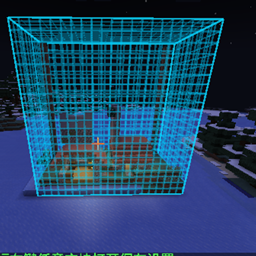
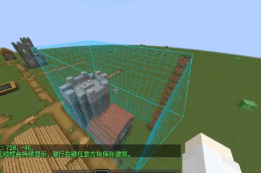
2.Hold the Building Saver item, right‑click one corner of the building, then right‑click the opposite corner – a selection outline appears.
3.Sneak + right‑click any block to save the selected area as a template.
4.When you create a new world, the mod will automatically find a suitable flat spot near spawn, place your building, and set the world spawn to the carpet position.
Building Saver – a carrot‑on‑a‑stick styled tool for selecting and saving.
Spawn Carpet – a marker block that records the spawn point; it is removed after saving (configurable).
(config/starter_cabin/template.nbt)| Option | Effect |
|---|---|
autoGenerate |
Enable/disable automatic generation in new worlds (default: true) |
copyEntities |
Save and place entities inside the selection |
clearGenerationArea |
Clear the target area before placement |
teleportPlayersOnFirstJoin |
Teleport players to the building on first join |
placementSearchRadius |
How far to search from world spawn (default 96) |
maxSurfaceVariation |
Maximum terrain height difference allowed (default 4) |
maxBlocks |
Maximum number of blocks in a saved template (default 262144) |
config/starter_cabin/template.nbtplacementSearchRadius or lower maxSurfaceVariation.