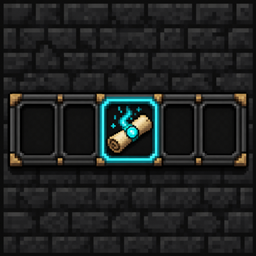
Spell Actionbar adds a dedicated 9-slot action bar for Iron's Spells 'n Spellbooks scrolls. Equip your favorite scrolls once, cast them from the HUD with keybinds, and keep playing without juggling items in your inventory.
Features
- 9 scroll slots — assign Iron's scrolls to a persistent personal action bar
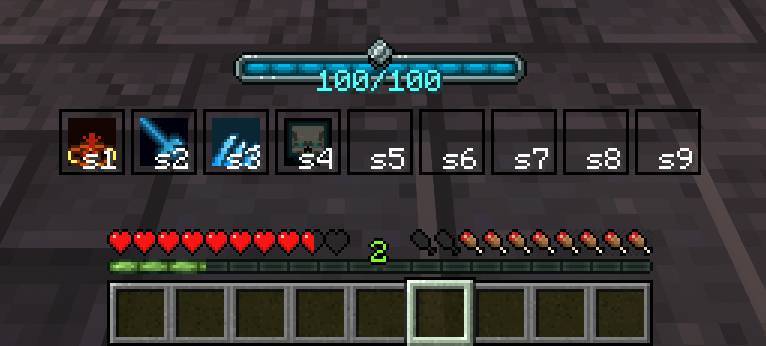
- On-screen HUD — spell icons displayed above the hotbar
- Keybind labels — each slot shows its bound key (e.g.
Q, cR for Ctrl+R, sQ for Shift+Q)
- Mana & cooldown feedback — spells gray out when you can't afford the mana cost; cooldown overlay shows remaining time
- Always-visible mana bar — Iron's mana bar is shown above the action bar so you always know your current mana
- Scroll-friendly casting — scrolls are not consumed from your action bar, but mana costs and spell cooldowns still apply normally
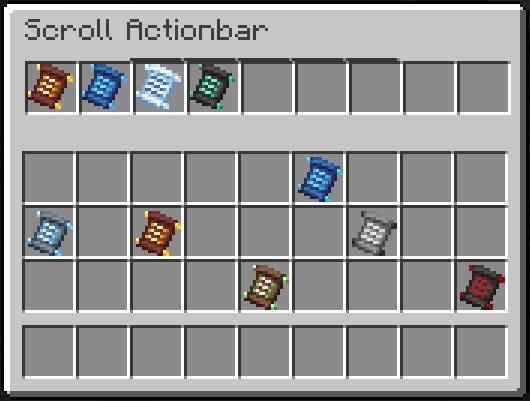
- Equip menu — open a familiar inventory-style GUI to manage your scroll slots and access your inventory at the same time
Controls
All keybinds are fully rebindable under Options → Controls → Spell Actionbar.
| ` (Grave) |
Open Scroll Actionbar menu |
| Numpad 1–9 |
Cast scroll in slot 1–9 (default) |
How it works
- Press ` to open the Scroll Actionbar screen
- Place Iron's scrolls into the top row of slots
- Close the menu — your equipped scrolls appear on the HUD
- Press your cast keybinds to use spells directly from the bar
Only scroll items from Iron's Spells can be placed in action bar slots. Your scroll assignments are saved per player and persist across sessions.
Requirements
- Minecraft 1.21.1
- NeoForge
- Iron's Spells 'n Spellbooks (required dependency)
Notes
- This mod is a companion to Iron's Spells — it does not add new spells or scrolls
- Casting uses Iron's standard mana and cooldown rules
- Designed for NeoForge;