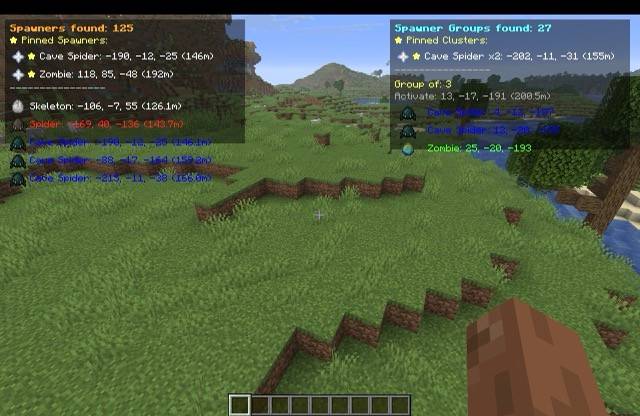
SpawnerFinder


A client-side Minecraft mod that displays nearby mob spawners in your HUD with color-coded information showing spawner type, coordinates, and distance to help you locate dungeons efficiently.
[!NOTE]
Exciting New Update for Minecraft 26.1! 🚀
We are thrilled to announce the release of SpawnerFinder v2.0.0 built specifically for Minecraft 26.1! This update brings a complete UI overhaul, a powerful multi-spawner grouping engine, smart in-game search functionality with modded spawner support, and massive performance improvements to keep your frame rates high. Read more about the new features below!
📸 Screenshots
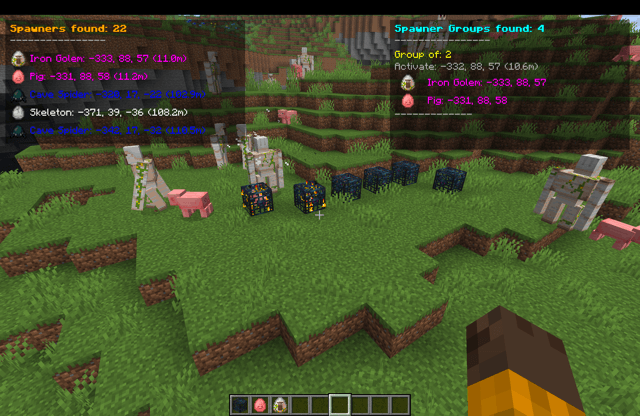
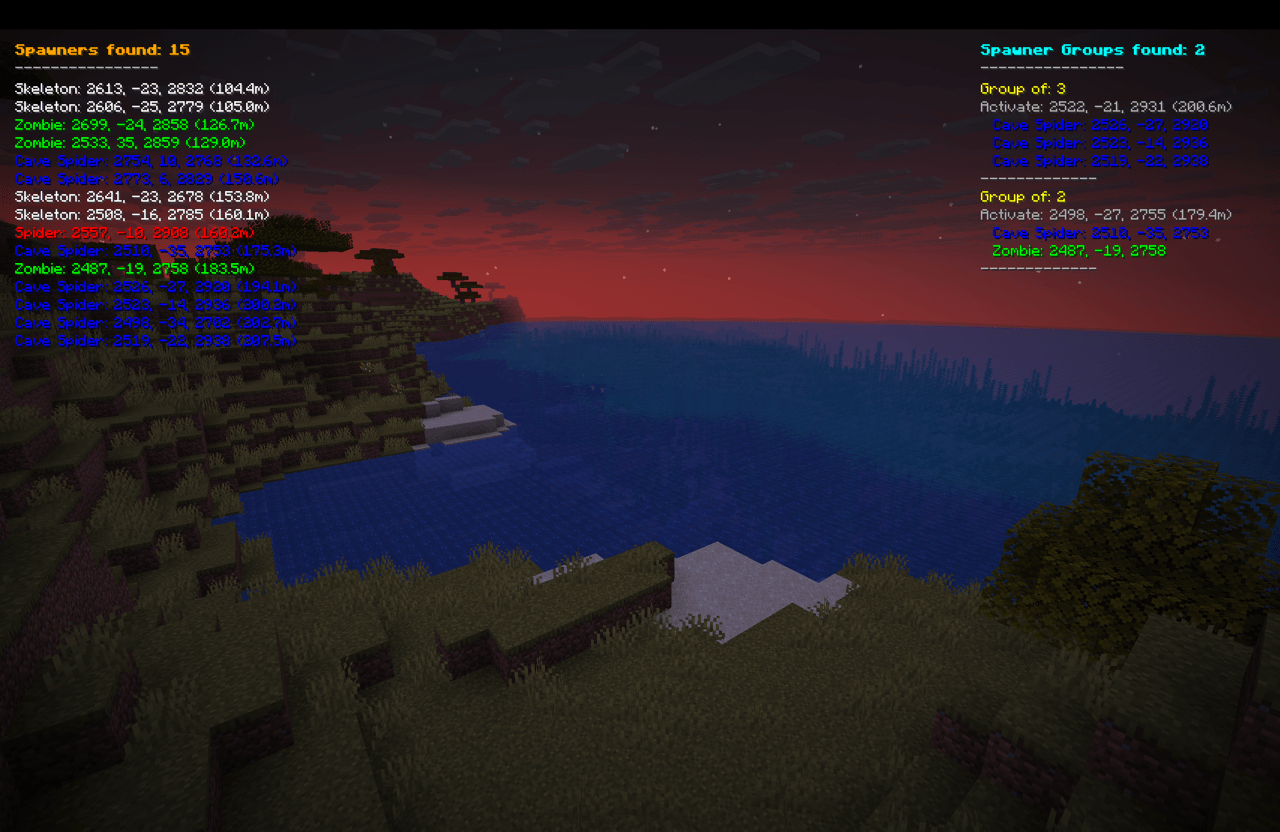
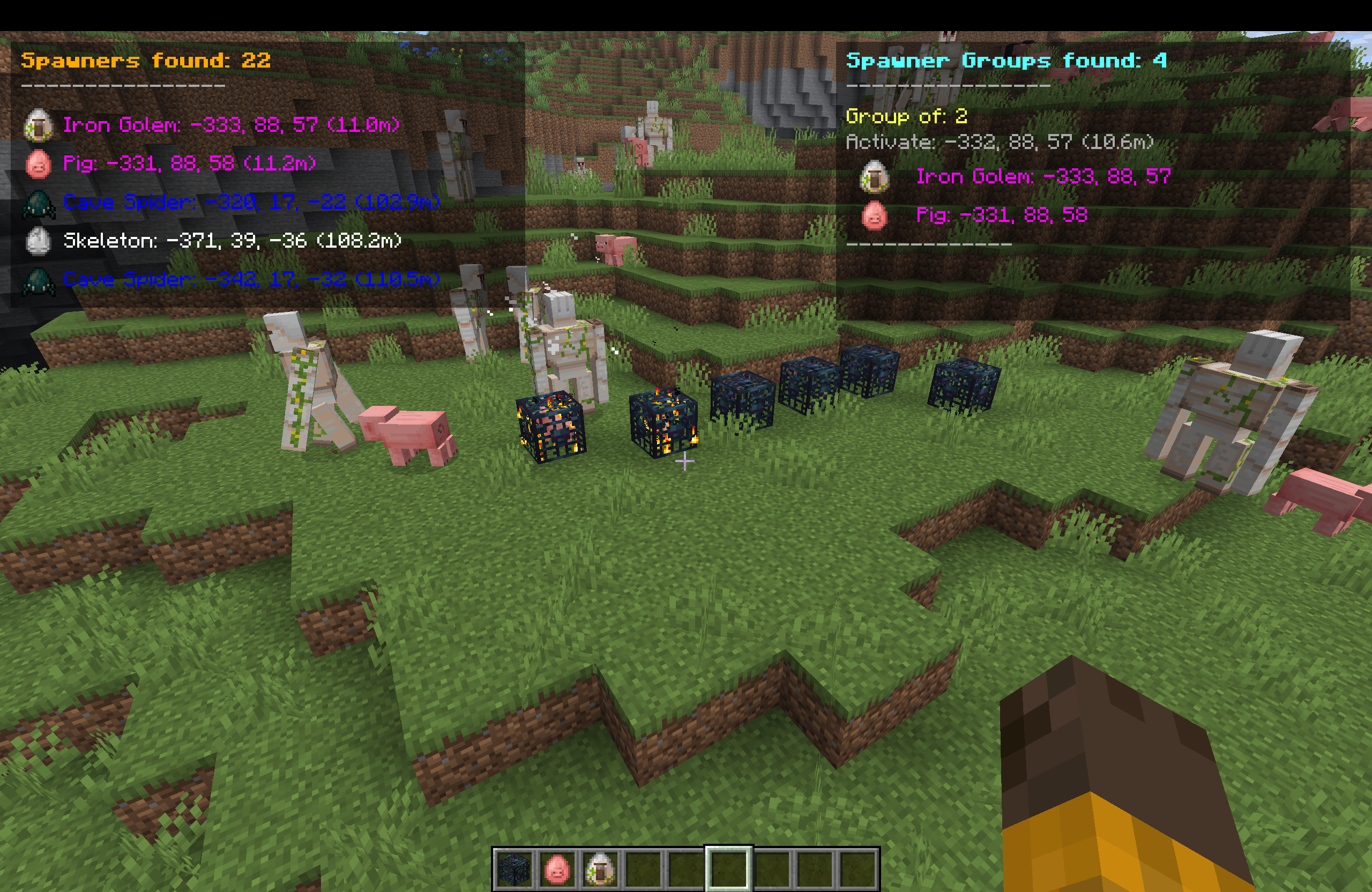 SpawnerFinder HUD displaying nearby mob spawners with coordinates and distances
🎯 Features
Core Functionality
- Real-time Spawner Detection - Automatically scans for mob spawners within a 160-block radius of your position.
- Color-Coded Display - Each mob type has a unique color for instant recognition.
- Distance Tracking - Shows exact distance to each spawner in meters.
- Coordinate Display - Provides precise X, Y, Z coordinates for easy navigation.
- High-Fidelity HUD Overlay - Clean overlay with transparent background boxes to keep stats legible in all environments.
- Mob Head / Spawn Egg Icons - Visual icon renders next to each spawner type for intuitive reading.
Advanced Features (New in v2.0.0)
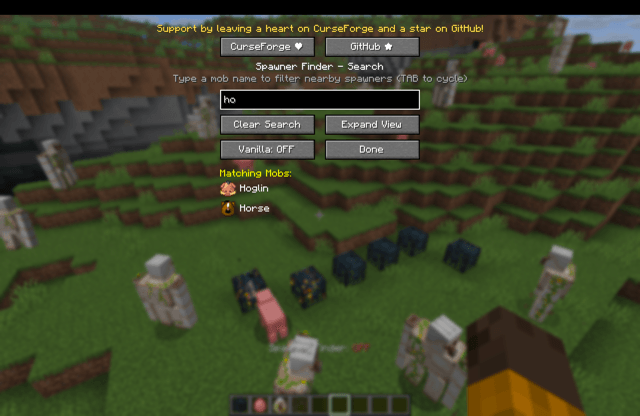
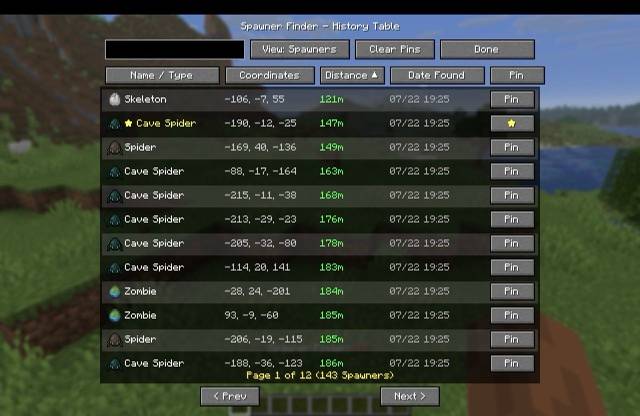
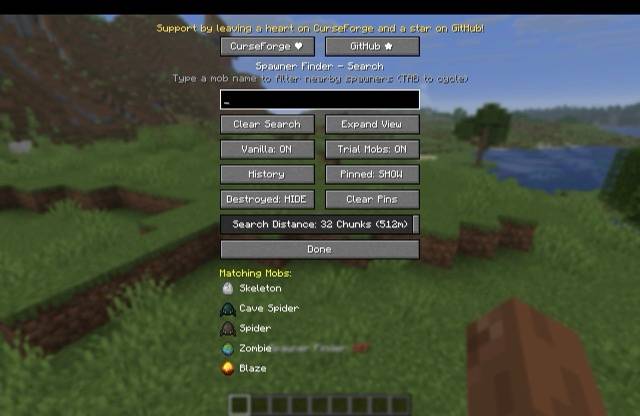
- Interactive Search GUI - Open with the
U key to filter spawners in real-time. Features search suggestions with TAB cycling.
- Custom Modpack & Server Support - Scans the game's registry dynamically to identify modded/non-vanilla spawners.
- Spawner Group Finder - Automatically detects spawners within activation range of each other (16 blocks) and calculates the exact coordinate centroid where you should stand to run multiple spawners at the same time.
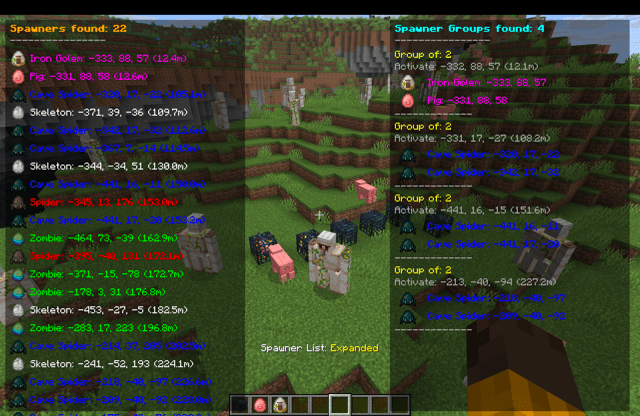
- Screen-Height Expansion - Toggle between compact (top 5) and expanded list views using the
I key to see everything in range.
Supported Mob Types
| Mob Type |
Color |
Hex Code |
| Skeleton |
White |
#FFFFFF |
| Zombie |
Green |
#00FF00 |
| Spider |
Red |
#FF0000 |
| Cave Spider |
Blue |
#0000FF |
| Magma Cube |
Orange |
#FF8000 |
| Blaze |
Yellow |
#FFFF00 |
| Silverfish |
Gray |
#808080 |
| Unknown Types |
Magenta |
#FF00FF |
Client-Side Only & Anti-Cheat Safe
- ✅ 100% Client-Side - No server modifications required
- ✅ Server Safe - Cannot be detected by anti-cheat systems
- ✅ No Network Traffic - Uses only locally available data
- ✅ Works on Any Server - Compatible with vanilla and modded servers
- ✅ HUD Only Display - No visual overlays or ESP to avoid behavior detection
📋 Requirements
- Minecraft: 26.1
- Fabric Loader: 0.18.4 or higher
- Fabric API: 0.144.1+26.1 or higher
- Java: 25 or higher
🚀 Installation
- Install Fabric Loader - Download from FabricMC
- Download Fabric API - Get it from Modrinth or CurseForge
- Download SpawnerFinder - Get the latest release from the releases page
- Install the Mod - Place
spawnerfinder-2.0.0.jar in your .minecraft/mods/ folder
- Launch Minecraft - Start the game with the Fabric profile
🎮 Usage
Keybindings & Controls
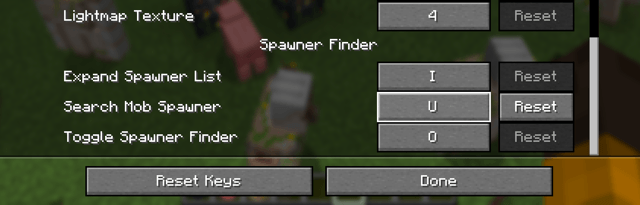
You can customize these controls in standard Minecraft settings:
O - Toggle the entire SpawnerFinder HUD ON/OFF.I - Toggle Spawner List between Compact (shows top 5 spawners) and Expanded (shows all spawners in loaded chunks, utilizing the full screen height).U - Open the Spawner Search & Settings Screen.
In-Game Display
Once installed, the mod automatically starts working:
- Left Panel (HUD) - Shows spawners found sorted by distance (closest first) with their specific mob icon, coordinate, and distance format:
Mob Type: X, Y, Z (Distance).
- Right Panel (HUD) - Shows groups of spawners found within activation proximity, along with the calculated coordinate centroid labeled
Activate: X, Y, Z.
- Automatic Scanning - Scans loaded chunks every 2 seconds asynchronously, ensuring zero performance drops.
Example Display
Closest Spawners:
Skeleton: 245, 23, -156 (12.3m)
Zombie: 267, 18, -145 (28.7m)
Spider: 223, 31, -178 (35.1m)
Cave Spider: 289, 15, -134 (45.6m)
Blaze: 201, 22, -189 (52.4m)
⚠️ Important Behavioral Warnings
Why HUD-Only Design?
This mod intentionally uses HUD display only instead of visual overlays (ESP/wallhacks) for important safety reasons:
- Behavior Tracking Protection - Many servers use behavior analysis that can detect players looking directly at blocks through walls
- Anti-Cheat Evasion - Visual ESP mods can trigger anti-cheat systems when players exhibit "impossible" knowledge
- Natural Gameplay - HUD display encourages normal exploration rather than direct navigation to hidden spawners
Recommended Usage
- ✅ Use coordinates for general direction - Navigate naturally toward the area
- ✅ Explore normally - Don't beeline directly to spawners through walls
- ✅ Mine/dig naturally - Follow normal cave systems and mining patterns
- ❌ Don't stare at walls - Avoid looking directly at spawner locations through blocks
- ❌ Don't tunnel straight - Avoid digging direct paths to spawners
Server Safety Notes
While this mod is technically undetectable:
- Behavior matters more than the mod itself - How you act is what gets you caught
- Play naturally - Use the information as a guide, not a GPS
- Respect server rules - Some servers prohibit any form of spawner detection
- When in doubt, don't use - Better safe than banned
🔧 Technical Details
Performance
- Chunk-Based Scanning - Scans loaded chunk data instead of brute forcing block coordinates, giving massive FPS gains.
- Optimized Cycle - Limits chunk scans to every 2 seconds to maintain 100% stable performance.
- Optimized Range - Scans up to a 10-chunk radius (approx. 160 blocks) efficiently.
- Memory Friendly - Lightweight collections and dynamic registry lookups ensure a negligible memory footprint.
Compatibility
- Fabric Ecosystem - Built using standard Fabric APIs
- Mod Compatibility - Should work alongside most other client-side mods
- Resource Pack Safe - Doesn't interfere with texture packs or shaders
Security & Design Philosophy
- No Server Detection - Uses only client-side world data
- Anti-Cheat Safe - Behaves identically to vanilla client from server perspective
- No Visual ESP - Deliberately avoids rendering overlays to prevent behavior tracking
- HUD-Only Information - Provides data without encouraging suspicious movement patterns
- No Unfair Advantage - Only shows information about loaded chunks
🛠️ Building from Source
Prerequisites
Build Steps
# Clone the repository
git clone <repository-url>
cd spawnerfinder

# Build the mod
./gradlew build

# Find the built JAR
ls build/libs/spawnerfinder-2.0.0.jar
📝 License
This project is licensed under the CC0-1.0 License - see the LICENSE file for details.
🤝 Contributing
Contributions are welcome! Please feel free to submit a Pull Request.
Development Setup
- Clone the repository
- Import into your IDE (IntelliJ IDEA recommended)
- Run
./gradlew genEclipseRuns or ./gradlew genIntellijRuns
- Use the generated run configurations for testing
Contributing Guidelines
- Follow existing code style and patterns
- Test thoroughly before submitting PRs
- Update documentation for new features
- Consider backward compatibility for configuration changes
📞 Support
- Issues - Report bugs or request features via GitHub Issues
- Compatibility - Check the requirements section for supported versions
- Performance - If you experience lag, try reducing render distance
🔄 Version History
v1.0.0
- Initial release
- Basic spawner detection and HUD display
- Support for common mob types
- Client-side only implementation
v1.1.0 - The Massive Update
New Features:
- Spawner Group Finder: Automatically identifies groups of spawners that can be activated simultaneously!
- Displays "Spawner Groups found" on the right side of the HUD.
- Shows the optimal activation coordinates (centroid) where effective farm stacking is possible.
- Lists individual spawners within each group.
- Sorts groups by size (largest groups first) to help you find the best farm locations instantly.
- Keybind Controls:
O: Toggle the entire Mod ON/OFF.I: Expand/Collapse the spawner lists (shows top 5 vs all).
- Performance Overhaul:
- Completely rewrote the scanning engine to use "Loaded Chunks" instead of brute-force block checking.
- Zero Lag Spikes: 100% efficient CPU usage, even on low-end hardware.
- Visual Improvements:
- Improved HUD readability with cleaner fonts and removal of unnecessary shadows.
- "Spawners found" header is now clearly visible with a separator line.
- Right-side HUD for group information to keep the screen organized.
v1.2.0
- Updated to Minecraft 26.1 (Tiny Takeover update)
- Ported to Java 25 compatibility
- Migrated rendering logic to the new
HudElementRegistry API
v2.0.0 - The Ultimate Search & UI Update (Minecraft 26.1)
New Features & Enhancements:
- Refined HUD UI:
- Dark transparent background panels behind spawner lists for readability.
- Interactive screen height expansion (toggle between Compact and Expanded view using the
I key).
- High-fidelity mob icon rendering (using custom mob heads or spawn eggs) right next to each entry on the HUD and in the search screen.
- Advanced Grouping System:
- Automatically identifies groups of spawners located within activation proximity (16-block radius).
- Calculates the exact coordinate centroid where players should stand to activate and run multiple spawners simultaneously.
- Displays groups on the right side of the HUD, sorted by group size (largest first) and distance.
- Dynamic Search & Filtering:
- Brand-new interactive search screen (default keybind:
U).
- Real-time search filter by typing mob names to narrow down spawners on the HUD.
- TAB-completion support to cycle through available mob names quickly in the search box.
- Complete support for non-vanilla and modded spawners (dynamically loaded from registry).
- "Vanilla Only" filter toggle to easily switch between base game and custom modded mobs.
- Significant Performance Tuning:
- Scanning engine uses chunk loading tracking (
LevelChunk) rather than brute-force block inspection, resulting in zero lag spikes and high FPS.
- Scanning interval optimized to 2 seconds to run smoothly even on lower-end systems.
🚨 Disclaimer
This mod is designed for exploration and convenience, not cheating.
Key Points:
- Information Only - Shows data about spawners in loaded chunks, doesn't provide ESP/wallhacks
- Behavior Responsibility - How you use this information determines if you get caught, not the mod itself
- Server Rules - Always check and respect individual server policies regarding client modifications
- Natural Play Encouraged - Use coordinates as guidance for exploration, not direct navigation
Legal Notice:
- This mod only accesses data already available to your Minecraft client
- No server-side detection is possible through technical means
- Player behavior and movement patterns are your responsibility
- The developers are not responsible for any bans resulting from suspicious gameplay behavior
Remember: The goal is enhanced exploration, not circumventing game mechanics. Play responsibly!