Mineuniverse
Resource Packs
Rainbow Enchantments Glints

Rainbow Enchantments Glints

RESOURCE PACK
Rainbow Enchantment Glint replaces the default enchantment glow with a vibrant, animated rainbow effect. Works on all enchanted items, fully shader-friendly, and has no performance impact. Brighten up your gear with a stunning multicolor shine! 🌈✨
by ErenxYeager_
Download Claim this project
8,508 downloads
0 likes
Updated Oct 14, 2026
0 hypes
16x Animated
Advertisement Remove ads with Premium →

Use my code to get 25% off at KCB!

🌈 Rainbow Enchantment Glint – Make Your Gear Shine Like Never Before!

Tired of the default enchantment glow? This resource pack replaces it with a stunning, animated rainbow effect that makes your enchanted items look vibrant, magical, and unique! Whether you're wielding a legendary sword or rocking enchanted armor, this glint will make your gear stand out.

✨ Features:
βœ… Fully animated rainbow enchantment glint 🌈
βœ… Works on all enchanted items – tools, weapons, armor, and books
βœ… Smooth, high-quality animation without being distracting
βœ… No performance impact – stays true to Minecraft's vanilla feel
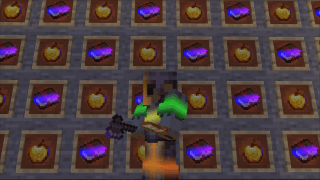
 alt text– Showcase of enchanted armor and tools glowing with the rainbow effect

πŸ”§ Compatibility:
⚑ Works with all versions that support custom enchantment textures
⚑ Compatible with OptiFine (but not required!)
⚑ Should work with shaders for an even more stunning look!
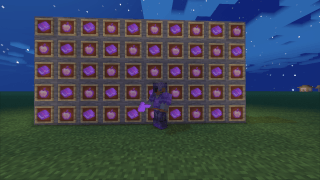
 alt text alt text– Side-by-side comparison: default vs. Rainbow Enchantment Glint

Upgrade your enchanted gear’s look today and bring a touch of color to your Minecraft adventures!

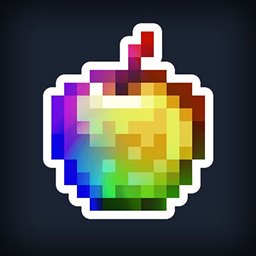
Rainbow Enchantment Guilt
MC 1.21.2-Snapshot, 1.21, 1.21.1-Snapshot, 1.21.5, 1.21.4, 1.21.5-Snapshot, 1.21.1, 1.21.3, 1.21-Snapshot, 1.21.4-Snapshot, 1.21.2
Release 2025-03-25 Get

Requirements & install

How to use this resource pack in Minecraft
Resolution
16x
Minecraft
1.21.1 – 1.21.5
Install folder
.minecraft/resourcepacks

How to install resource packs

  1. Download the resource pack .zip file (do not extract it).
  2. In Minecraft open Options β†’ Resource Packs β†’ Open Pack Folder.
  3. Drop the .zip into the resourcepacks folder (.minecraft/resourcepacks).
  4. Move the pack to the Selected column and click Done.
Browse more: 16x resource packs 32x resource packs 64x resource packs 128x resource packs 256x resource packs 512x+ resource packs Resource Packs for 1.21.5 All resource packs

More from ErenxYeager_

Advertisement Remove ads with Premium →

You Might Also Like