SimpleBroadcast is a server-sided broadcast command mod/plugin that allows you to announce messages to all players on the server at once.
It can be used out of the box with zero configuration, but has deep configuration and sub-commands which allow you to control the broadcast finely.
SimpleBroadcast supports the Simplified Text Format, and the Placeholder API.
To use the broadcast command out of the box, simply call /broadcast <contents>
Here are some examples of the command:
/broadcast '<rainbow>Hello everyone! This is a rainbow gradient!'/broadcast 'The server TPS is currently %server:tps%'/broadcast '<color:gold>New record!<r> There are %server:online% players online!'
As previously said, you can customize every part of the broadcast - including the prefix ([BROADCAST]) and suffix of the actual chat message sent.
This can be done through broadcast message types - these types specify the prefix, suffix and location of messages.
By default, there are three example types provided with the mod:
minecraft:plain (No prefix, no suffix, default location is chat)minecraft:vanilla (Prefix is [Server], no suffix, default location is chat)simplebroadcast:default (As seen in the basic usage section, no suffix, default location is chat)You can modify these through the /broadcast types command:
/broadcast types create <id> - Create a new broadcast type with the ID specified./broadcast types <id> location - Get the default location of a broadcast type./broadcast types <id> location [actionbar/title/chat] - Set the default location of the broadcast type./broadcast types <id> prefix - Get the prefix of the broadcast type, if it exists./broadcast types <id> prefix <value> - Set the prefix of the broadcast type, supports placeholders and the simplified text format./broadcast types <id> suffix - Get the suffix of the broadcast type, if it exists./broadcast types <id> suffix <value> - Set the suffix of the broadcast type, supports placeholders and the simplified text format.To use a broadcast type, you can prepend your broadcast message with a type ID:
/broadcast minecraft:vanilla 'Hello world!'
You can override the default location as well by specifying either actionbar, title or chat after the type ID and before the contents of the broadcast.
/broadcast simplebroadcast:default actionbar '<rainbow>This is awesome!'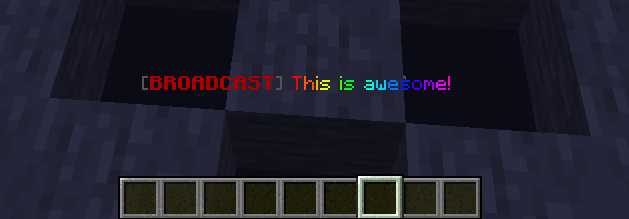
This is what's planned: