⚔️ Pojav Tier Tagger
A sleek, performance-friendly Fabric client mod that seamlessly integrates OPTL Networks rankings into your HUD, tab list, and chat.




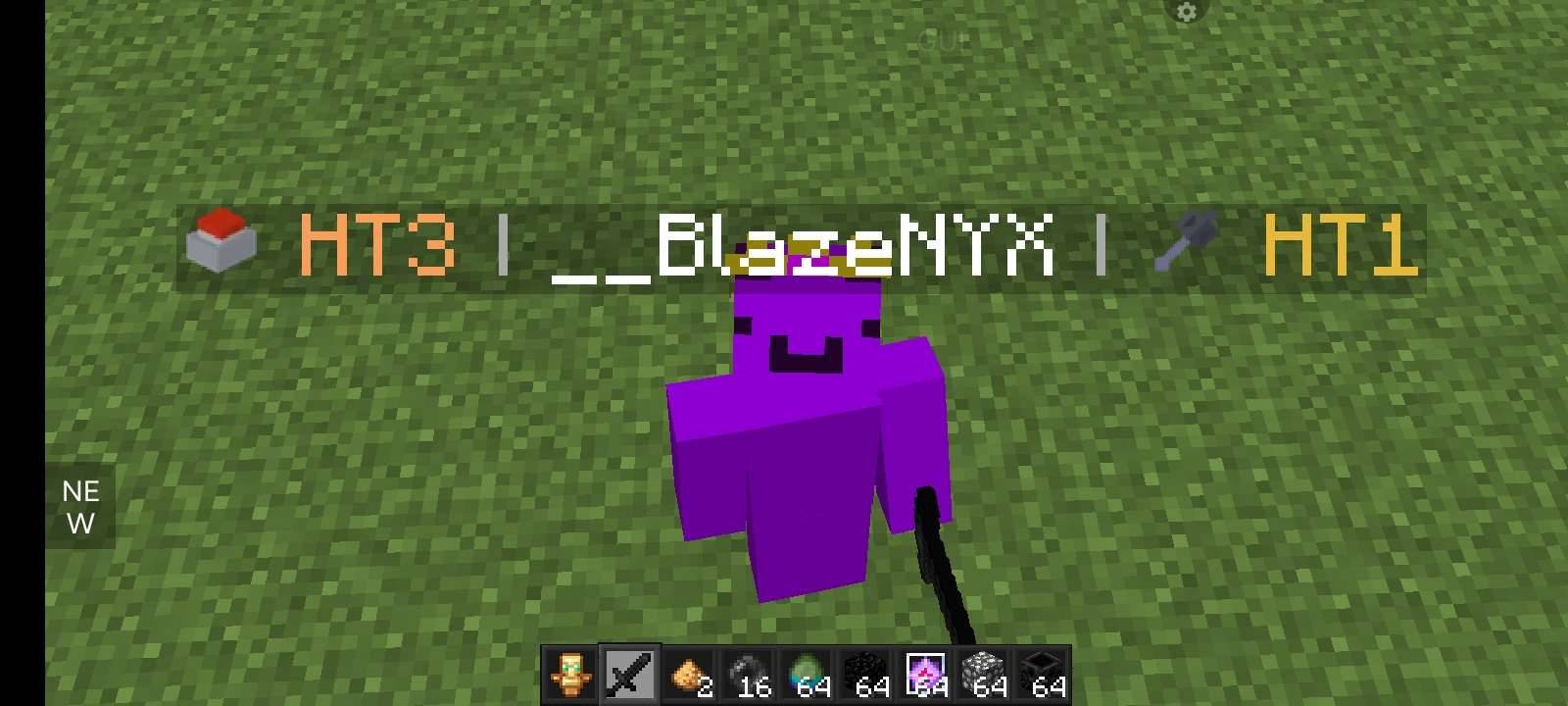
Example Display: [🪓 HT1] | PlayerName
Dynamically updates based on live MMPvP player ranking data.
🌟 Overview
Pojav Tier Tagger pulls live ranking data directly from the MMPvP tier list and attaches dynamic, custom badges to every player in-game.
The mod automatically calculates each player's highest-scoring gamemode and displays their tier alongside custom bitmap icons across player nametags, the tab list overlay, and chat channels. Everything runs asynchronously in the background, ensuring zero impact on your FPS or gameplay latency.
✨ Key Features
- 🎛️ Universal HUD Integration: Display badges clearly above player heads, inside the tab list, and throughout chat.
- ⚡ Automated Rank Calculation: Automatically detects and highlights a player's peak gamemode rank without complex setup.
- 🎨 Custom Gamemode Icons: Includes high-resolution bitmap icons for 8 supported gamemodes:
Sword • Mace • SMP • Pot • Vanilla • NethOP • UHC • Axe
- ⚙️ Full Customization: Adjust tier color schemes, refresh rates, and toggle visibility for individual UI elements using an in-game config UI.
- 🔍 Live Player Lookups: Query any player's exact rating on the fly with
/pojavtier player <name>.
- 🚀 Zero Lag: Built from the ground up using light API background polling to prevent stuttering.
🛠️ Requirements & Compatibility
IMPORTANT: Make sure to download the specific file build matching your exact Minecraft version!
| Requirement |
Supported Version |
| Minecraft |
1.21 through 1.21.11 |
| Mod Loader |
Fabric Loader |
| Java |
Java 21+ |
| Dependencies |
Fabric API |
| Optional |
Mod Menu (For in-game config screen) |
📥 Installation
- Install Fabric Loader for your exact Minecraft version.
- Download the corresponding Fabric API and place it in your
.minecraft/mods folder.
- Download Pojav Tier Tagger for your exact game version and place the
.jar into .minecraft/mods.
- (Optional) Add Mod Menu to customize settings via the options menu.
- Launch your game and enjoy live tier tracking!
⚙️ Configuration
Access settings in-game via Mod Menu or manually edit .minecraft/config/pojavtiertagger.json:
- Tier Colors: Customize hex color codes assigned to distinct rank tiers.
- Refresh Rates: Change how frequently the mod polls live ranking data.
- Display Toggles: Individually toggle tier badge visibility on Nametags, Tab List, or Chat.
- Dual Badges: Configure a secondary badge with left/right alignment choices.
💬 Community & Support
Have questions, bug reports, or suggestions? Join the community!