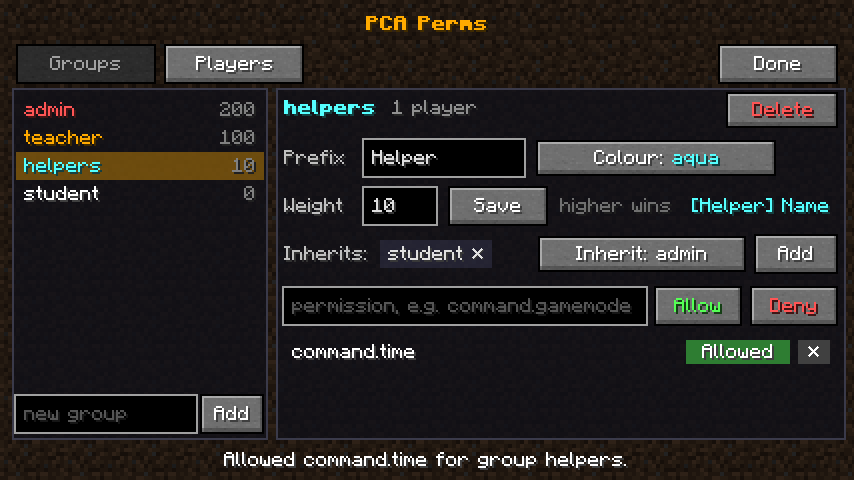
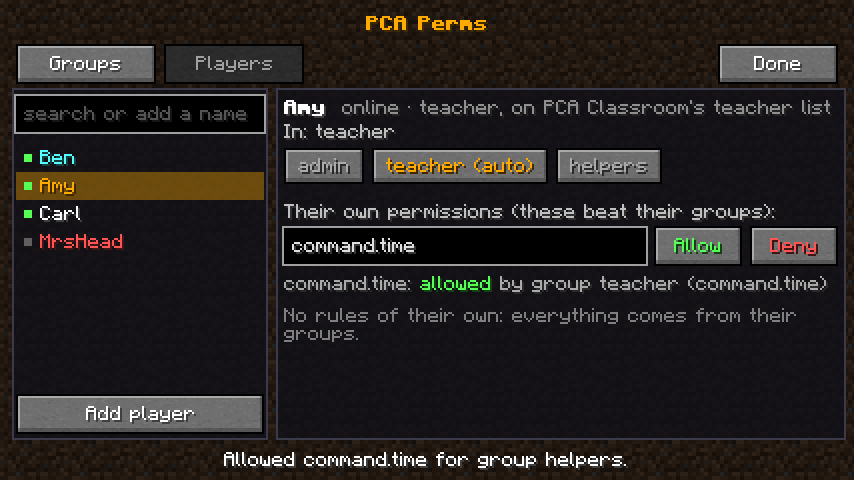
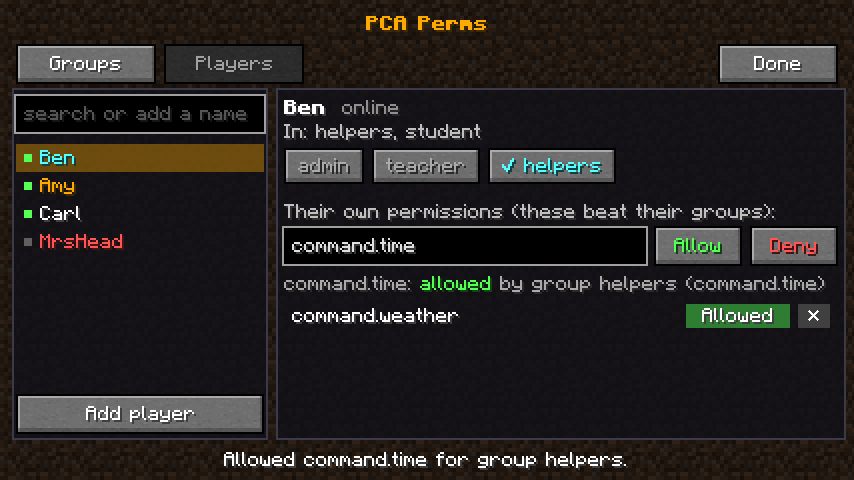
Permission groups for school servers, managed in game: everyone is automatically a student or a teacher, and every command and every mod's permissions can be given or taken away from an editor screen.
PCA Perms is a permissions mod made for teaching. Instead of making teachers ops (which gives them /stop, /op and everything else), you give the teacher group exactly what teachers need. Students are a group too, so you can take things away from them in one place. Everything is set up in an in-game editor, with no website or config files needed, and every change works straight away.
It was made by Pixel Creators Academy for our teaching servers and is built to link with the other PCA mods, but it works with any Forge 1.20.1 mod and with Minecraft's own commands.
/perms, open the Players tab, pick MrSmith and click teacher. He can now use /class, /plot admin, /puzzle, /gamemode and /tp, but not /stop or /op./plot visit to wreck the mood during lessons? Open the Groups tab, pick student, type command.plot.visit and press Deny. Teachers aren't affected.command.time and command.weather, and put Amy in it./gamemode is command.gamemode, /plot admin reset is command.plot.admin.reset. Allow it and a player can use it even if it's normally ops-only; deny it and they can't, even an op. Players' games only show the commands they're allowed to use.forge.use_entity_selectors (whether a player can use @a, @p and so on in commands).pcaplots.*, command.plot.*, or * for everything.pcaclassroom.teacher)./plot admin (pcaplots.teacher).pcapuzzle.build, pcapuzzle.items and pcapuzzle.unlock for its commands, given to teachers. pcapuzzle.bypass (keys not used up, no Master Key cooldown) lets a teacher test a puzzle in adventure mode.pcapuzzleplots.use for /puzzleplot, given to teachers.pcacurrency.balance and pcacurrency.admin for its commands, given to teachers.pcaquiz.edit (setting up question blocks) and pcaquiz.manage (/quiz), given to teachers.pcashop.admin (teacher shops, and editing anyone's shop), given to teachers.pcagames.manage (running games such as red light, green light), given to teachers.pcaquests.manage (making and giving out quests, checking students' work, the class view), given to teachers.| Command | Example |
|---|---|
/perms |
Opens the editor |
/perms group <group> allow / deny / unset <permission> |
/perms group student deny command.plot.visit |
/perms user <players> add / remove <group> |
/perms user MrSmith add teacher |
/perms user <players> allow / deny / unset <permission> |
/perms user Amy allow command.time |
/perms user <player> check <permission> |
/perms user Amy check command.gamemode |
/perms group create / delete <name> |
/perms group create helpers |
/perms group <group> inherit / prefix / colour / weight ... |
/perms group helpers prefix Helper |
/perms groups, /perms nodes, /perms reload |
Permissions are saved in config/pcaperms/permissions.json, which is easy to read, back up and edit by hand. Because it's in the config folder, a world reset keeps everyone's permissions. Every change made in the editor is written to the server log.
No other mods are required.
| Mod | ||
|---|---|---|
| PCA Classroom 0.1.1 or newer | Optional | Its teacher list is linked with the teacher group |
| PCA Plots 0.1.2 or newer | Optional | Plot teachers come from the teacher group |
| PCA Puzzle 0.3.2, PCA Puzzle Plots 0.1.1, PCA Currency 0.1.2 or newer | Optional | Their permissions are given to teachers from the start |
| PCA Leaderboard 0.1.0 or newer | Optional | Teachers get pcaleaderboard.manage (run the leaderboard, and don't earn points) |
| PCA Auction 0.1.0 or newer | Optional | Teachers get pcaauction.manage (run storage unit auctions) |
| PCA Weapons 0.1.0 or newer | Optional | Teachers get pcaweapons.manage (PVP mode, crafting, handing weapons out) |
/perms commands.useAsForgeHandler in pcaperms-common.toml.PCA Perms doesn't need the Pixel Creators Academy server or any PCA service. It works on any Forge 1.20.1 server, with or without the other PCA mods.
mods folder, and in your own game's mods folder for the editor. Start the server./perms. Open Players, pick a teacher and click teacher.config/pcaperms-common.toml.Version: 0.1.9 · Licence: All Rights Reserved · Made by Pixel Creators Academy